
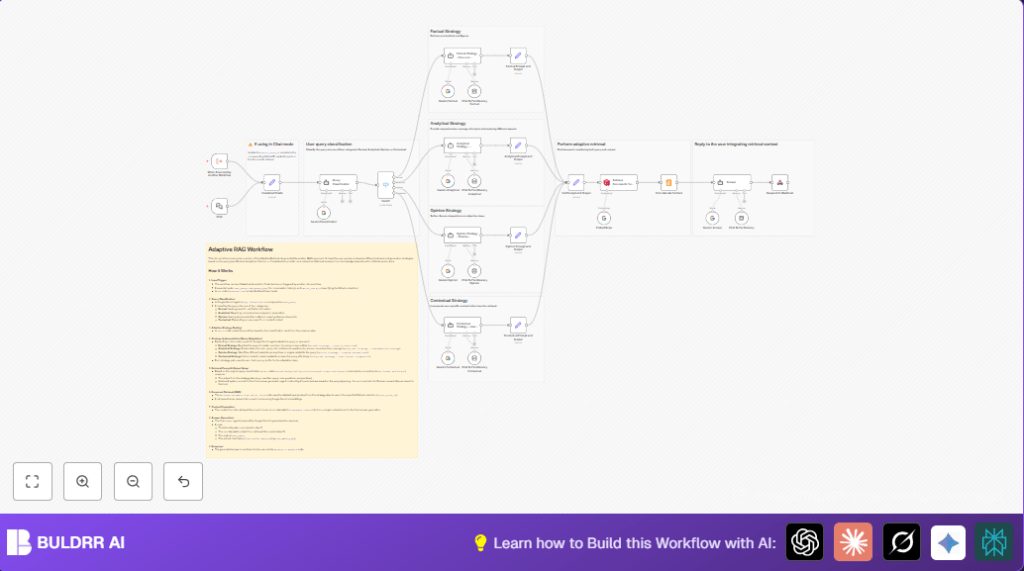

What This Workflow Does
This workflow sorts questions into four types: Factual, Analytical, Opinion, and Contextual.
It uses Google Gemini AI to classify questions and picks a special way to answer each one.
The workflow finds matching documents in Qdrant and then writes a clear answer.
The result is faster and more accurate answers without manual sorting.
Who Should Use This Workflow
People who get many different types of questions daily.
Teams needing precise, detailed, or opinion-rich answers from documents.
Those who want to save time and avoid mistakes from manual sorting.
Users looking for smart AI that adjusts answers based on question type.
Tools and Services Used
- n8n: Automation platform to build and run the workflow.
- Google Gemini API: Classifies questions and generates answers.
- Qdrant Vector Store: Stores embedded documents and finds related content.
- Chat Buffer Memory in n8n: Keeps conversation history for better answers.
- self-host n8n: Optionally run n8n on your own server.
Beginner Step-by-Step: How to Use This Workflow in n8n
Importing the Workflow
- Download the workflow file using the Download button on this page.
- Open n8n editor and click “Import from File.”
- Select the downloaded workflow file to add it.
Setup After Import
- Add credentials for Google Gemini API in the n8n settings.
- Make sure the Qdrant collection ID is set properly in the workflow.
- Set any emails, folders, or other IDs if your setup requires.
- Check prompt text in strategy nodes if you want custom answers.
Testing and Activation
- Run the workflow once with a test question to verify it works.
- Make sure question classification returns one of the four types correctly.
- Activate the workflow toggle in n8n to start usage in production.
Inputs, Processing, and Output
Inputs
- User Query: The question text to answer.
- Chat Memory Key: Optional key to keep track of conversation.
- Vector Store ID: ID of the Qdrant collection storing documents.
Processing Steps
- The Query Classification node uses AI to assign one of four question types.
- Based on the type, the Switch node sends the query to one of four custom strategies.
- Each strategy refines the query differently for better document search and answer creation.
- The workflow uses Google Gemini embeddings to find top 10 related documents from Qdrant.
- Document content is joined together to form a knowledge base for the final answer.
- The Answer node combines the refined query, documents, and chat history to write a reply.
Outputs
The workflow sends back a clear, helpful answer matching the question type through a Webhook node.
Common Failures and How to Fix Them
- No documents found: Check that the
vector_store_idmatches a valid Qdrant collection with data. - Wrong query category: Make sure the classification prompt returns exact words “Factual,” “Analytical,” “Opinion,” or “Contextual.”
- Answers missing chat context: Confirm the
chat_memory_keyis provided and consistent. - Webhook response errors: Verify response format and client endpoint are correct.
Customization Ideas
- Change classification categories in the Query Classification node prompt.
- Adjust how many documents to get by changing topK in the retrieval node.
- Tweak strategy node prompts to change query adaptation style.
- Switch Qdrant to another vector database supported by n8n.
- Modify chat memory window size for more or less conversation history.
Production Checklist
- Confirm Google Gemini API credentials work and have permissions.
- Test classification with sample questions for expected categories.
- Verify Qdrant collection has indexed documents and correct ID.
- Run tests on each query type path separately.
- Check conversation memory persists with given keys.
- Test workflow triggers through both Chat node and external workflows.
Deployment Tips
After testing, enable the workflow with the toggle in n8n.
Use the Webhook node URL to connect chatbots or API clients.
Watch error logs for failures or slow steps.
Keep notes on strategy steps inside n8n for future maintenance.
Example Prompts
Here is an example of the classification prompt used in the Query Classification node:
You are an AI assistant classifying queries into one of four categories: Factual, Analytical, Opinion, or Contextual. Return only the category name exactly.
This helps the AI select proper answer strategies in the workflow.
Summary of Benefits
✓ Saves 10-15 hours weekly from manual sorting and research.
✓ Gives precise, clear answers tailored to question types.
✓ Keeps conversation history for more natural replies.
✓ Works with your existing Qdrant knowledge base.
✓ Easy to activate and test in n8n.
