
Why Pay $20/month, When you can Self Host n8n @ $3.99 only

50+ InMails. Advanced Lead search. First 2 Users only

Promoted by BULDRR AI

The Practical Reality of GPT-5.2

(Why this model quietly changes how real work gets done)

Most people ignored GPT-5.2.

No hype.

No flashy demos.

No viral benchmark screenshots.

That’s a mistake.

GPT-5.2 isn’t about novelty.

It’s about capability density.

This guide is not here to hype a release.

It’s here to explain why GPT-5.2 materially changes how professionals work — and how to prompt it correctly.

By the end, you’ll understand:

  • What actually changed in GPT-5.2
  • Why it behaves differently than previous models
  • How to feel the difference through real use cases
  • The exact prompt structures that unlock its strengths

Section 1 — First-Day Reality Check (Is GPT-5.2 Actually Better?)

Most people treat this like “another point release.”

It’s not.

To understand GPT-5.2, you need to see the pattern OpenAI has followed for years.


The Intelligence Cycle OpenAI Keeps Repeating

OpenAI alternates between:

  1. New intelligence paradigms (slow + expensive)
  2. Optimization releases (fast + cheap)

Here’s the pattern:

  • GPT-3
    • New training
    • New intelligence paradigm
    • Slow and expensive
  • GPT-3.5
    • Same intelligence
    • Faster and cheaper
  • GPT-4
    • New training
    • New paradigm
    • Slow and expensive
  • GPT-4o
    • Same intelligence
    • Faster and cheaper
  • GPT-4.5
    • New training
    • New paradigm
    • Slow and expensive
  • GPT-5
    • Same intelligence
    • Faster and cheaper
  • GPT-5.2
    • New training
    • New paradigm
    • Slow and expensive

This tells us something important:

GPT-5.2 is not an upgrade.

It’s the foundation.

GPT-6 will almost certainly be:

  • Faster
  • Cheaper
  • Built on GPT-5.2’s intelligence

That’s why this release matters now, not later.


Section 2 — Why Benchmarks Finally Matter This Time

Whenever a new model drops, the first thing worth checking is what OpenAI chose to measure.

For GPT-5.2, the key phrase is:

“Economically valuable tasks.”

That’s not marketing language.

It means:

  • Project management
  • Strategy
  • Writing internal docs
  • Excel modeling
  • Research synthesis
  • Decision memos

According to expert human judges, GPT-5.2 performs at or above human expert level on these tasks.

This isn’t junior work anymore.

This is knowledge work — the same work done by:

  • Operators
  • Analysts
  • Consultants
  • Managers
  • Founders

That’s the shift.


Section 3 — Memory Finally Works the Way You Expect

LLMs live and die by context.

Context = memory + understanding + accuracy.

GPT-5.2 makes a massive leap here.

What Changed:

  • Context window: 256,000 tokens
  • Information retention: ~98%

What does that mean in real terms?

You can upload:

  • 700 pages of text
  • Long PDFs
  • Contracts
  • Research papers
  • Internal documentation

…and GPT-5.2 actually remembers them.

Previously:

  • ~50% recall on 300 pages
  • Less than 50% on 700 pages

That’s the difference between:

  • A guessing machine
  • And a dependable assistant

For lawyers, doctors, insurance teams, executives — this is enormous.


Section 4 — Vision Is No Longer a Gimmick

GPT-5.2 doesn’t just read text better.

It sees better.

OpenAI reports:

  • ~22% improvement in vision understanding

In practice, this means:

  • Screenshots make sense
  • Dashboards are interpreted correctly
  • Excel sheets are understood structurally
  • PDFs don’t confuse the model

This is no longer “describe the image.”

It’s analyze the image.


Section 5 — How to Actually Feel the Difference (Real Use Cases)

Reading about improvements is boring.

Using them is not.

Here’s how GPT-5.2 shows its strength.


Case Study 1 — Forcing GPT-5.2 to Build a Real Excel File

This is where previous models collapsed.

Prompt (unchanged):

Build an Excel workbook (.xlsx) from the assumptions below.

Tabs:

  1. Inputs (assumptions + 3 scenarios: Base/Downside/Upside)
  2. Model (monthly for 12 months)
  3. Dashboard (3 charts + 6 KPIs)

Assumptions:

  • Starting revenue: $120,000 MRR
  • Growth: Base 8% MoM, Downside 4%, Upside 12%
  • Churn: Base 3% MoM, Downside 5%, Upside 2%
  • CAC: $35 per new subscriber
  • ARPU: $6/mo
  • Fixed costs: $45,000/mo
  • Variable costs: 6% of revenue

Rules:

  • No hard-coded numbers outside Inputs
  • Show formulas clearly
  • Output the .xlsx file

GPT-5.2:

  • Generated a real spreadsheet
  • Included formulas
  • Maintained clean separation of assumptions

This is work-grade output, not a demo.


Case Study 2 — Auditing Long Documents for Contradictions

This uses the long-context advantage.

Prompt (unchanged):

I’m going to paste a long document.

Your job:

  1. Extract a 12-bullet factual summary. Each bullet must include an exact quote + source.
  2. List contradictions or unclear claims (at least 8). Quote both sides.
  3. Make a decision memo:
  • What we know
  • What we don’t know
  • Risks (top 5)
  • Next actions (top 7)

Rules:

  • If missing, write “Not stated”
  • Do not guess Ready? Say: “Paste it.”

This works because GPT-5.2:

  • Doesn’t lose context halfway
  • Doesn’t invent missing details
  • Maintains consistency across sections

Case Study 3 — Diagnosing a Screenshot Like an Analyst

Vision + reasoning combined.

Prompt (unchanged):

I will upload ONE screenshot of a dashboard, analytics page, or UI.

Do this:

  1. Describe what I’m looking at (2 sentences)
  2. Extract 10 important numbers verbatim
  3. Diagnose 3 likely issues or opportunities
  4. Give a 7-step plan for what to check next
  5. Write a 5-line Slack update

Rules:

  • Only use visible data
  • Say “Can’t read” if unclear
  • Ask max 3 clarifying questions

This was borderline impossible before.

Now it’s reliable.


Section 6 — How to Prompt GPT-5.2 Properly (This Matters More Than Ever)

GPT-5.2 is less forgiving of sloppy prompts.

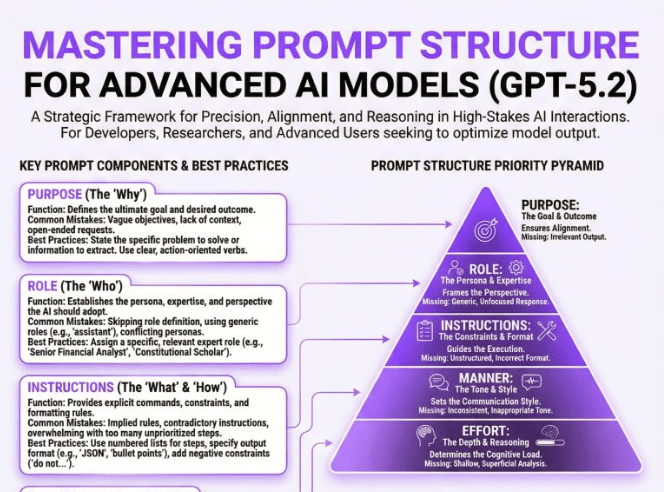
Here’s the structure that works:

  1. Define the end result
  2. Specify the thinking role
  3. Prepare context before dumping inputs
  4. Break work into explicit steps
  5. Add hard constraints
  6. Control the output format
  7. Limit clarification questions

This one change alone removes most bad outputs.


Section 7 — Why This Changes Work, Not Just AI

GPT-5.2 isn’t about replacing creativity.

It’s about:

  • Compressing execution time
  • Reducing cognitive load
  • Making high-level work repeatable

This is the first version where:

  • AI feels dependable
  • Errors are predictable
  • Output quality is consistent

That’s why this release matters.

Not because it’s new.

Because it finally works the way professionals need it to.

Learn how to Build this Workflow with AI:

Follow us:

There’s no automation you can’t learn to build with BULDRR AI.

I'll show how you can implement AI AGENTS to take over repetitive tasks.

Promoted by BULDRR AI

The Practical Reality of GPT-5.2

(Why this model quietly changes how real work gets done)

Most people ignored GPT-5.2.

No hype.

No flashy demos.

No viral benchmark screenshots.

That’s a mistake.

GPT-5.2 isn’t about novelty.

It’s about capability density.

This guide is not here to hype a release.

It’s here to explain why GPT-5.2 materially changes how professionals work — and how to prompt it correctly.

By the end, you’ll understand:

  • What actually changed in GPT-5.2
  • Why it behaves differently than previous models
  • How to feel the difference through real use cases
  • The exact prompt structures that unlock its strengths

Section 1 — First-Day Reality Check (Is GPT-5.2 Actually Better?)

Most people treat this like “another point release.”

It’s not.

To understand GPT-5.2, you need to see the pattern OpenAI has followed for years.


The Intelligence Cycle OpenAI Keeps Repeating

OpenAI alternates between:

  1. New intelligence paradigms (slow + expensive)
  2. Optimization releases (fast + cheap)

Here’s the pattern:

  • GPT-3
    • New training
    • New intelligence paradigm
    • Slow and expensive
  • GPT-3.5
    • Same intelligence
    • Faster and cheaper
  • GPT-4
    • New training
    • New paradigm
    • Slow and expensive
  • GPT-4o
    • Same intelligence
    • Faster and cheaper
  • GPT-4.5
    • New training
    • New paradigm
    • Slow and expensive
  • GPT-5
    • Same intelligence
    • Faster and cheaper
  • GPT-5.2
    • New training
    • New paradigm
    • Slow and expensive

This tells us something important:

GPT-5.2 is not an upgrade.

It’s the foundation.

GPT-6 will almost certainly be:

  • Faster
  • Cheaper
  • Built on GPT-5.2’s intelligence

That’s why this release matters now, not later.


Section 2 — Why Benchmarks Finally Matter This Time

Whenever a new model drops, the first thing worth checking is what OpenAI chose to measure.

For GPT-5.2, the key phrase is:

“Economically valuable tasks.”

That’s not marketing language.

It means:

  • Project management
  • Strategy
  • Writing internal docs
  • Excel modeling
  • Research synthesis
  • Decision memos

According to expert human judges, GPT-5.2 performs at or above human expert level on these tasks.

This isn’t junior work anymore.

This is knowledge work — the same work done by:

  • Operators
  • Analysts
  • Consultants
  • Managers
  • Founders

That’s the shift.


Section 3 — Memory Finally Works the Way You Expect

LLMs live and die by context.

Context = memory + understanding + accuracy.

GPT-5.2 makes a massive leap here.

What Changed:

  • Context window: 256,000 tokens
  • Information retention: ~98%

What does that mean in real terms?

You can upload:

  • 700 pages of text
  • Long PDFs
  • Contracts
  • Research papers
  • Internal documentation

…and GPT-5.2 actually remembers them.

Previously:

  • ~50% recall on 300 pages
  • Less than 50% on 700 pages

That’s the difference between:

  • A guessing machine
  • And a dependable assistant

For lawyers, doctors, insurance teams, executives — this is enormous.


Section 4 — Vision Is No Longer a Gimmick

GPT-5.2 doesn’t just read text better.

It sees better.

OpenAI reports:

  • ~22% improvement in vision understanding

In practice, this means:

  • Screenshots make sense
  • Dashboards are interpreted correctly
  • Excel sheets are understood structurally
  • PDFs don’t confuse the model

This is no longer “describe the image.”

It’s analyze the image.


Section 5 — How to Actually Feel the Difference (Real Use Cases)

Reading about improvements is boring.

Using them is not.

Here’s how GPT-5.2 shows its strength.


Case Study 1 — Forcing GPT-5.2 to Build a Real Excel File

This is where previous models collapsed.

Prompt (unchanged):

Build an Excel workbook (.xlsx) from the assumptions below.

Tabs:

  1. Inputs (assumptions + 3 scenarios: Base/Downside/Upside)
  2. Model (monthly for 12 months)
  3. Dashboard (3 charts + 6 KPIs)

Assumptions:

  • Starting revenue: $120,000 MRR
  • Growth: Base 8% MoM, Downside 4%, Upside 12%
  • Churn: Base 3% MoM, Downside 5%, Upside 2%
  • CAC: $35 per new subscriber
  • ARPU: $6/mo
  • Fixed costs: $45,000/mo
  • Variable costs: 6% of revenue

Rules:

  • No hard-coded numbers outside Inputs
  • Show formulas clearly
  • Output the .xlsx file

GPT-5.2:

  • Generated a real spreadsheet
  • Included formulas
  • Maintained clean separation of assumptions

This is work-grade output, not a demo.


Case Study 2 — Auditing Long Documents for Contradictions

This uses the long-context advantage.

Prompt (unchanged):

I’m going to paste a long document.

Your job:

  1. Extract a 12-bullet factual summary. Each bullet must include an exact quote + source.
  2. List contradictions or unclear claims (at least 8). Quote both sides.
  3. Make a decision memo:
  • What we know
  • What we don’t know
  • Risks (top 5)
  • Next actions (top 7)

Rules:

  • If missing, write “Not stated”
  • Do not guess Ready? Say: “Paste it.”

This works because GPT-5.2:

  • Doesn’t lose context halfway
  • Doesn’t invent missing details
  • Maintains consistency across sections

Case Study 3 — Diagnosing a Screenshot Like an Analyst

Vision + reasoning combined.

Prompt (unchanged):

I will upload ONE screenshot of a dashboard, analytics page, or UI.

Do this:

  1. Describe what I’m looking at (2 sentences)
  2. Extract 10 important numbers verbatim
  3. Diagnose 3 likely issues or opportunities
  4. Give a 7-step plan for what to check next
  5. Write a 5-line Slack update

Rules:

  • Only use visible data
  • Say “Can’t read” if unclear
  • Ask max 3 clarifying questions

This was borderline impossible before.

Now it’s reliable.


Section 6 — How to Prompt GPT-5.2 Properly (This Matters More Than Ever)

GPT-5.2 is less forgiving of sloppy prompts.

Here’s the structure that works:

  1. Define the end result
  2. Specify the thinking role
  3. Prepare context before dumping inputs
  4. Break work into explicit steps
  5. Add hard constraints
  6. Control the output format
  7. Limit clarification questions

This one change alone removes most bad outputs.


Section 7 — Why This Changes Work, Not Just AI

GPT-5.2 isn’t about replacing creativity.

It’s about:

  • Compressing execution time
  • Reducing cognitive load
  • Making high-level work repeatable

This is the first version where:

  • AI feels dependable
  • Errors are predictable
  • Output quality is consistent

That’s why this release matters.

Not because it’s new.

Because it finally works the way professionals need it to.

Learn how to Build this Workflow with AI:

Follow us:

Promoted by BULDRR AI

Our AI Articles

Learn from our AI Articles to excel in your profession ;)

THE RUBEN HASSID BLUEPRINT: Complete Creator & Channel Analysis

A comprehensive breakdown of Ruben Hassid’s digital presence, covering actionable insights, proven frameworks, and structured analysis designed for clarity, usability,...

Workflow Orchestration

1. Plan Node Default 2. Subagent Strategy 3. Self-Improvement Loop 4. Verification Before Done 5. Demand Elegance (Balanced) 6. Autonomous...

How to Use OpenClaw Skills — A Complete Beginner’s Guide

What is OpenClaw? OpenClaw is an open-source AI assistant designed as “AI that actually does things.” It doesn’t just chat....

Build a $10,000 RAG system using Gemini + Claude Code

This ‘$10,000 RAG system’ isn’t about expensive infrastructure—it’s about how you structure retrieval....

Free OpenRouter API Keys & Free Models List [Updated April 2026]

Get a free OpenRouter API key in minutes. See all free models available in 2026, rate limits, and how to...

7 AI Agents Clients Are Paying $2,000+/Month For in 2026 [Real Examples]

Discover the 7 AI agents businesses are actively buying in 2026 — with real pricing, use cases, and how to...

Comprehensive Channel Analysis: Alex Hormozi

Alex Hormozi gives away what others sell for $10K—not to make money from content, but to manufacture million-dollar businesses at...

Beginner to Pro Guide: Using the Agentic SEO Claude Skill

This isn’t just an SEO audit—it’s a feedback loop where your system analyzes, prioritizes, and answers based on your data,...

Top 60 Claude Skills, Workflows & GitHub Repos for AI

This isn’t just a list. It’s a full-stack AI toolkit: from coding agents → to frameworks → to workflows →...

How to Use Claude Code for Free in 2026 (No Subscription Needed)

Yes, you can use Claude Code for free. This guide shows exactly how — free tier limits, local model workarounds,...

Frequently Asked Questions

We share all our insights and resources for free, but building them isn’t cheap. Ads help us recover those costs so we can keep offering everything at no charge forever.

Yes, Ofcourse. Contact us and we’ll set it up. We also offer 100+ hours of free visibility to select brands.

No, nothing at all. In fact, many ads come with extra discounts for you.

Yes, sometimes. If you buy through our links, we may earn a small commission at no extra cost to you.

1:1 Free Strategy Session
Your competitors are already automating. Are you still paying for it manually?

Do you want to adopt AI Automation?

Every hour your team does repetitive work, you're burning real money.
While you wait, faster businesses are cutting costs and moving quicker.
AI and automations aren't the future anymore — they're the present.

Book a live 1-on-1 session where we show you exactly which of your daily tasks can be automated — and what it’s costing you not to.