
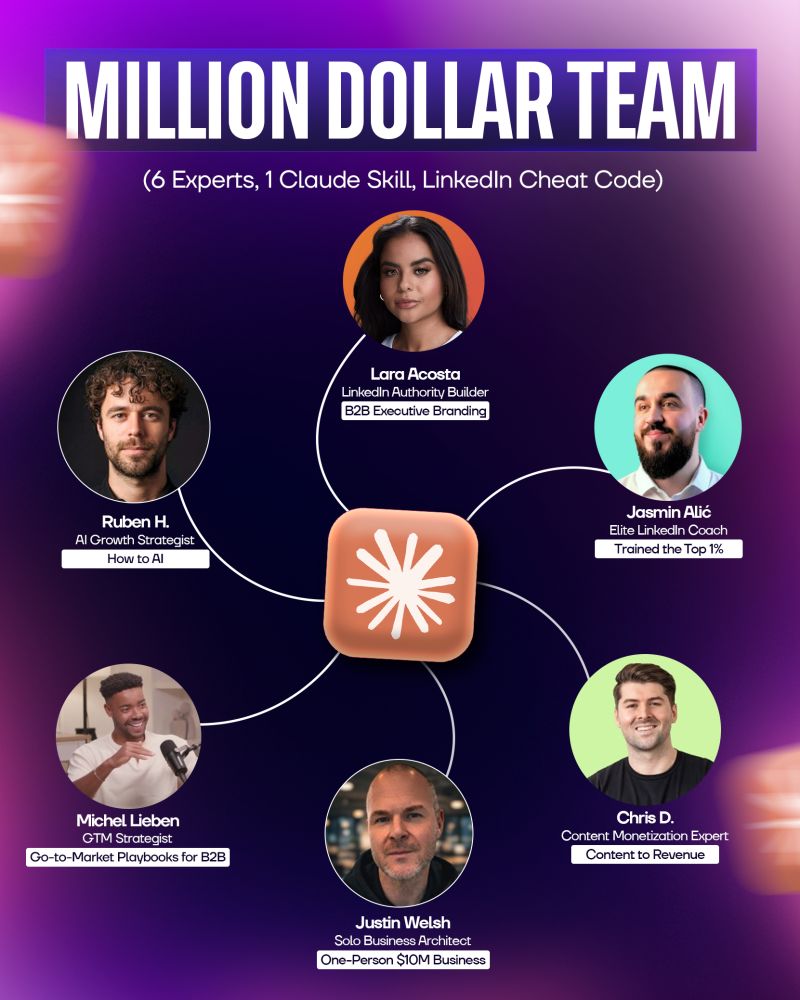
You now have access to 6 AI LinkedIn Mastermind who’ve collectively generated 500M+ impressions and built multiple 7-figure businesses.
WHAT YOU RECEIVED
1. The Claude Skill (AI LinkedIn Mastermind skill.md)
- Complete frameworks from all 6 experts
- 15,000+ words of actionable strategies
- Personalized guidance based on your situation
2. The PDF Reference Guide (AI LinkedIn Mastermind reference.pdf)
- 20+ page professional document
- Quick-access frameworks for each expert
- Print-friendly format for offline use
Important Note
Unlike ChatGPT custom GPTs, Claude Skills/Projects can’t be shared via links.
That’s why you’re getting everything needed to recreate THE BILLION-DOLLAR AI BOARD yourself — including the exact setup, instructions, and training data.
Think of this as the full blueprint for building your own viral content and growth system.
Complete Setup Guide
Files Included
- Interactive Claude Skill (upload this)
- Reference PDF (backup)
METHOD 1: CALL THE SKILL BY NAME (EASIEST)
Requirements
- Claude account (free or Pro)
How to Upload
- Go to claude.ai
- Click your profile (bottom left)
- Select Your Skills
- Click + Upload Skill
- Upload (ai_linkedin_mastermind_skill.md)
- Click Upload
✅ Done — the skill is ready.
How to Use
Mention the skill in your prompt:
Template:
“Hey Claude, use my AI LinkedIn Mastermind skill to help me [your task].”
METHOD 2: USE IN A CLAUDE PROJECT (ALWAYS ACTIVE)
When to Use
- You want the skill always active
- You’re working across multiple sessions
- You want to combine it with other documents
Setup Steps
Step 1: Create a Project
- Go to claude.ai
- Click Projects
- Click Create Project
- Name it (e.g. Business Advisory Board)
Step 2: Add the Skill
- Click Add Content
- Upload (ai_linkedin_mastermind_skill.md)
Done. Every chat inside this project now has access to all experts.
HOW IT WORKS
When you ask a question, the system will:
- Ask clarifying questions (business model, ICP, stage, challenge)
- Route you to the most relevant expert(s)
- Apply their frameworks to your situation
- Deliver personalized, non-generic advice
THE 6 EXPERTS & WHEN TO USE THEM
Justin Welsh — The Solopreneur King
Use for: One-person businesses, productized services, content systems
Ask: “How do I scale revenue without hiring?”
Lara Acosta — The LinkedIn Queen
Use for: B2B positioning, executive branding, enterprise sales
Ask: “How do I position myself to win enterprise deals?”
Jasmin Alić — The LinkedIn Coach
Use for: Viral content, engagement, audience growth
Ask: “How do I create posts that get millions of impressions?”
Ruben Hassid — The AI Growth Expert
Use for: AI tools, systems, data-driven growth
Ask: “How do I use AI without sounding robotic?”
Michel Lieben — The GTM Architect
Use for: Go-to-market strategy, scaling, expansion
Ask: “How do I build a repeatable B2B growth system?”
Chris Donnelly — The Brand Monetizer
Use for: Monetization, conversions, authority building
Ask: “How do I turn followers into paying clients?”
EXAMPLE QUESTIONS
Justin Welsh
- “I’m doing $200K/year — how do I productize?”
- “How do I build a content system without burnout?”
- “Fastest path to $1M solo?”
Lara Acosta
- “How do I position as a thought leader in my niche?”
- “What content attracts enterprise clients?”
- “How do I optimize for C-suite buyers?”
Jasmin Alić
- “Why aren’t my posts getting engagement?”
- “How do I write strong hooks?”
- “How do I grow from 1K to 10K followers?”
Ruben Hassid
- “How do I use AI for content naturally?”
- “What metrics actually matter?”
- “How do I predict viral posts?”
Michel Lieben
- “How do I launch a B2B GTM strategy?”
- “How do I shorten my sales cycle?”
- “Expand or double down?”
Chris Donnelly
- “How do I convert DMs into high-ticket clients?”
- “How do I monetize a small audience?”
- “How do I justify premium pricing?”
PRO TIPS FOR BEST RESULTS
1. Give Context
Include your business model, audience, challenge, and what you’ve tried
2. Ask Follow-Ups
Go deeper with examples and application
3. Combine Experts
Use multiple perspectives for better decisions
4. Ask for Execution
Always request actionable next steps
5. Use the PDF Guide
Keep it open for quick reference while working
COMMON WORKFLOWS
Content Creation
- Jasmin → Improve hooks & engagement
- Ruben → Generate ideas with AI
- Justin → Build systems
Business Growth
- Michel → GTM strategy
- Lara → Positioning
- Chris → Monetization
Audience Building
- Jasmin → Growth strategy
- Ruben → Metrics tracking
- Chris → Revenue conversion
TROUBLESHOOTING
“Advice feels generic” → Add more context
“Not sure which expert to use” → Ask for routing
“Need deeper insight” → Request examples
“Want multiple perspectives”
→ Mention multiple experts
NEXT STEPS
- Upload the skill (preferably in a Project)
- Ask your first question with context
- Save the PDF for quick access
- Bookmark this guide
SUPPORT
- DM Yunus on LinkedIn
- Tag him in a post
- Connect and ask directly
Ready to Use All 6 Experts?
Upload the skill and start asking. 🚀
