
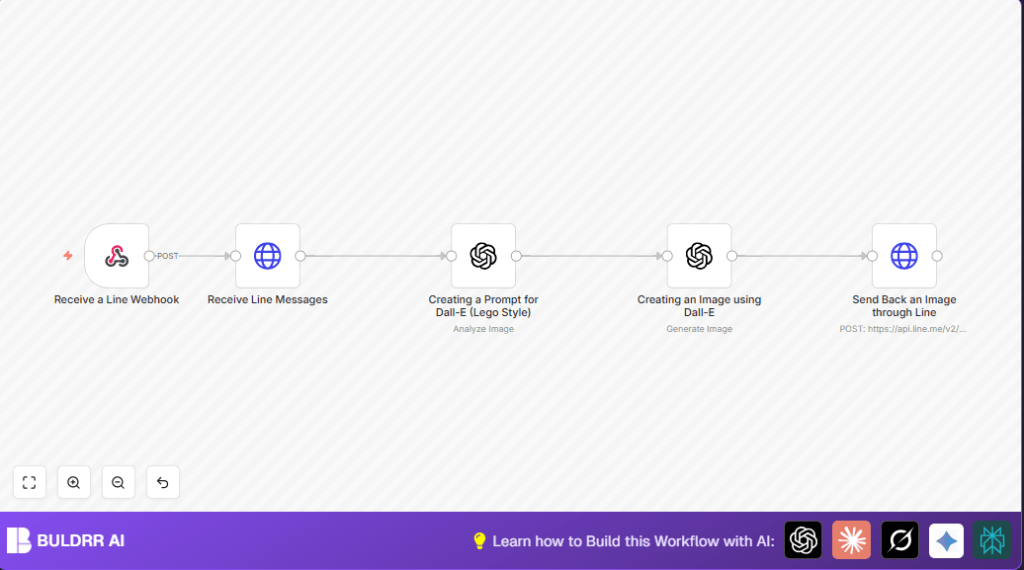

What This Workflow Does
This workflow automatically changes images sent via LINE chat into isometric Lego-style pictures.
It receives the image, sends it to OpenAI’s DALL·E 3 for conversion, and then sends the Lego picture back to the user without manual effort.
This saves time and lets social media managers share fun, consistent Lego art fast.
Tools and Services Used
- LINE Messaging API: Receives and sends messages in LINE.
- n8n: Automates process with nodes and workflows.
- OpenAI API (DALL·E 3): Creates Lego-style images from prompts and original photos.
Inputs, Processing Steps, and Output
Inputs
- Images sent by users via a LINE chat.
- API Keys for LINE and OpenAI in n8n credentials.
Processing Steps
- The Webhook node catches image messages from LINE.
- The HTTP Request node downloads the original image data using the message ID and LINE API.
- The OpenAI Text Completion node makes a detailed prompt to tell DALL·E 3 how to translate the image into Lego style.
- The OpenAI Image Generation node uses this prompt to create a new Lego-style image.
- The final HTTP Request node sends the Lego image back to the user on LINE.
Output
The user gets a fresh Lego-style image delivered automatically in LINE chat.
Who Should Use This Workflow
This workflow helps content creators managing LINE chat groups who want quick, automated fun image edits.
No special design skills needed. It’s also valuable for businesses wanting consistent Lego-style image content fast.
Beginner Step-by-Step: How to Use This Workflow in n8n
Import the Workflow
- Click the Download button on this page to save the workflow file.
- Open your n8n editor where workflows run.
- Use “Import from File” to upload this workflow file into n8n.
Configure the Workflow
- Enter your LINE Messaging API credentials in the workflow’s credential settings.
- Add your OpenAI API Key for access to DALL·E 3 images.
- If needed, change any IDs, URLs, or tokens that are specific to your LINE bot or OpenAI account.
Test and Activate
- Send a test image message to your LINE bot to trigger the workflow.
- Confirm the Lego-style image reply comes back in LINE.
- Once confirmed, toggle the workflow switch to activate it for production use.
If self hosting n8n on your own server, visit self-host n8n to learn more about stable operation.
Common Problems and How to Fix Them
- Problem: Workflow can’t fetch images from LINE API.
- Cause: Wrong or expired LINE API Key in HTTP Request node headers.
- Fix: Check and update the API Key under credentials.
- Problem: DALL·E does not make Lego images correctly or returns nothing.
- Cause: Bad prompt or invalid OpenAI API Key.
- Fix: Revise the prompt input and confirm OpenAI API Key is active.
Customization Ideas
- Change the prompt text in OpenAI Text Completion node to adjust Lego art style or perspective.
- Add watermarking of images by inserting an image processing API call before sending back to LINE.
- Expand the webhook and HTTP Request node filters to accept other image types and media.
- Log all converted image URLs and prompts into a Google Sheet or database to track usage.
Summary
✓ Saves time by automating Lego-style image creation from LINE photos.
✓ Works without any graphic design skills needed.
✓ Uses LINE Messaging API, n8n automation, and OpenAI DALL·E 3 image generation.
→ Users send an image in LINE and get a Lego art reply fast.
→ Helps content managers publish consistent, engaging posts daily.
