

What This Automation Does ⚙️
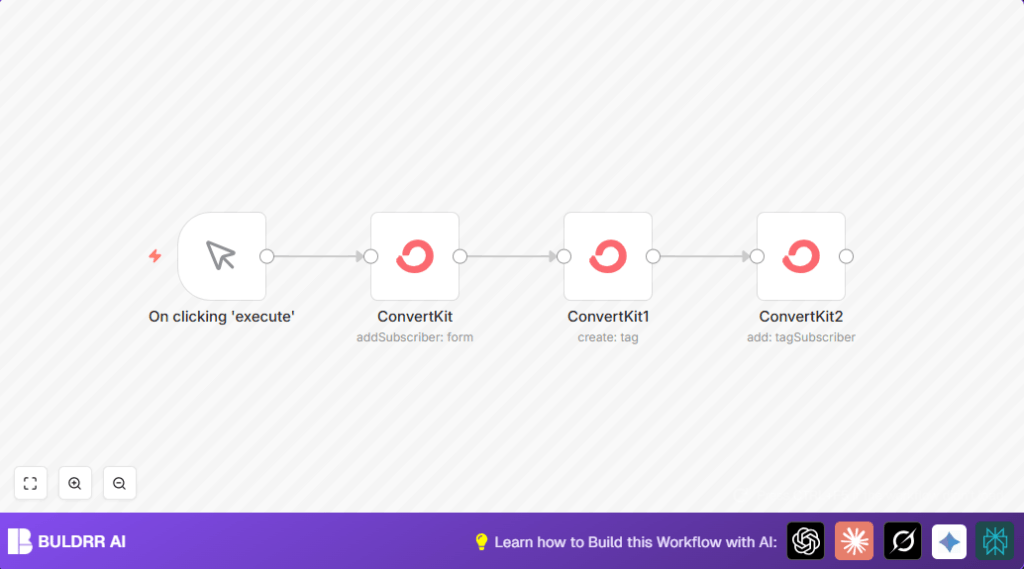
This workflow adds new subscribers to a ConvertKit form automatically.
It also creates or finds the right tag and then assigns that tag to the subscriber.
This stops mistakes from manual input and saves about 30 minutes per subscriber.
Who Should Use This Workflow
This is great for people managing many subscriber lists in ConvertKit.
If manual tagging wastes time or leads to missed emails, this helps fix that.
Users who want accurate email targeting with less work will find this useful.
Tools and Services Used
- n8n: Automation platform to build and run the workflow.
- ConvertKit API: To add subscribers, create tags, and tag subscribers.
- Manual Trigger: Starts workflow when user clicks execute.
Inputs, Processing, and Output
Inputs
- Email address of subscriber to add.
- Form ID in ConvertKit where subscriber is added.
- Tag name or ID to assign to subscriber.
Processing Steps
- Add subscriber to the specified ConvertKit form.
- Create or find a tag in ConvertKit by tag name.
- Assign the tag to the subscriber.
Output
- New subscriber data with email confirmed.
- ID of the created or fetched tag.
- Confirmation that subscriber is tagged correctly.
Beginner Step-by-Step: How to Use this Workflow in n8n
Step 1: Download and Import
- Download the workflow file using the Download button on this page.
- Open the n8n editor and select Import from File.
- Choose the downloaded file to load the workflow in n8n.
Step 2: Configure Credentials
- Go to the credentials section in n8n.
- Add or update the ConvertKit API Key under ConvertKit API credentials.
- Save the credentials to allow API calls.
Step 3: Update IDs and Inputs
- Check the form ID in the first ConvertKit node matches your desired ConvertKit form.
- Set tag names or IDs as needed in the tag and tagSubscriber nodes.
- If testing, input a test email or map an input email dynamically.
Step 4: Test the Workflow
- Click Execute Workflow in n8n.
- Watch the outputs of each node to verify subscriber addition and tagging.
- Check ConvertKit dashboard to confirm subscriber and tag setup.
Step 5: Activate for Production
- When ready, turn the workflow active in n8n.
- Run it manually or replace the manual trigger with a webhook or schedule node for automatic use.
If using self-host n8n, see self-host n8n for hosting options.
Common Mistakes to Avoid
- Not setting ConvertKit API Key properly in credentials.
- Using wrong form or tag IDs causing API errors.
- Failing to map subscriber email correctly between nodes.
Customization Ideas ✏️
- Set tag names dynamically from external data or previous nodes.
- Use a Google Sheets node or webhook to input subscriber emails automatically.
- Add extra tagSubscriber nodes to assign many tags per subscriber.
- Add error handling nodes to catch API errors and send messages via Slack or email.
Troubleshooting ????
Problem: “Invalid API Key or Unauthorized”
Cause: Wrong or missing API Key in n8n credentials.
Solution: Re-enter your correct API Key under ConvertKit API Credentials in n8n and save.
Problem: “Subscriber Email not added”
Cause: Email parameter empty or wrong in node mapping.
Solution: Use this expression to map email from subscriber node:
{{$node["ConvertKit"].json["subscriber"]["email_address"]}Pre-Production Checklist ✅
- Make sure API credentials are valid and saved.
- Confirm form and tag IDs are exact and exist in ConvertKit.
- Test the manual trigger with an example email for success.
- Verify subscriber appears with correct tag in ConvertKit dashboard.
- Back up ConvertKit settings before widespread changes.
Deployment Guide
This uses a manual trigger node to start.
Press Execute Workflow in n8n for each subscriber addition.
For more automation, replace the manual trigger with a webhook or schedule node for regular runs.
Monitor runs in n8n logs to catch any issues early on.
Summary
✓ Saves time by automating subscriber addition and tag assignment.
✓ Prevents mistakes by removing manual input steps.
✓ Improves email targeting by organizing subscribers with tags.
→ Runs inside n8n using ConvertKit API with manual or automated triggers.
→ Gives clear workflow structure: add subscriber → create/find tag → assign tag.
→ Easy to customize and extend for more complex email marketing needs.
