

What This Automation Does ⚙️
This workflow watches an RSS feed and posts new items on BlueSky automatically.
It saves time by posting updates with images and correct timestamps.
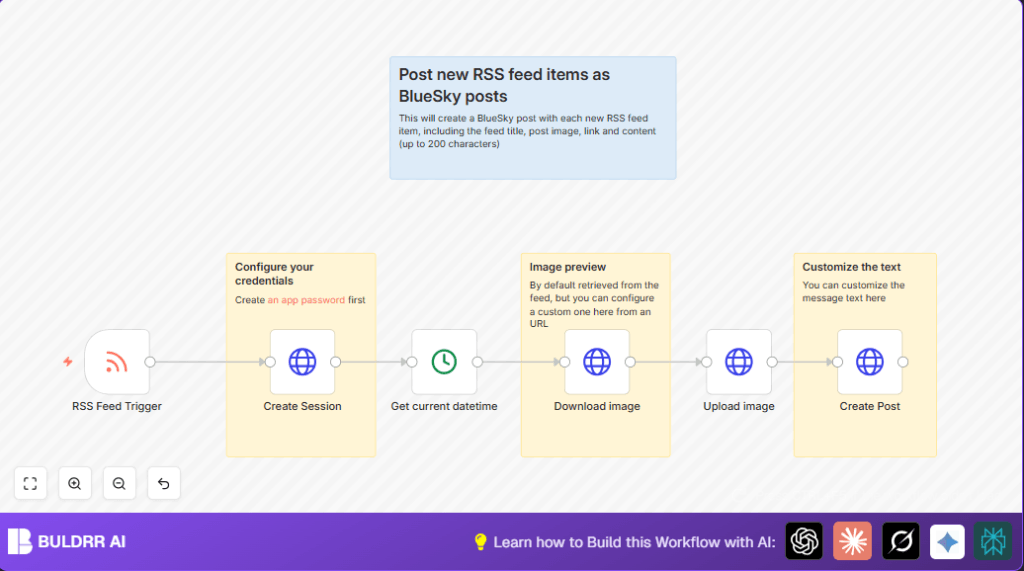
The workflow logs into BlueSky safely, downloads feed images, then uploads them with post text.
Result: new BlueSky posts every time feed updates, with content and pictures ready to engage followers.
Who Should Use This Workflow
- People who manage content and want to save hours posting manually.
- Users who want automated, timely BlueSky updates with images included.
- Content curators preferring simple tools without deep coding.
- Anyone needing safe login using BlueSky app passwords.
Tools / Services Used
- n8n: Automation platform to build workflows visually.
- BlueSky API: For authentication, image upload, and post creation.
- RSS Feed URL: The source of new articles or blog items.
- HTTP Request Nodes: To access BlueSky API and download images.
- DateTime Node: For precise post timestamps.
Input → Process → Output
Input
- RSS Feed URL with new content updates.
- BlueSky username and app password for authentication.
Processing Steps
- Trigger runs every minute checking RSS feed for new items.
- Log in to BlueSky via API to get access token.
- Get current date and time for post timestamp.
- Download image from the feed item’s enclosure as a file.
- Upload image to BlueSky as a blob using the token.
- Create a BlueSky post with snippet text, link, image embed, language tag, and timestamp.
Output
- New BlueSky post featuring text snippet, clickable article link, and embedded image.
- Posts are tagged with correct language identifier (e.g., Spanish “es-ES”).
- Posts show accurate creation date/time for engagement timing.
Beginner step-by-step: How to Use This Workflow in n8n
Import the Workflow
- Open n8n editor on your account.
- Click the Download button on this page to get the workflow file.
- In n8n, choose “Import from File” and upload the downloaded workflow JSON.
Configure Credentials and Settings
- Add BlueSky username and app password in the Create Session node.
- Enter the RSS feed URL in the RSS Feed Trigger node.
- Check image URL path in the Download image node; update if necessary.
- Review any IDs or metadata fields like language tags in the Create Post node JSON body.
Test and Activate
- Run the workflow manually once to ensure posts create correctly.
- Check BlueSky profile for new test posts with images and correct text.
- If successful, activate the workflow in n8n to run automatically on schedule.
For users running the self-host n8n, consider this setup for deploying the workflow efficiently.self-host n8n
Common Edge Cases and Errors
- Authentication Fails: Check app password use, not account password.
- No Image Downloaded: Ensure Download image node response format is set to file.
- Image Upload Error: Confirm correct Content-Type header and binary data connection.
- No New Posts Triggered: Verify RSS feed URL and polling interval.
- Incorrect Timestamp: Confirm Get current datetime node uses system time and is connected correctly.
Customization Ideas
- Change “langs” array in Create Post node to match post audience language.
- Adjust RSS feed polling to less frequent if updates are rare.
- Modify post text length or add hashtags in the JSON body of Create Post node.
- Use a fixed image URL in Download image node for branding if RSS feed lacks images.
- Include multiple language codes in “langs” field for bilingual posts.
Summary of Workflow Result
✓ Saves many hours by posting new blog or news content automatically.
✓ Posts include images and links with correct timestamps and language tags.
✓ Uses secure BlueSky app password authentication, protecting user credentials.
✓ Runs every minute to create timely posts matching new RSS updates.
→ User gets engaging BlueSky feed updates automatically without manual work.
