
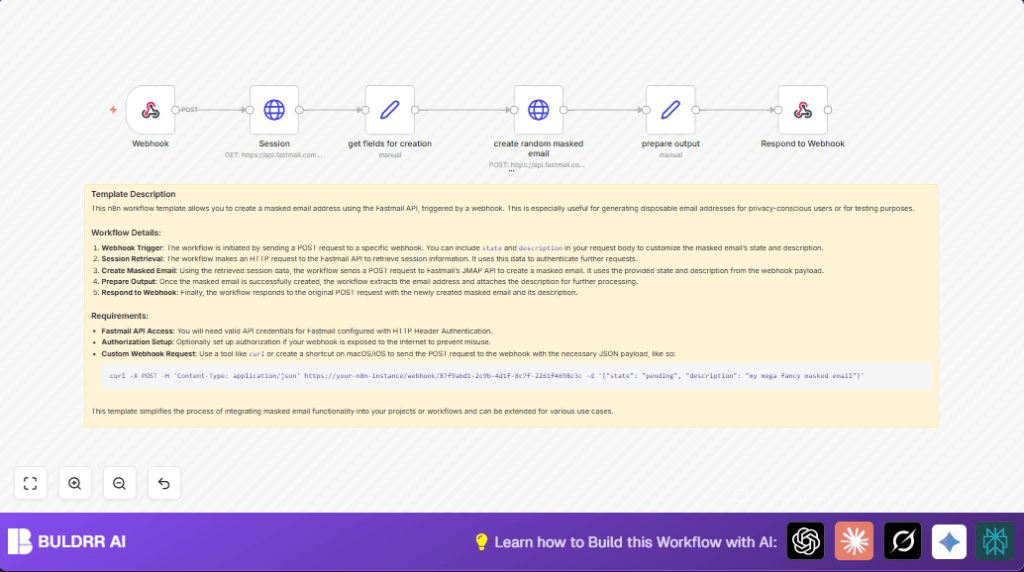

What this workflow does
This workflow creates new Fastmail masked email addresses automatically when you send a POST request to its webhook.
It saves time by removing manual steps of logging in and setting up masked emails.
You get back the masked email address and its description right in the webhook response.
The workflow handles authentication, session fetching, and calling Fastmail’s JMAP API to create the mask.
Who should use this workflow
This workflow is for developers or testers who need to create Fastmail masked emails often.
It works well if you want less manual work and fewer errors when making masked emails.
Anyone with Fastmail API access and a bit of automation setup can use it.
Tools and services used
- Fastmail API: To get session info and create masked email addresses.
- n8n automation platform: To build the workflow, handle webhook triggers, HTTP requests, and responses.
- Webhook client (like curl or Postman): To send POST requests to the workflow endpoint.
Inputs, Processing Steps, and Output
Inputs
- POST request to the webhook with JSON fields: state (email mask status) and description (label for the mask).
- Fastmail API credentials set in n8n to authenticate API calls.
Processing Steps
- Use Webhook node to receive input data.
- HTTP Request node (Session) calls Fastmail’s session endpoint to get account IDs.
- Set node (get fields for creation) sets default values for state and description if missing.
- HTTP Request node (create random masked email) sends JSON body with account ID and fields to Fastmail API to create the masked email.
- Set node (prepare output) extracts new masked email and description from API response.
- Respond to Webhook node sends back the masked email info as the POST response.
Output
- JSON response containing new masked email address and its description.
Beginner step-by-step: How to use this workflow in n8n production
Step 1: Download and Import Workflow
- Find the Download button on this page and save the workflow file.
- Open n8n editor where you want to use the workflow.
- Click “Import from File” and select the downloaded file.
Step 2: Configure Credentials
- Add your Fastmail API Key in n8n’s HTTP Header Authentication credentials.
- Ensure the HTTP Request nodes that call Fastmail use this credential.
Step 3: Update IDs and Parameters if Needed
- Check if any account IDs, emails, or folder IDs need updating from your Fastmail account.
- Adjust Set nodes if you want different default description or state.
Step 4: Test the Workflow
- Send a POST request to the workflow webhook URL with JSON, for example:
{
  "state": "active",
  "description": "Test Mask"
}
- Verify you get a JSON response with the new masked email and its description.
Step 5: Activate Workflow for Production
- Toggle the workflow status to active in n8n.
- Use the webhook URL in your app or scripts to create masked emails automatically.
- Monitor executions inside n8n for errors or retries.
To run this well over time, consider self-host n8n for better control of uptime and security.
Customization ideas
- Change the default masked email state from “pending” to “active” or “disabled” in the get fields for creation node.
- Add more fields like note or expires in the create random masked email node JSON to control metadata or auto-expiry.
- Protect the webhook by adding authorization or IP filtering to avoid misuse.
- Log each created masked email to Google Sheets or a database for tracking after the prepare output node.
- Add other triggers like Scheduler nodes to make masked emails on a regular time basis without a webhook call.
Common edge cases and troubleshooting
- 401 Unauthorized error: Check if Fastmail API credentials are correct and HTTP Header Auth is used.
- Webhook not triggering or empty response: Confirm webhook uses POST method and Respond to Webhook node is connected properly.
- Missing or invalid accountId in masked email creation: Verify that
primaryAccounts['https://www.fastmail.com/dev/maskedemail']is correctly referenced from Session node output.
Deployment advice
Make sure Fastmail API keys work and are valid in n8n credentials.
Test creating masked emails with different inputs using the webhook.
Keep monitor logs for errors after turning workflow active.
Add security on the webhook if this is reachable on the public internet.
Use self-host n8n if reliable uptime and control are important.
Summary
✓ Save time by automating Fastmail masked email creation
✓ Reduce manual errors in email mask setup
✓ Get immediate JSON response with new masked email info
→ Use a webhook POST with state and description to create masks
→ Workflow fetches session data, creates email mask, and returns detail
✓ Easy import and setup inside n8n for production use
