

What This Workflow Does
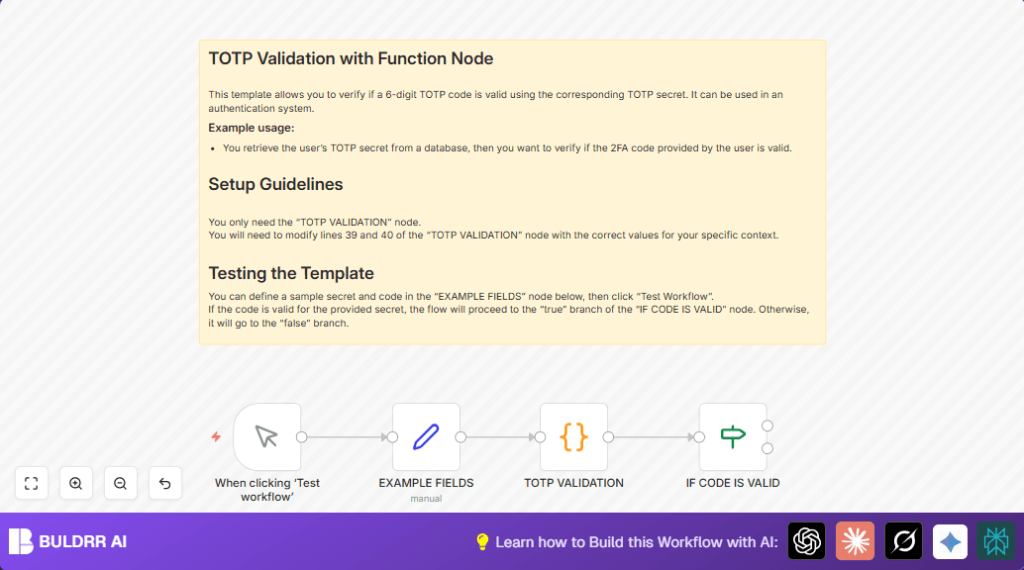
This workflow checks if a 6-digit TOTP code matches the secret key using Python, inside n8n.
It solves the problem of manual, slow, possibly unsafe TOTP code validation.
The result is a clear status showing if the code is correct or not.
Who Should Use This Workflow
This is for users who want to verify TOTP 2FA codes securely and quickly without outside tools.
It is good for anyone managing user authentication, especially where manual checking wastes time or causes errors.
Tools and Services Used
- n8n Automation Platform: Runs the workflow and nodes.
- Python Code Node: Runs Python script to decode secrets and check TOTP.
- Manual Trigger Node: Starts the workflow by user action.
- Set Node: Holds example TOTP secret and code.
- IF Node: Decides if the code is valid or not.
Inputs, Processing Steps, and Outputs
Inputs
The workflow starts with user trigger.
Example inputs are set: a sample 6-digit code and a base32-encoded TOTP secret key.
Processing Steps
The Python Code node decodes the secret from base32.
Then it calculates the current TOTP code using HMAC-SHA1 and a 30-second time window.
It compares the generated code to the user input.
The node returns a status: 1 if codes match, 0 if not.
The IF node checks this status to branch the flow.
Outputs
Outputs split into two possibilities: valid or invalid TOTP code.
The valid branch can proceed to allow authentication.
The invalid branch can block access or notify users.
Beginner Step-by-Step: How to Use in n8n
Step 1: Import the Workflow
- Download the workflow file from this page.
- Open the n8n editor where the workflow will run.
- Use the Import from File option to add the downloaded workflow.
Step 2: Configure the Workflow
- Check if any credentials or API Keys are needed and add them.
- If the workflow connects to other services, update emails, IDs, or channels accordingly.
- Make sure the example TOTP secret and code fields match expected format or replace with your own test data.
Step 3: Test and Activate
- Run the workflow by clicking Execute Workflow.
- Watch the result to confirm if status returns 1 for valid code or 0 for invalid code.
- Once tests succeed, activate the workflow to use in production.
- For ongoing use, replace the manual trigger with real input sources like webhooks or database queries.
Use self-host n8n if hosting n8n on your own server.
Common Edge Cases and Failures
Incorrect system time can cause valid codes to fail validation.
Make sure the server clock is accurate and synced with internet time.
Secrets must be base32 encoded correctly or decoding will fail.
Check secret strings for typos or missing characters.
Python environment in n8n must support required modules like hmac, hashlib, base64.
Errors in the code node usually mean environment setup issues.
Customization Ideas
- Replace the Set node’s example secret and code with data from a database or form submission.
- Add more checks in the IF node for different status codes or error messages.
- Connect true or false branches to notification nodes like Email or Slack to alert admin or users.
Summary
✓ Validate TOTP codes inside n8n without external apps.
✓ Automate code checking using a Python script.
✓ Avoid manual errors and save time on user authentication.
✓ Control workflow branches based on valid or invalid status.
→ Ready to use with manual triggers or connect to live user data.
