

What this workflow does
This workflow connects to Systeme.io API to manage contacts and tags automatically.
It solves the problem of slow, manual exporting and importing, and handles API rate limits.
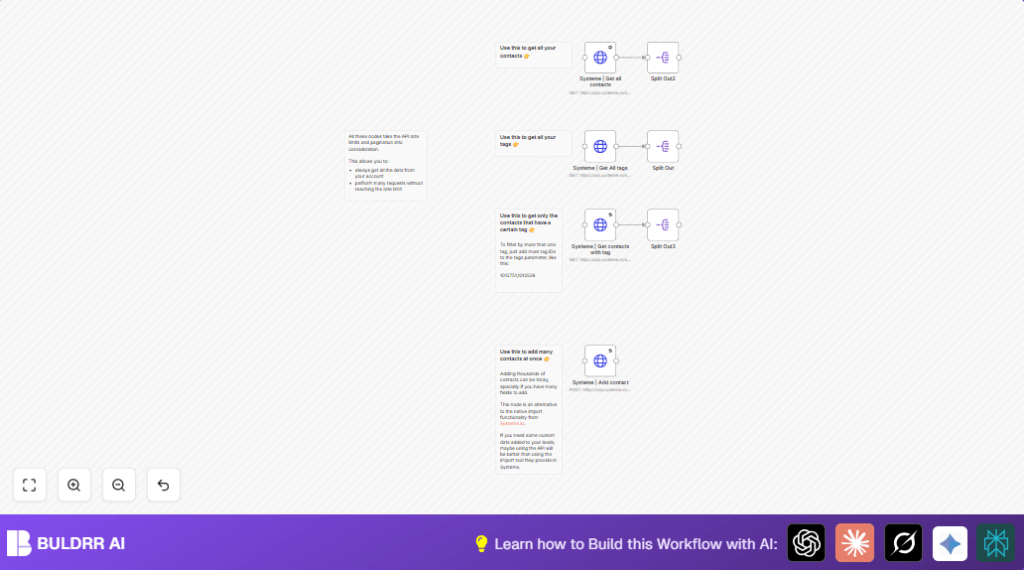
The workflow fetches all contacts and tags, filters contacts by tags, and adds new contacts in bulk with custom fields.
Users get accurate lists without hitting rate limits or manual errors.
Who should use this workflow
This workflow suits anyone using Systeme.io CRM who needs to manage many contacts and tags.
If spending hours exporting, filtering, or importing contacts manually, this workflow saves time and avoids data mistakes.
It works for marketers, sales teams, or admins wanting better automation with Systeme.io data.
Tools and services used
- n8n automation platform: For building and running the workflow.
- Systeme.io API and API Key: To securely connect and access contact and tag data.
- HTTP Request nodes: To send API calls to Systeme.io endpoints for contacts and tags.
- Split Out nodes: To break large API responses into single items for processing.
- Batching and pagination: To handle large data sets and respect API rate limits.
How the workflow works (Inputs → Processing → Output)
Inputs
- Systeme.io account with valid API Key.
- Optional: Specific tag IDs to filter contacts.
- Contact data to be added in bulk with custom fields.
Processing steps
- Send HTTP GET requests to get all contacts, using pagination and rate limit delay.
- Use Split Out nodes to turn bulk contact and tag API responses into single items.
- Retrieve all tags with similar pagination logic.
- Fetch contacts filtered by provided tag IDs via query parameters.
- Bulk add contacts with POST requests using JSON bodies, including custom fields like
utm_source. Use batches to avoid rate limits.
Outputs
- Complete lists of contacts and tags retrieved from Systeme.io.
- Individual contact items ready for further automation or export.
- New contacts added to Systeme.io in bulk, including custom data fields.
Beginner step-by-step: How to use this workflow in n8n
Importing the workflow
- Download the workflow file using the Download button on this page.
- Open the n8n editor where you want to use the workflow.
- Click on “Import from File” and select the downloaded workflow file.
Setup after import
- Add credentials: Enter Systeme.io API Key in the HTTP Request node authentication settings.
- Update any tag IDs in the query parameters for filtering contacts by tag as needed.
- If adding contacts, prepare your contact data with custom fields in the POST request body JSON.
Testing and activation
- Run the workflow manually once to test data retrieval and contact creation.
- If results are as expected, activate the workflow to run automatically or on a schedule.
If self hosting n8n, the user can check self-host n8n for setup help.
Customization ideas
- Filter contacts by multiple tags by adding comma-separated IDs in the Systeme | Get contacts with tag node.
- Adjust batch size in the bulk add node to fit API rate limits or contact volume.
- Add more custom fields in the POST request body by including extra entries in the “fields” array.
- Use a Function or Set node to dynamically provide tag IDs before fetching contacts by tag.
Handling errors and common issues
Problem: Pagination does not complete or data seems incomplete.
Cause: Wrong pagination expression or incorrect startingAfter parameter.
Fix: Verify the condition {{$response.body.hasMore == false}} is exactly used and startingAfter points to last item ID in previous response.
Problem: Rate limit errors or requests failing.
Cause: Sending requests too fast.
Fix: Use request interval of 1000ms or longer between requests in pagination settings to prevent bans.
Pre-production checklist
- Check the Systeme.io API key is valid and allowed to access contacts and tags.
- Test each HTTP Request node separately to confirm data is fetched correctly.
- Make sure pagination returns complete data by comparing with Systeme.io dashboard exports.
- Confirm Split Out nodes produce one item per contact or tag.
- Test bulk add with a small set of contacts and correct JSON structure before full import.
Final results of using this workflow
✓ Save hours weekly by automating export and import of contacts and tags.
✓ Avoid manual errors when managing contacts and tags in Systeme.io.
✓ Prevent hitting API rate limits with built-in delays and batch processing.
→ Get accurate, segmented contact lists every time.
→ Bulk-add contacts with custom tracking fields easily.
→ Use clean individual contact items for more automation steps.
