

What This Automation Does
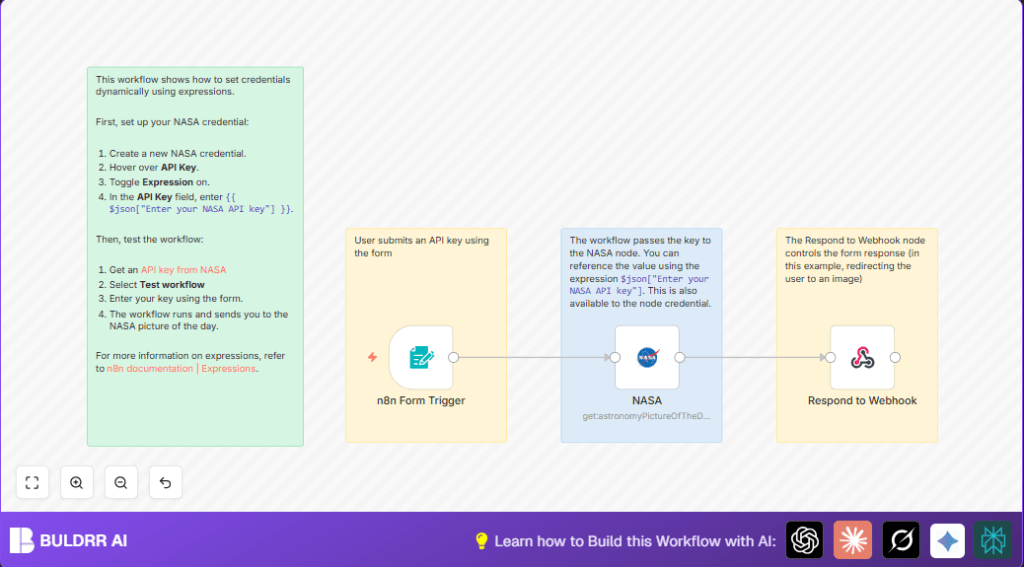
This workflow lets users enter their own NASA API key each time they want to get NASA’s picture of the day.
It solves the problem of hardcoded keys that expire or cause security risks.
Users submit their key with a web form, and the workflow uses that key directly without saving it.
The result is an up-to-date picture link that users get by being redirected automatically.
Who Should Use This Workflow
This is for developers or space lovers who want to share NASA data apps.
People who want to avoid editing or updating API keys manually will benefit.
Users who do not want their API key stored permanently but want to fetch data live should try this.
Tools and Services Used
- n8n Platform: Workflow automation engine.
- Form Trigger node: To collect NASA API keys from users in a web form.
- NASA node: To fetch NASA picture of the day data.
- Respond to Webhook node: To redirect users to NASA’s image URL.
- NASA API: Source of Astronomy Picture of the Day data.
Input → Process → Output
Input
User opens a link with the web form.
They type their NASA API key and submit.
Processing Steps
- Form Trigger node receives the key.
- The key is passed dynamically to the NASA node using an expression in the credential.
- NASA node calls the NASA API to get today’s picture using that key.
- Result with image URL is passed to Respond to Webhook node.
- Respond to Webhook node redirects the user to the image URL.
Output
User sees the NASA picture of the day automatically after submitting their API key.
Beginner Step-by-Step: How to Use This Workflow in n8n
Importing the Workflow
- Download the workflow file using the Download button on this page.
- Open the n8n editor.
- Go to “Import from File” and choose the downloaded workflow file.
Configuring Credentials and IDs
- Go to Credentials and add a NASA API credential with Expression mode enabled on the API Key field.
- Ensure the API key expression uses
{{ $json["Enter your NASA API key"] }}exactly. - Update the Form Trigger node path if needed to a unique URL path.
Testing and Activation
- Activate the workflow toggle.
- Open the webhook URL in a browser.
- Enter a valid NASA API key in the form and submit.
- Confirm redirect to NASA’s picture of the day.
- Once verified, keep the workflow activated for production use.
Common Mistakes and Troubleshooting
- Not enabling Expression toggle on the API Key in NASA credential blocks dynamic key usage.
- Mismatched form field name causes API key not to be received.
- Forget to connect Form Trigger node to NASA node breaks data flow.
- Respond to Webhook node not configured for redirect leaves blank pages.
Customization Ideas
- Change NASA node to use other API endpoints like Mars Rover photos.
- Add extra form fields to get other inputs like date, and pass them dynamically.
- Instead of redirect, respond with JSON that includes image URL and details for API clients.
Pre-Production Checklist
- Test submitting valid NASA API keys to confirm the dynamic credential works.
- Check if NASA node receives the API key per run.
- Verify the redirect URL expression is set as
= {{ $json.url }}in Respond to Webhook node. - Ensure all nodes are linked properly and workflow is active.
- Backup the workflow JSON before making changes.
Deployment Guide
Activate the workflow in n8n.
Share the webhook URL with users so they can submit their NASA API keys.
Keep an eye on workflow runs to catch errors.
Enable error handling in n8n for better production control.
Consider running self-host n8n for better data handling.
Summary of Results
→ Users enter their NASA API key directly in the form.
→ Workflow uses each key dynamically without storing it.
✓ No manual key updates needed.
✓ Secure API usage because keys aren’t saved in code.
✓ Users get NASA’s picture of the day instantly.
