

What This Workflow Does ⚙️
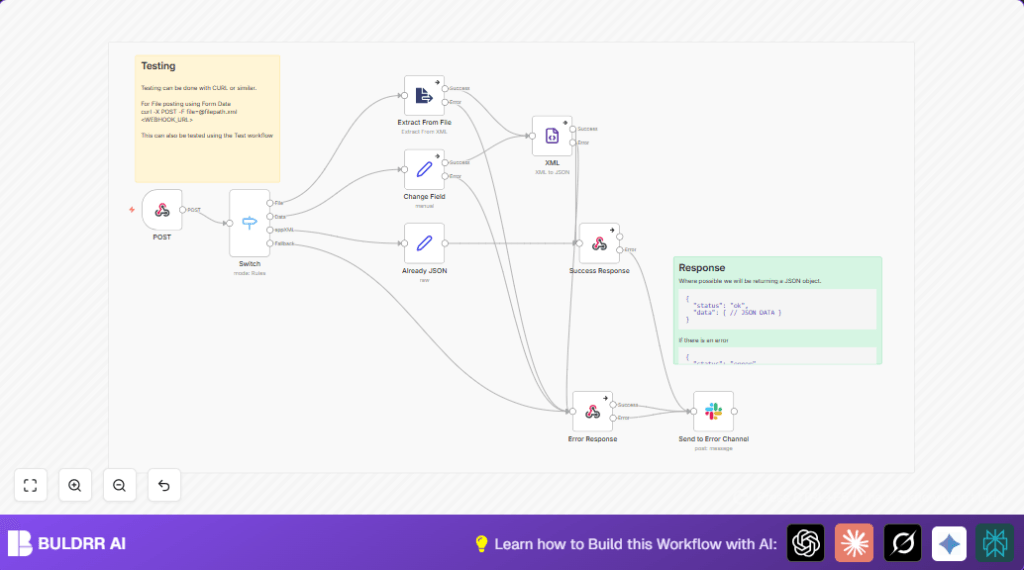
This workflow turns XML data into JSON fast and easy. It solves the problem of spending too much time and making mistakes when changing XML files into JSON. You send XML data or files to a webhook. The workflow reads the data, changes it into JSON, and sends JSON back to you reliably.
It works by checking if the data comes as a file or plain text, then processes it in the right way. If errors happen, it alerts a Slack channel with details to help fix issues quickly.
Inputs, Processing, and Output
Inputs
- HTTP POST requests to the webhook with XML as a file upload (binary data) or raw XML text.
- Content-type headers to identify data format like ‘text/plain’ or ‘application/xml’.
Processing Steps
- Webhook node receives XML data or file.
- Switch node checks if input is binary file data or XML text and routes accordingly.
- For files: Extract From File node pulls out XML text from the file.
- For raw XML: a Set node sets XML string in a uniform field.
- In some cases, a Set node prepares JSON directly if data is already in JSON.
- XML node converts XML text field into usable JSON.
- Respond to Webhook node sends JSON response with status.
- If errors occur, Error Response node returns error JSON and Slack node notifies a Slack channel.
Output
The workflow returns a JSON object with a status message and the converted data if successful, or an error message if failed.
Who Should Use This Workflow
Anyone needing to quickly convert XML files or raw XML data into JSON without manual effort can use this. It helps data analysts, developers, or teams working with external partners sending XML data.
If your systems or clients send XML via HTTP POST requests, this automates the conversion simply and avoids errors.
Tools and Services Used
- n8n: Workflow automation platform to run the process.
- Slack API: Sends alerts when errors occur.
- Webhook HTTP Endpoint: Receives XML data or uploads from clients.
- Optional cURL or Postman: Used for testing the webhook.
Beginner Step-by-Step: How to Use This Workflow in n8n for Production
Step 1: Download and Import the Workflow
- Use the Download button on this page to get the workflow file.
- In the n8n editor, choose “Import from File” and select the downloaded file.
Step 2: Configure Credentials and Details
- Add the needed Slack API credentials in n8n under Credentials.
- Update the Slack channel name in the relevant node if different from default.
- If necessary, update webhook path, folder IDs, or email addresses according to your setup.
Step 3: Test the Workflow
- Send a test POST request with XML file or text to the webhook URL.
- Check the workflow runs and returns JSON success responses.
Step 4: Activate Workflow for Production
- Turn on the workflow in n8n to run whenever the webhook receives data.
- Monitor execution logs in n8n for errors and Slack notifications.
- For users with self-host n8n, make sure the server is online and reachable.
Customization Ideas
- Add more conditions in the Switch node to handle other data types like CSV or JSON.
- Add Set or Function nodes to log data to databases or sheets for audits.
- Include notifications on successful conversions using Slack or email nodes.
- Add XML schema validation with Code nodes to check XML quality before converting.
Common Issues and Solutions ????
XML Node Fails or Returns Empty Output
Cause: The XML is bad or incomplete.
Solution: Use an XML validator before sending. Add XML validation steps in the workflow.
Webhook Not Triggering on POST
Cause: Wrong URL or missing binary property name for files.
Solution: Verify webhook URL. Ensure files are sent under the ‘data’ field matching Webhook node setup.
Slack Notifications Not Sent
Cause: Slack credentials missing or wrong channel name.
Solution: Check Slack API credentials in n8n under Credentials. Confirm channel name is correct in Slack node.
Summary
✓ Saves many hours converting XML to JSON.
✓ Removes human errors in manual conversions.
✓ Sends back reliable JSON data through webhook.
✓ Alerts errors in Slack fast.
→ Gets XML input as files or raw text.
→ Processes input with smart branching.
→ Outputs JSON with clear status.
