
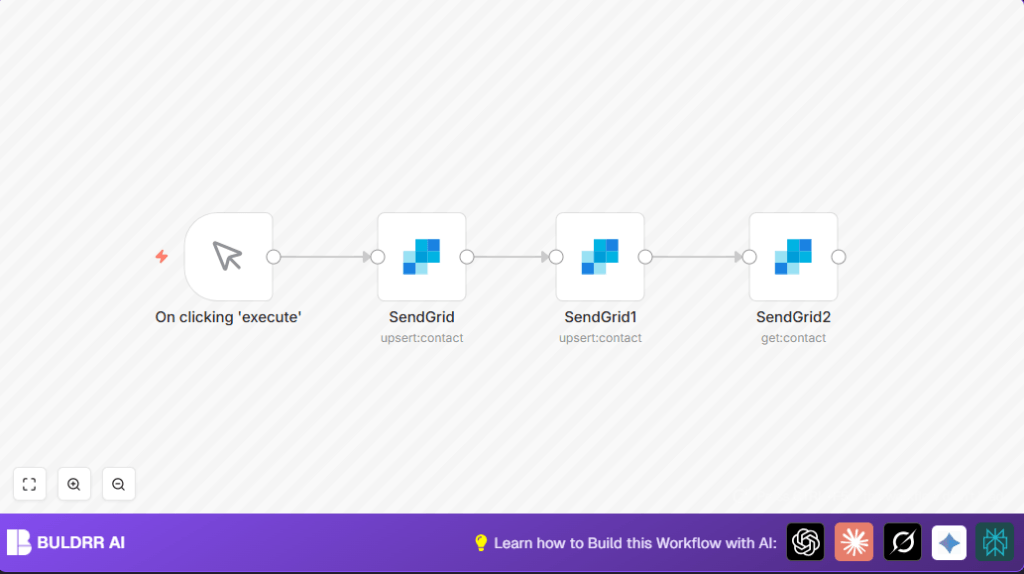

What this workflow does
This workflow helps to create, update, and get a contact in SendGrid using n8n in one flow.
It solves the problem of managing contacts manually that wastes time and causes errors.
After running the workflow, you get updated and confirmed contact details from SendGrid.
Who should use this workflow
This is good for someone who needs to manage SendGrid contacts often.
If manual updates take hours or mistakes happen because of manual work, this workflow helps reduce time and errors.
Tools and services used
- n8n: The automation tool where the workflow runs.
- SendGrid API: Used to create, update, and get contact data.
Inputs, processing steps, and output
Inputs
Data inputs are an email address, first name, and last name for the SendGrid contact.
Processing steps
- The Manual Trigger starts the workflow.
- The first SendGrid node creates a new contact with email and first name.
- The second SendGrid node updates the contact with the last name, reusing the email from the first node.
- The third SendGrid node gets the contact details by email to check the information.
Output
The workflow outputs the full contact details from SendGrid after update.
Beginner step-by-step: How to use this workflow in n8n
Step 1: Import workflow
- Download the workflow file using the Download button on this page.
- Open n8n editor (already logged in).
- Click “Import from File” and choose the downloaded workflow file.
Step 2: Configure credentials
- Go to the SendGrid nodes and add your SendGrid API Key in credentials.
- Check settings to update any emails or fields as needed for your contacts.
Step 3: Test the workflow
- Click on Manual Trigger node.
- Click “Execute Workflow” to run the process.
- Look at outputs of SendGrid nodes to check contacts create and update correctly.
Step 4: Activate workflow
- Turn on the active switch in the n8n editor to enable workflow for production use.
- Run it manually as needed or replace the manual trigger with another trigger like webhook for automatic runs.
For setups like running n8n on a server or VPS, visit self-host n8n for more info.
Customization ideas
- Add more contact fields in SendGrid nodes like phone or company.
- Change Manual Trigger to a Webhook node for automatic contact updates.
- Add a Catch Error node to handle API failures with alerts.
- Connect to Google Sheets or database nodes to log contact info.
Common issues and fixes
- “401 Unauthorized” error means API Key is wrong or expired. Fix by re-entering API Key in credentials.
- Empty email or “No email provided” error means email field has no value or expression error. Use correct expression like
{{$node["SendGrid"].parameter["email"]}}. - The workflow does not start if Manual Trigger is not clicked or nodes are not linked properly. Click trigger or check node connections.
Summary of results
✓ Saves more than 3 hours each week by automating contact management.
✓ Reduces mistakes from manual contact updates.
✓ Provides up-to-date and verified contact info from SendGrid.
✓ Runs on demand with Manual Trigger or can be automated.
