

Automate French to English Audio Translation with ElevenLabs and OpenAI

This workflow automates translating French text into spoken English audio, saving hours of manual transcription and translation. It combines ElevenLabs TTS and OpenAI Whisper for seamless audio generation and transcription.
httpRequest
set
chainLlm
+4
Workflow Identifier: 2451
NODES in Use: manualTrigger, stickyNote, httpRequest, set, code, chainLlm, lmChatOpenAi
Automate French to English audio with n8n and OpenAI

Press CTRL+F5 if the workflow didn't load.

Learn how to Build this Workflow with AI:

1. What This Workflow Does

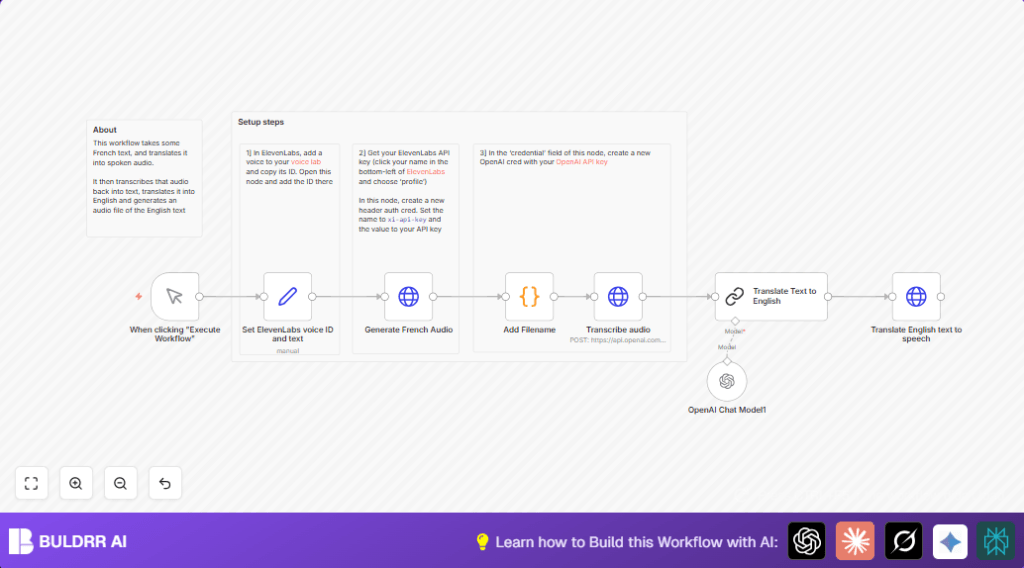
This workflow takes French text as input and makes two audio files. The first is French speech from the text. The second is English speech from a translation of the French text.

The main problem it solves is saving time. It avoids manually recording, transcribing, and translating text. The user gets fast, clear audio in both languages.

The result is ready bilingual audio files named properly. The files are easy to save or share with others.


2. Tools and Services Used

  • ElevenLabs Text-to-Speech API: Converts text into natural sounding speech in multiple languages.
  • OpenAI Whisper API: Transcribes French audio back into text to check accuracy.
  • OpenAI GPT model: Translates the French transcription into English text.
  • n8n Automation Platform: Runs the workflow and connects the different services.

3. Beginner Step-by-Step: How to Use This Workflow in n8n

Import Workflow

  1. Download the workflow file using the Download button on this page.
  2. Open the n8n editor where you want to use it.
  3. Use the Import from File option to load the workflow.

Configure Credentials and Settings

  1. Add your ElevenLabs API Key in n8n credentials.
  2. Add your OpenAI API Key for Whisper and GPT services.
  3. In the Set ElevenLabs voice ID and text node, update the voice_id to the voice ID from ElevenLabs Voice Lab you want to use.
  4. Change the sample French text if you want different input.
  5. Optionally edit translation prompt if you want to use another OpenAI model.

Test and Activate

  1. Run the workflow once by clicking Execute Workflow on the Manual Trigger node to check everything works.
  2. Watch for audio files named audio.mp3 generated in the output.
  3. If all works as expected, switch the workflow from inactive to active for production use.
  4. You can run the workflow manually or connect it to other triggers inside n8n for automation.
  5. If using self-host n8n, set up the environment accordingly before deployment.

4. Inputs, Processing, and Output

Inputs

  • French text to be converted into audio.
  • ElevenLabs voice ID for the French audio voice.

Processing Steps

  1. The workflow creates French audio from the text using ElevenLabs TTS.
  2. It adds a filename to the audio data for proper handling.
  3. The French audio is sent to OpenAI Whisper for transcription back into French text.
  4. The transcription is then sent to GPT to translate into English text.
  5. ElevenLabs TTS converts the translated English text into English audio.

Output

  • French audio file named audio.mp3.
  • English audio file named audio.mp3 representing the translation.

5. Common Problems and Fixes

ElevenLabs API Key Error

If you see a 401 Unauthorized error, check if the ElevenLabs API key is correct and not expired. Fix the credentials inside n8n and try again.

Empty or Bad Transcriptions

Make sure audio files are not broken. Confirm the Add Filename node sets the filename on the audio binary data properly before transcription.

Translation Issues

If translation fails or is wrong, verify the prompt format inside the Translate Text to English node. It should use {{ $json.text }} as input. Test with sample texts.


6. Ways to Customize

  • Change the voice in ElevenLabs by updating the voice_id in the setting node.
  • Tweak the stability and similarity_boost in ElevenLabs API calls to get voice tone you like.
  • Use other OpenAI GPT models in the translation step for faster or more detailed results.
  • Add support for other languages by duplicating translation and audio generation nodes with new languages.

7. Summary of Results

✓ Saves many hours converting French text to bilingual audio.

✓ Produces two clear audio files: one French and one English translation.

✓ Reduces errors by automating transcription and translation steps.

→ Allows creating audio content faster and easier for a bigger audience.


Automate French to English audio with n8n and OpenAI

Visit through Desktop to Interact with the Workflow.

Author
Written By
Vikash Kumar
Building AI agents, n8n workflows and end-to-end automation for 30+ Brands across India, the US, Europe, Dubai & Australia. 7+ years of Experience saving founders real hours every week - no code required.
Author
Written By
Vikash Kumar
Building AI agents, n8n workflows and end-to-end automation for 30+ Brands across India, the US, Europe, Dubai & Australia. 7+ years of Experience saving founders real hours every week - no code required.

Frequently Asked Questions

ElevenLabs API key for text-to-speech and OpenAI API key for both Whisper transcription and GPT translation.
Update the voice_id value in the Set ElevenLabs voice ID and text node with an ID from ElevenLabs Voice Lab.
Yes, but adding other languages requires creating additional translation and audio generation nodes manually.
Check the ElevenLabs API key stored in n8n credentials and correct or update it if expired or incorrect.

Related Workflows

Automate Twist Channel Creation and Messaging with n8n

This workflow automates creating and updating a channel in Twist and sending a personalized message to specific users. It eliminates manual setup errors and saves time managing Twist communications.

Automate Ideogram Image Generation with Google Sheets & Gmail

This workflow automates graphic design image generation via Ideogram AI, storing image data in Google Sheets and Google Drive, with email alerts via Gmail. It saves designers hours by automating image creation, remixing, review, and record-keeping.

Automate IT Support with Slack and OpenAI in n8n

Streamline IT support by automating Slack message handling using n8n and OpenAI. This workflow handles Slack DMs, filters bots, queries a Confluence knowledge base, and delivers AI-generated responses, improving support efficiency and response time.

Automate Crypto Analysis with CoinMarketCap & n8n AI Agent

Discover how this unique n8n workflow leverages CoinMarketCap’s multi-agent AI to deliver precise, real-time cryptocurrency insights directly via Telegram. Manage crypto data analysis efficiently with automated multi-source API integration.

Automate Gumroad to Beehiiv Subscriber Sync with n8n

Learn how to automatically add new Gumroad sales customers as Beehiiv newsletter subscribers using n8n automation. This workflow saves time by syncing sales data to Google Sheets CRM and notifying your Telegram channel instantly.

Generate On-Brand Blog Articles Using n8n and OpenAI

This workflow automates the creation of on-brand blog articles by analyzing existing company content using n8n and OpenAI. It extracts article structures and brand voice to produce consistent draft articles, saving significant content creation time.
1:1 Free Strategy Session
Your competitors are already automating. Are you still paying for it manually?

Do you want to adopt AI Automation?

Every hour your team does repetitive work, you're burning real money.
While you wait, faster businesses are cutting costs and moving quicker.
AI and automations aren't the future anymore — they're the present.

Book a live 1-on-1 session where we show you exactly which of your daily tasks can be automated — and what it’s costing you not to.