
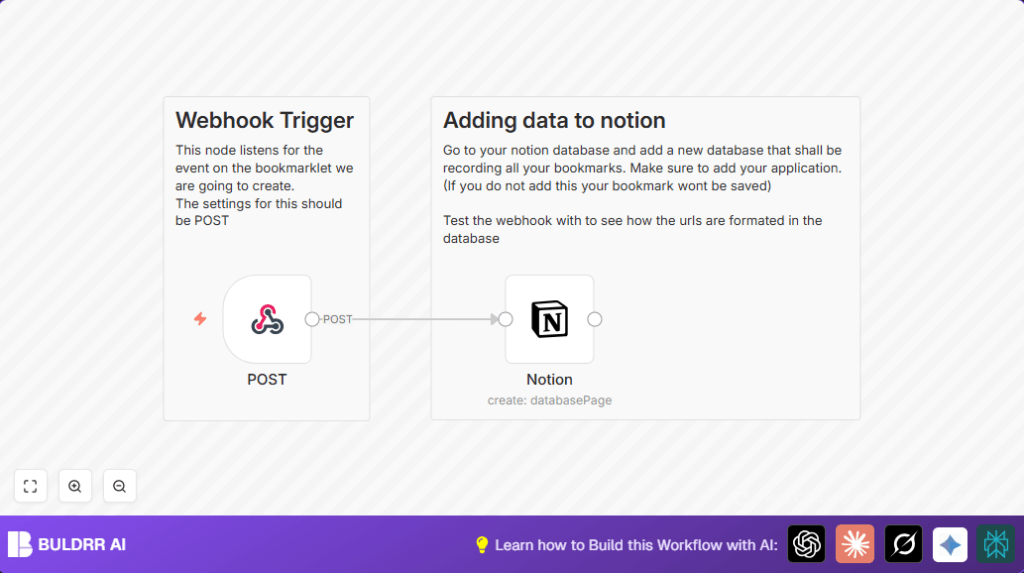

What this workflow does
This workflow saves website links automatically to a Notion database using n8n automation. It stops the need to copy and paste URLs manually every day. The result is less time spent on data entry, fewer mistakes, and bookmarks always saved correctly in one place.
It listens for website URLs sent by an external app or browser bookmarklet and adds them as new pages to a Notion database. This helps to keep bookmarks organized without manual work.
Who should use this workflow
This workflow is good for people who collect many bookmarks and use Notion to organize notes. It helps freelancers, researchers, writers, or anyone who visits many websites and wants to save their links fast and error-free.
If a user finds copying, pasting, and typing links into Notion takes too much time or causes mistakes, this workflow removes those problems.
Tools and services used
- n8n: Runs the automation and manages workflow.
- Notion: Stores bookmarks in a database.
- Webhook node: Receives URLs sent through HTTP POST requests.
- Browser bookmarklet or external app: Sends URL data to the workflow.
Inputs, processing, and outputs
Inputs
The workflow gets data from HTTP POST requests. The JSON sent must have this format:
{ "url": "https://website.com" }The URL is the website link to save.
Processing steps
The Webhook node receives the POST request with the URL.
Then, the Notion node creates a new page in the specified Notion database. It uses the URL from the webhook as the page title.
Output
A new page appears in the Notion database. The page title is the saved URL.
Beginner step-by-step: How to use this workflow in n8n
Step 1: Import the workflow
- Click the Download button on this page to save the workflow file.
- Inside the n8n editor, choose “Import from File” and select the downloaded workflow.
Step 2: Add necessary details
- Connect your Notion account by adding API credentials in the Notion node.
- Update the Database ID in the Notion node to the database where bookmarks should be saved.
- Check the Webhook node has the right HTTP method (POST) and the path is the same as the webhook URL you will send requests to.
Step 3: Test and activate
- Send a test POST request to the webhook URL with JSON like
{ "url": "https://example.com" }. - Confirm the new page appears in Notion as expected.
- If it works, toggle workflow status to Active to start using it live.
For better data handling, consider self-host n8n.
Common errors and fixes
- Error: Cannot add page to Notion, database ID invalid.
Fix: Check the Notion database ID is correct and properly authorized in n8n. - Error: Workflow does not start when sending POST request.
Fix: Make sure webhook path and HTTP method in the Webhook node match the request exactly.
How to customize this workflow
- Add more properties in the Notion node like tags or notes by mapping extra JSON fields.
- Change the Webhook node path to a secret name to protect the URL.
- After the Notion node, add notifications like Slack or email alerts when a bookmark saves.
Summary
✓ Saves URLs automatically into Notion.
✓ Cuts about 30 minutes daily of manual entry.
✓ Removes errors from manual copying.
→ Webhook listens for POST requests with URLs.
→ Notion node adds bookmark pages.
→ Workflow activates to run fully inside n8n.
