
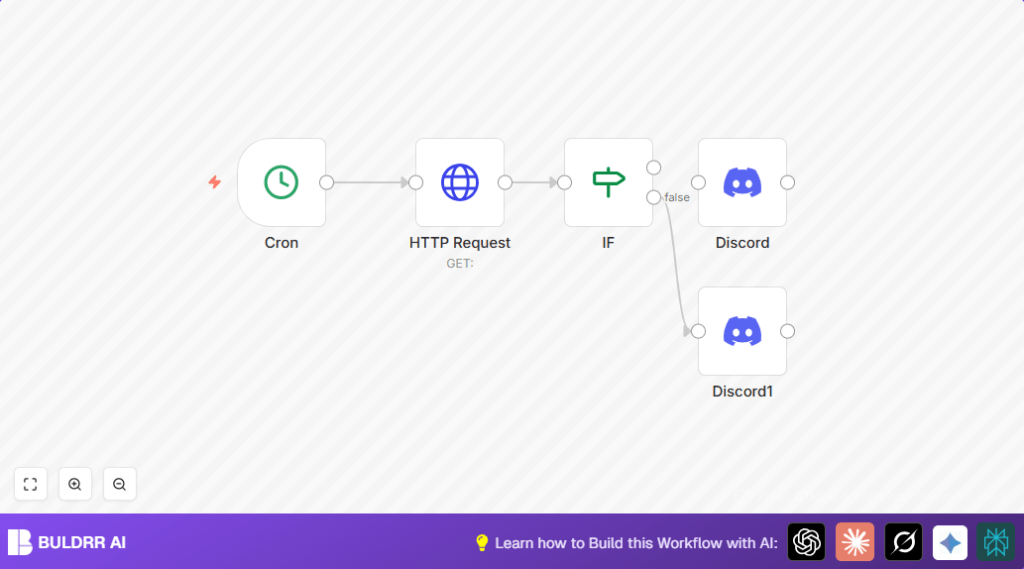

What This Workflow Does
This workflow checks if a product is out of stock on a website every hour and sends a message to a Discord channel.
It helps avoid manual checking and prevents selling items that are not available.
The workflow makes sure the sales team always knows the current stock status.
Tools and Services Used
- n8n platform: Runs the automation and links nodes.
- Cron node: Triggers the workflow every hour.
- HTTP Request node: Requests the product page HTML as text.
- IF node: Checks if “Out Of Stock” phrase is present in the HTML.
- Discord node: Sends alert messages to a Discord channel via webhook.
How the Workflow Works (Inputs → Process → Output)
Inputs:
- Product page URL to monitor stock status.
- Discord webhook URL to send alerts.
Processing Steps:
- Cron node starts workflow every hour.
- HTTP Request node fetches the product page HTML as raw text.
- IF node searches the HTML text for the phrase “Out Of Stock.”
- The workflow splits based on IF result:
- If true, it goes to Discord node that sends “Out of Stock” message.
- If false, it goes to Discord node that sends “In Stock” message.
Output:
- Discord messages sent to notify about current stock status.
Who Should Use This Workflow
Anyone running an online store with limited stock and wanting to avoid manual stock checks.
Ideal for small teams who rely on Discord for communication.
Beginner Step-by-Step: How to Use This Workflow in n8n Production
Step 1: Import Workflow
- Download the workflow file using the Download button on this page.
- Open the n8n editor.
- Choose “Import from File” and select the downloaded workflow.
Step 2: Configure Credentials and URLs
- Enter your Discord webhook URLs in the Discord nodes.
- Update the HTTP Request node with the exact product page URL to check.
- Make sure the phrase “Out Of Stock” in the IF node matches exactly what the website uses.
Step 3: Test Workflow
- Run the workflow manually in n8n once.
- Check if Discord gets the correct message based on stock availability.
Step 4: Activate for Production
- Turn on the workflow toggle to make it run automatically every hour.
- Optionally, monitor execution logs in n8n to ensure it runs correctly.
For long-term control and removing limits, consider self-host n8n.
Common Customizations
- Change the IF node phrase from “Out Of Stock” to other stock terms like “Sold Out.”
- Adjust the Cron node to check more or less often, like every 30 minutes or daily.
- Add more Discord nodes to send alerts to different channels or teams.
- Add email notifications using a Gmail node alongside Discord alerts.
- If API returns JSON stock data, set HTTP Request node to JSON format and adapt IF node accordingly.
Handling Problems and Failures
- Empty HTTP Request Data: Check URL is right and website allows requests. Add headers or user-agent if needed.
- Discord Message Not Sent: Verify webhook URLs are exactly correct. Test manually.
- IF Node Condition Always False: Confirm phrase spelling and case. Use lowercase or regex for better matching.
Summary
✓ Saves hours daily by automating stock checks.
✓ Sends instant Discord alerts on stock changes.
✓ Helps avoid selling out-of-stock items.
✓ Keeps sales teams updated automatically.
✓ Easy to customize for phrases, frequency, and alerts.
