

Build a Polite AI Chatbot Using n8n and Mistral-7B Model

Discover how to create a polite and emoji-friendly AI chatbot using n8n with the Mistral-7B language model on Hugging Face. This workflow transforms chat messages into thoughtful AI responses, saving hours on customer support and enhancing interaction quality.
chatTrigger
chainLlm
lmOpenHuggingFaceInference
+1
Workflow Identifier: 2433
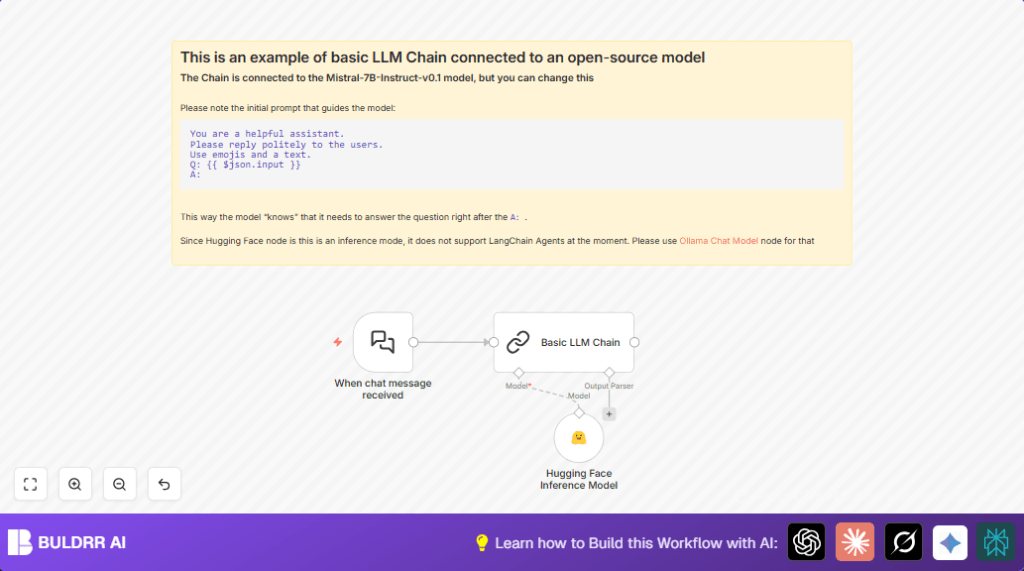
NODES in Use: Sticky Note, Chat Trigger, Basic LLM Chain, Hugging Face Inference Model
Automate chatbot responses with n8n and Hugging Face

Press CTRL+F5 if the workflow didn't load.

Learn how to Build this Workflow with AI:

What this workflow does

This workflow runs an AI chatbot that answers customer messages kindly and with emojis.

It solves the problem of spending too much time replying to common questions.

The chatbot uses the Mistral-7B-Instruct model to write polite and friendly replies.

This helps users get answers faster, saves time, and keeps customers happy.


Who should use this workflow

People who manage customer chats and want automatic helpful replies.

Small business owners or those with busy online stores will find it useful.

No deep AI or programming skills needed to run this with n8n.


Tools and services used

  • n8n: Workflow automation software to connect nodes.
  • Hugging Face: Hosts the Mistral-7B-Instruct AI model for text generation.
  • Chat Trigger node: Receives incoming chat messages via webhook.
  • Basic LLM Chain node: Adds a prompt that tells AI how to reply nicely with emojis.
  • Hugging Face Inference Model node: Sends prompt to AI model and returns chat responses.

Inputs, Processing, and Output

Inputs

  • Incoming chat messages captured by the Chat Trigger node via a webhook.

Processing Steps

  • The Basic LLM Chain node applies a prompt that requests polite, emoji-rich responses.
  • The Hugging Face Inference Model node uses the Mistral-7B-Instruct model to generate replies based on the prompt and chat input.
  • Connections ensure messages flow from receiving, through the prompt and AI model, to generating replies.

Output

  • Polite, friendly chat replies enriched with emojis, sent back to the user’s chat interface.
  • Faster customer support with less manual typing and fewer errors.

Beginner step-by-step: How to use this workflow in n8n production

Import the workflow

  1. Download the workflow file using the Download button on this page.
  2. Open n8n editor and click Import from File to upload the downloaded workflow.

Configure credentials and settings

  1. Add Hugging Face API Key in Settings > Credentials inside n8n.
  2. Check nodes for any IDs, emails, channels, or folders and update them if the workflow connects to external systems.
  3. Verify the prompt text in the Basic LLM Chain node. Copy and paste if needed:
  4. =You are a helpful assistant. Please reply politely to the users. Use emojis and a text.

Test and activate

  1. Run the workflow once manually to confirm inputs and outputs work correctly.
  2. Use the webhook URL from the Chat Trigger node in your chat system.
  3. After successful test, click Activate in n8n to run the chatbot constantly.

For users interested, consider self-host n8n for more control and privacy.


Common problems and fixes

Invalid API key or permission denied

Check if Hugging Face API Key is correct and active in n8n credentials.

Make sure the API key has access to the Mistral-7B-Instruct model.

Workflow doesn’t trigger on chat messages

Verify the webhook URL from the Chat Trigger node is correctly used.

Confirm the workflow is activated and receiving traffic.


Customization ideas

  • Change the AI personality by editing the prompt text to make replies humorous or formal.
  • Replace the model in Hugging Face node to use alternative language models you prefer.
  • Adjust response length, creativity, and repetition by changing maxTokens, temperature, and frequencyPenalty values.

Summary of results

✓ Automates polite, emoji-friendly replies to customers.

✓ Saves time and reduces errors in answering common questions.

→ Chat users get quicker, friendlier support.

→ Offers easy customization and works fully inside n8n and Hugging Face.


Automate chatbot responses with n8n and Hugging Face

Visit through Desktop to Interact with the Workflow.

Frequently Asked Questions

Yes, users can change the model name in the Hugging Face Inference Model node to any supported model.
Yes, each call to the Hugging Face API consumes credits based on the subscription plan.
The Chat Trigger node uses a webhook URL to receive live chat messages from the chat interface.
Yes, data travels securely over HTTPS through Hugging Face’s API; keeping API keys private is important.

Promoted by BULDRR AI

Related Workflows

Automate Twist Channel Creation and Messaging with n8n

This workflow automates creating and updating a channel in Twist and sending a personalized message to specific users. It eliminates manual setup errors and saves time managing Twist communications.

Automate Ideogram Image Generation with Google Sheets & Gmail

This workflow automates graphic design image generation via Ideogram AI, storing image data in Google Sheets and Google Drive, with email alerts via Gmail. It saves designers hours by automating image creation, remixing, review, and record-keeping.

Automate IT Support with Slack and OpenAI in n8n

Streamline IT support by automating Slack message handling using n8n and OpenAI. This workflow handles Slack DMs, filters bots, queries a Confluence knowledge base, and delivers AI-generated responses, improving support efficiency and response time.

Automate Crypto Analysis with CoinMarketCap & n8n AI Agent

Discover how this unique n8n workflow leverages CoinMarketCap’s multi-agent AI to deliver precise, real-time cryptocurrency insights directly via Telegram. Manage crypto data analysis efficiently with automated multi-source API integration.

Automate Gumroad to Beehiiv Subscriber Sync with n8n

Learn how to automatically add new Gumroad sales customers as Beehiiv newsletter subscribers using n8n automation. This workflow saves time by syncing sales data to Google Sheets CRM and notifying your Telegram channel instantly.

Generate On-Brand Blog Articles Using n8n and OpenAI

This workflow automates the creation of on-brand blog articles by analyzing existing company content using n8n and OpenAI. It extracts article structures and brand voice to produce consistent draft articles, saving significant content creation time.
1:1 Free Strategy Session
Your competitors are already automating. Are you still paying for it manually?

Do you want to adopt AI Automation?

Every hour your team does repetitive work, you're burning real money.
While you wait, faster businesses are cutting costs and moving quicker.
AI and automations aren't the future anymore — they're the present.

Book a live 1-on-1 session where we show you exactly which of your daily tasks can be automated — and what it’s costing you not to.