
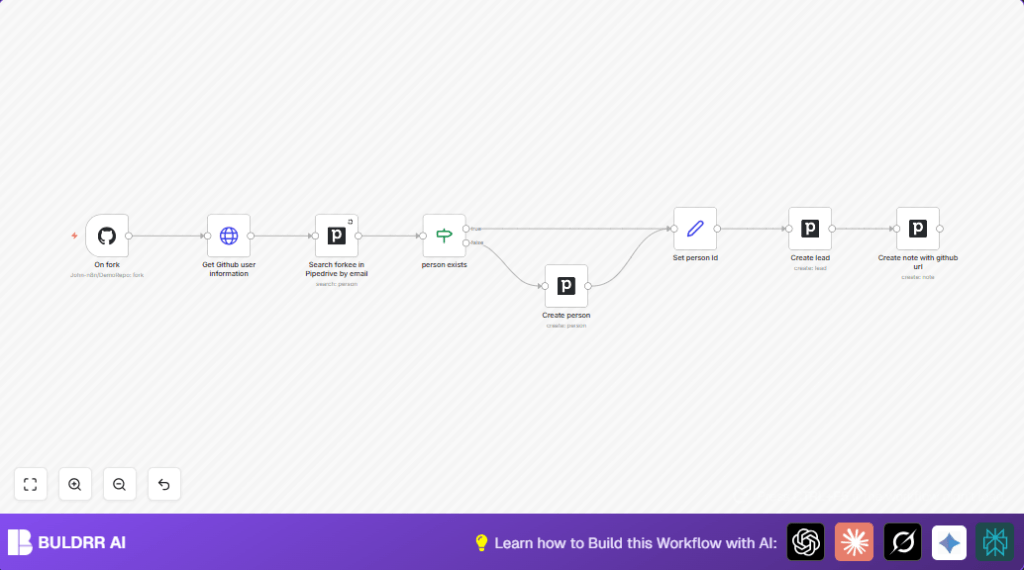

What This Workflow Does
This workflow watches for when someone forks a GitHub repository.
It gets the forker’s info using GitHub API and checks Pipedrive CRM to see if they are already a contact.
If the person exists, it uses their ID; if not, it creates a new contact with name and email.
Then it makes a new lead in Pipedrive linked to that person.
It also adds a note with the GitHub user profile link on the new lead.
This saves time by stopping manual copying and keeps data accurate.
Who Should Use This Workflow
This is useful for anyone managing sales or leads from GitHub activity, like team managers or sales reps.
If your team wants to capture fork events as leads automatically, this workflow helps.
Tools and Services Used
- n8n Automation Platform: Runs and connects all nodes.
- GitHub API and Webhook: Sends fork event data, fetches user info.
- Pipedrive CRM API: Searches, creates persons and leads, adds notes.
- HTTP Request Node in n8n: Calls GitHub API for detailed user info.
Inputs → Processing Steps → Output
Inputs
- GitHub repository fork webhook event data.
- GitHub API access for user details.
- Pipedrive API access for CRM actions.
Processing Steps
- Trigger on GitHub fork event via webhook.
- Request detailed user info from GitHub API.
- Search Pipedrive for existing person with matching email.
- Use IF node to check if person exists.
- If exists, store Pipedrive person ID.
- If not, create new person with GitHub name and email.
- Store new person ID.
- Create a lead linked to this person, with repo and user info in title.
- Add a note on the lead with GitHub user profile URL.
Output
- A new or existing Pipedrive person record.
- A new lead associated to that person in Pipedrive.
- A note on the lead with GitHub profile link for easy reference.
Beginner Step-by-Step: How to Use This Workflow in n8n
Step 1: Download and Import Workflow
- Find the Download button on this page and save the workflow JSON file.
- Open your n8n editor where you want to use the workflow.
- Click on Import from File and select the downloaded JSON.
Step 2: Configure Credentials
- Add your GitHub API credentials in n8n Credential Manager.
- Add your Pipedrive API credentials similarly.
- Make sure the GitHub Trigger node uses the correct repository owner and name.
Step 3: Adjust IDs and Fields if Needed
- Check the Pipedrive nodes’ settings. If you use custom pipelines or fields, update them.
- Update email mappings if GitHub user data format changes.
Step 4: Test the Workflow
- Fork the GitHub repository to trigger the webhook.
- Watch execution logs in n8n for errors and data flow.
- Confirm new leads and persons appear correctly in your Pipedrive account.
Step 5: Activate the Workflow
- After testing, enable the workflow by clicking Activate in n8n.
- Monitor runs regularly to catch any failures.
Consider using self-host n8n if hosting the automation on your own server.
Customizations Ideas
- Add more GitHub profile info like bio or location when creating the person in Pipedrive.
- Filter fork events for certain repositories only with extra IF nodes.
- Customize the lead title to include fork date or description for better tracking.
- Send notifications with Slack or email when a new lead is created.
- Log all fork events to Google Sheets for auditing or reports.
Common Problems and Fixes
- Webhook not triggering: Check GitHub webhook URL, selected repository and fork event correctness.
- 401 Unauthorized on HTTP Request: Verify GitHub API credentials and token permissions.
- No person found in search: Confirm email field mapping matches GitHub user email exactly.
- Person creation errors: Ensure all required fields like name and email are not empty.
Pre-Production Checklist
- Confirm GitHub webhook is active and set for fork events.
- Test API credentials for GitHub and Pipedrive nodes.
- Run a manual fork to watch workflow execution in n8n logs.
- Check Pipedrive for correct person and lead creation and linkage.
- Backup current Pipedrive data before activating automation.
Deployment Guide
After setup and testing, activate the workflow in n8n.
Keep monitoring executions through the n8n dashboard.
Set up alerts in n8n or use external tools to catch failed runs quickly.
You may export the workflow JSON anytime for backup or sharing.
Summary of Workflow Benefits
✓ Saves hours weekly by automating lead capture from GitHub forks.
✓ Reduces manual data entry errors in CRM contacts and leads.
✓ Keeps leads fresh and correctly linked to persons in Pipedrive.
→ Provides clear sales opportunities based on GitHub activity.
→ Gives sales teams better focus by handling routine tasks automatically.
