
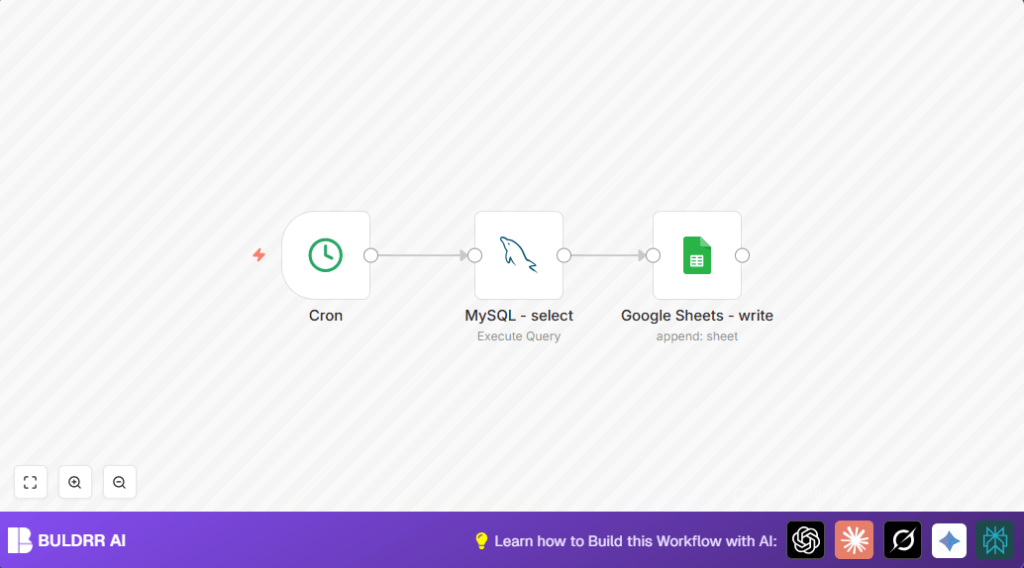

What This Automation Does
This workflow exports all book records from a MySQL database to a Google Sheet every week at 5 AM automatically.
It solves the problem of spending over an hour doing this data copying by hand and avoids mistakes.
You get an always updated Google Sheet without doing this work manually.
The input is the books table data from MySQL.
The process runs a query to fetch data and sends it to Google Sheets for appending.
The output is fresh rows added to the Google Sheet for reporting.
Tools and Services Used
- n8n Workflow Automation: Coordinates the process.
- MySQL Database: Stores book data.
- Google Sheets: Receives the exported data.
- Cron node in n8n: Schedules weekly runs.
- OAuth2 Credentials: Provide secure access to Google Sheets.
Who Should Use This Workflow
This automation is good for people who have book data in MySQL and must export it regularly to Google Sheets.
It fits users who want to save time and avoid errors from manual copying.
The workflow is also helpful for those who want scheduled, hands-free data syncing.
Beginner Step-by-Step: How to Use This Workflow in n8n
Download and Import the Workflow
- Use the Download button on this page to save the workflow file.
- Open the n8n editor.
- Choose “Import from File” and select the downloaded workflow.
Configure Credentials and IDs
- Add your MySQL credentials in the n8n credentials manager.
- Set up Google Sheets OAuth2 credentials with access to the target sheet.
- Update the Google Sheet ID in the Google Sheets node to your specific sheet.
Test the Workflow
- Run the workflow manually inside n8n.
- Check Google Sheets to confirm book data is added.
Activate for Production
- Enable the workflow to run automatically as scheduled.
- Monitor future runs in n8n executions panel.
If self hosting n8n, see self-host n8n for help.
Inputs, Processing, and Outputs
Inputs
- Books data from MySQL database table called
books. - Scheduled trigger time at 5 AM weekly.
Processing Steps
- Cron node triggers the workflow weekly.
- MySQL node runs the SQL query
SELECT * FROM books;. - The data output from MySQL node is passed to the Google Sheets node.
- Google Sheets node appends this data as new rows in the configured sheet.
Outputs
- New rows appear in Google Sheets with up-to-date books data.
- This removes manual export and copy-paste.
Common Errors and Solutions
MySQL connection errors
Incorrect credentials or blocked network access can prevent connection.
Confirm credentials and allow access to database from the n8n server IP.
Google Sheets authentication errors
OAuth token expiration or missing permissions cause write failures.
Re-authenticate or update permissions for the Google Sheets OAuth2 connection.
Customization Ideas
- Modify SQL query inside MySQL node to filter books, for example:
SELECT * FROM books WHERE in_stock = 1; - Change scheduled time by adjusting hours or day in the Cron node.
- Add a specific sheet tab or range in Google Sheets node to write data to a set location.
Summary
✓ Saves over an hour every week by automating data export.
✓ Prevents manual errors by handling data transfer automatically.
✓ Keeps Google Sheets always updated with fresh books information.
→ Frees time for more valuable tasks.
