

What This Automation Does
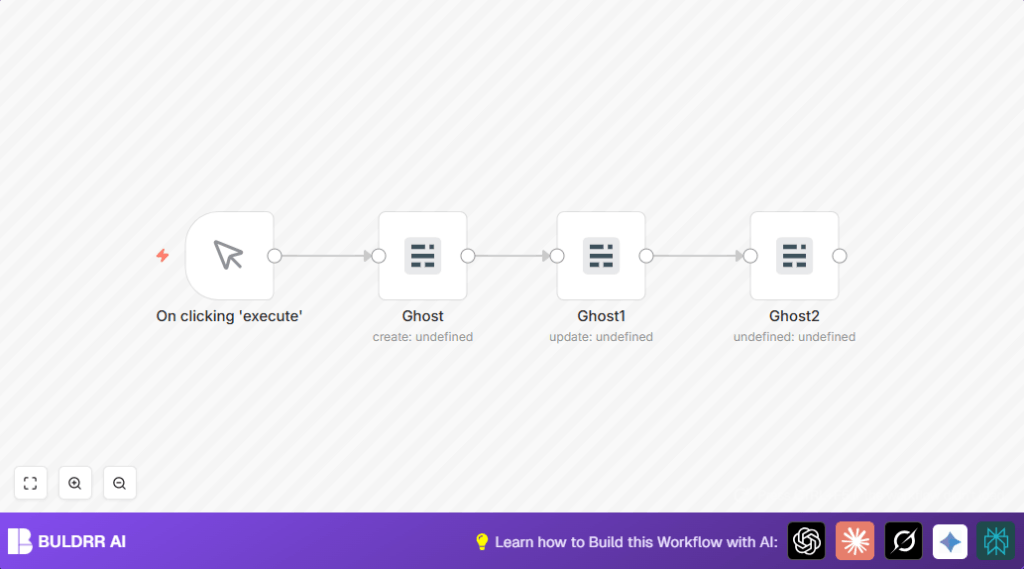
This workflow in n8n helps you create, publish, and check blog posts on Ghost CMS fast. It solves the problem of slow and error-prone manual posting. After you run it, a new post is made, set to published status, and then the workflow fetches details to confirm the update.
The workflow takes a little input from you and uses the Ghost Admin API to do three big steps: create a post, publish it, and get post information. This saves you about 15 minutes each time. It also helps avoid mistakes from clicking too many buttons.
It is easy to use and designed for people new to automation but needing faster content management.
Step-by-Step Guide
Beginner Step-by-Step: Using This Workflow in n8n Production
1. Download and Import Workflow
- Find the Download button on this page and save the workflow file.
- Open your n8n editor where you want to run the automation.
- Choose Import from File and pick the saved workflow.
2. Configure Workflow Settings
- Add your Ghost Admin API credentials in the Ghost nodes.
- Update any IDs, emails, or other info if needed (usually for API or content changes).
- Copy and paste any code or expressions shown into the appropriate fields exactly.
3. Test and Activate
- Run Manual Trigger node once to test if posts create and publish without errors.
- Check outputs in nodes and your Ghost dashboard to confirm results.
- When ready, activate workflow to run on demand or set another trigger.
This way, you quickly get the workflow working in real life without building from zero.
What This Workflow Uses
- Ghost Admin API: For creating, updating, and fetching posts.
- n8n Platform: Automates workflow and chains steps.
- Manual Trigger Node: Starts the workflow when you click.
Workflow Inputs, Process, and Outputs
Inputs
- Manual trigger clicking in n8n.
- Ghost Admin API credentials.
- Post title and HTML content text in the create node.
Processing Steps
- Create Post: Sends data to Ghost to make a new post draft.
- Publish Post: Updates post status to published using post ID.
- Retrieve Post: Gets full post details for verification.
Outputs
- New post created in Ghost CMS.
- Post status changed to published automatically.
- Full post data returned in workflow output for review.
Customizations ✏️
- Change the post content HTML in the Ghost create node to add images or links.
- Add a delay node between create and update to schedule when post gets published.
- Use expressions to set the post title dynamically from other data instead of fixed text.
Troubleshooting 🔧
- Error: “Authentication failed for Ghost Admin API”
Reason: API Key is wrong or expired.
Fix: Reenter your Ghost Admin API Key and URL in credentials. - Error: “Post ID not found for update”
Reason: The update node’s post ID expression is missing or incorrect.
Fix: Check that the create node outputs post ID. Use exact expression:{{$node["Ghost"].json["id"]}} - Error: “No data returned when getting post”
Reason: Wrong identifier or API permission.
Fix: Verify get node uses correct post ID expression and credentials.
Deployment Guide
After testing, activate the workflow by toggling it on in n8n for running automatically or keep manual trigger for action on demand.
If using self-host n8n, make sure your Ghost API Keys are stored securely and workflow access is limited.
Watch execution logs inside n8n to find and fix errors quickly.
Conclusion
✓ Automates blog post creation, publishing, and checking in Ghost CMS.
✓ Saves around 15 minutes and removes manual mistakes.
✓ Easy to set up in n8n and modify for specific needs.
→ Results in faster, error-free content updates.
→ You can extend this for scheduled posts, notifications, or social media sharing.
Happy automating!
