
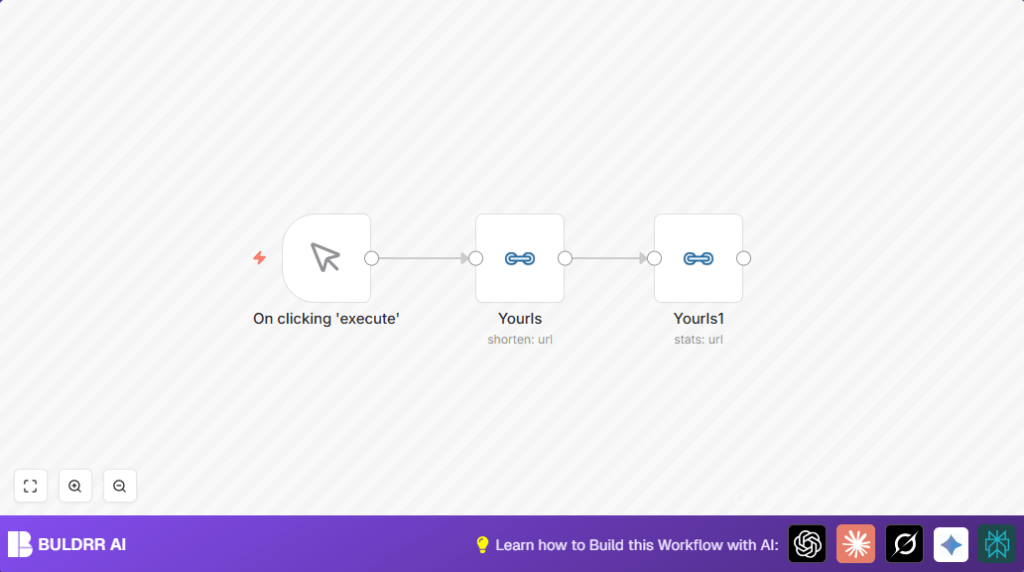

1. What This Automation Does
This workflow helps you make short URLs fast and get their click statistics right away.
The problem it solves is cutting out the slow, manual process of making short links and checking stats on Yourls.
After using this, you get short URLs and their performance numbers without extra clicks or copy-pasting.
This saves time and avoids mistakes in tracking campaign links.
2. Tools and Services Used
- n8n: Automation platform running the workflow.
- Yourls URL Shortener: Service to create short URLs and provide stats via API.
- Yourls API Credentials: Needed to access Yourls programmatically.
3. How the Workflow Works
Inputs
The workflow starts with a long URL (like a blog post link).
Processing Steps
- First, a Manual Trigger node starts the process when you click execute.
- Then the first Yourls node sends the long URL to Yourls API to create a short URL.
- Its output (the new short URL) is passed to a second Yourls node.
- The second Yourls node asks Yourls API for the statistics about the short URL.
Output
You get the short URL plus detailed stats like how many times people clicked it.
This data shows up inside n8n’s output panel.
4. Beginner Step-by-Step: How to Use This Workflow in n8n
Importing the Workflow
- On the page with this workflow, click the Download button to get the workflow file.
- Open your n8n editor (if self hosting n8n, see self-host n8n for help).
- Click on Import from File and pick the downloaded workflow JSON file.
Configuring the Workflow
- Look at the Yourls nodes and set your Yourls API credentials in the credentials dropdown.
- If needed, change the long URL inside the first Yourls node to the URL you want to shorten.
- Adjust any titles or labels if you want them different.
Testing and Activating
- Run the workflow one time by pressing Execute Workflow on the top right.
- Check the output of the second Yourls node for stats data.
- If all looks good, toggle the workflow activation switch so you can use it anytime.
5. Customizations
- You can let the long URL be typed in when you start the workflow by adding an input field to Manual Trigger and using expressions in Yourls nodes.
- Add a Google Sheets node after stats fetching to save click data automatically.
- Include an Email or Slack node to send click reports to teammates.
6. Troubleshooting Common Issues
Issue: Authentication failed in Yourls node.
Reason: API Key is wrong or expired.
Fix: Update Yourls API credentials in n8n settings and try again.
Issue: Error saying Cannot read property ‘shorturl’ of undefined.
Reason: Yourls did not produce a short URL, maybe due to bad long URL or server error.
Fix: Verify long URL formatting and test Yourls API connection manually.
7. Pre-Production Checklist
- Make sure Yourls API credentials are valid and can create URLs.
- Test the long URL to confirm it works and is correctly written.
- Run manual tests in n8n to confirm URL creation and stats fetching happen.
- Back up Yourls credentials and workflow JSON before heavy changes.
8. Deployment Guide
Turn on the workflow switch in n8n to run in production.
This workflow uses Manual Trigger but can be changed to Webhook node for automatic runs.
Keep an eye on the Executions page in n8n for any error or data logs.
9. Summary and Next Steps
✓ The workflow makes short URLs and instantly pulls stats.
✓ This cuts manual work and chance of mistakes.
✓ You get clear stats inside n8n without switching apps.
→ Next: Automate URL creation from forms or CRM.
→ Next: Add Google Sheets to track all link data.
→ Next: Connect marketing tools for better reports.
Keep trying new automations to save time.
