
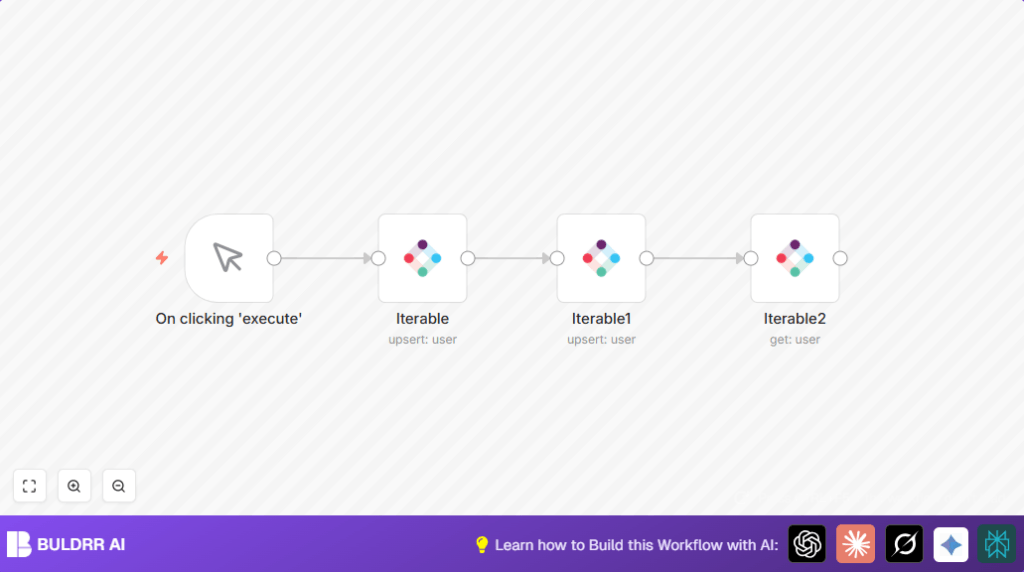

What This Workflow Does
This workflow automates user management in Iterable. It creates new users, updates user details, and fetches user information by email. It helps avoid mistakes and saves time by handling user data automatically.
The workflow runs with one click using the Manual Trigger node. It sends data to Iterable to keep the user information correct and up-to-date. The outcome is accurate user profiles for better marketing.
Tools and Services Used
- n8n: Automation platform where the workflow runs.
- Iterable API: Used to create, update, and get user details.
Inputs, Processing Steps, and Output
Inputs
- User email (identifier) to create or update a user profile.
- User’s additional data like name, phone, or custom fields.
Processing Steps
- Step 1: Manual Trigger starts the workflow manually.
- Step 2: First Iterable node creates or updates a user using the email.
- Step 3: Second Iterable node updates extra user fields like name by mapping dataFieldsUi.
- Step 4: Third Iterable node retrieves full user details to confirm changes.
Output
- Current, verified user data from Iterable.
- Confirmation that user profiles are created or updated correctly.
Who Should Use This Workflow
This workflow suits marketing managers or operators who handle many user profiles in Iterable. They want to save time and reduce errors when managing user data. No coding skills are needed to run or maintain it.
Beginner Step-By-Step: How to Use This Workflow in n8n
1. Download and Import
- Click the “Download” button on this page to get the workflow file.
- Open n8n editor, click the menu, choose “Import from File,” then upload the downloaded file.
2. Configure Credentials
- Inside n8n, go to Credentials and add your Iterable API Key.
- Make sure API Key has user management permissions.
3. Update Parameters If Needed
- Check the Iterable nodes for fields like email, names, or identifiers, and update with your test or real data.
4. Test Workflow
- Click the Manual Trigger node’s Execute Workflow button.
- Enter an email and test data when prompted.
- Watch each node run to confirm no errors occur.
5. Activate for Production
- After successful test, save the workflow and toggle the switch to active.
- You can now trigger the workflow anytime or replace Manual Trigger with an automated trigger (like Webhook or Schedule).
Customization Ideas
- Add more fields like phone numbers or custom attributes in the second Iterable node to enrich user profiles.
- Change the identifier to userId or another supported field if email is not preferred.
- Switch Manual Trigger to Webhook node or Schedule Trigger in n8n for automated runs.
Troubleshooting
Invalid API key or authentication failed
The Iterable API Key in n8n might be wrong or expired. Verify and re-enter a correct API Key with user management permission.
User not found during get operation
The user email used in the get step could be wrong or the user does not exist yet. Make sure the first node created or updated the user before the get operation runs. Use a known email for testing.
Pre-Production Checklist
- Confirm Iterable API Key is valid and allows user management calls.
- Try creating a user with a sample email and check the API response.
- Update user fields and confirm the changes appear in Iterable dashboard.
- Retrieve user data and verify it matches expected profile information.
- Backup existing data before running large user modifications.
Deployment Guide
After setting active, monitor workflow run results in the n8n executions panel. Use the output to confirm user creation, updates, and retrieval works well. Change triggers as needed for real-time or periodic automation.
If hosting n8n on your own infrastructure, consider self-host n8n for better control.
Summary
✓ Automates user create, update, and get operations in Iterable.
✓ Reduces manual errors and saves hours of data entry time.
→ Provides accurate, current user data for marketing use.
→ Works with simple clicks or can be scheduled for automation.
