
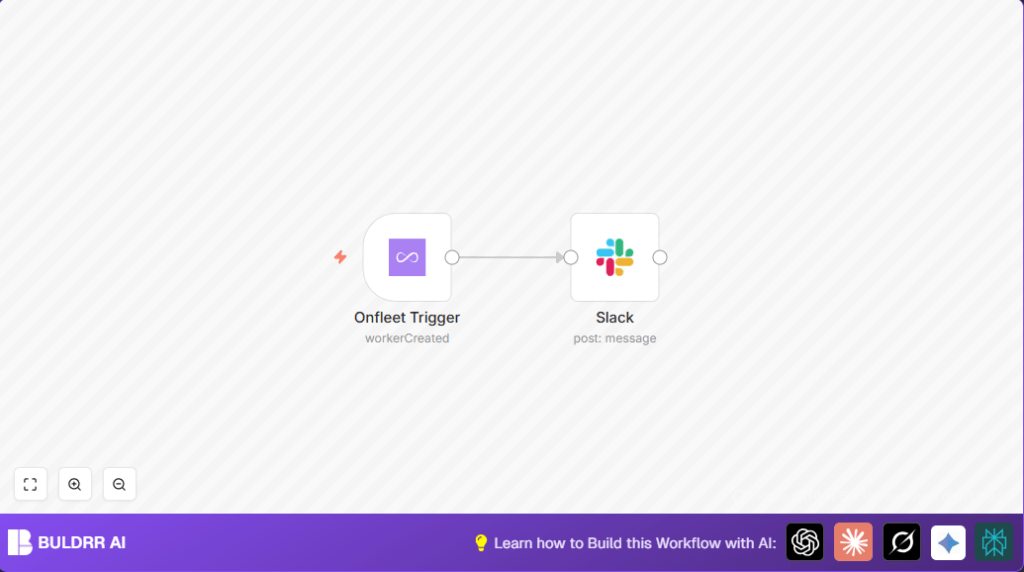

What This Workflow Does
This workflow watches when a new driver is added in Onfleet.
When a driver signs up, the workflow sends a message to a Slack channel fast.
This stops the team from missing or delaying notice about new drivers.
By using it, teams save over 10 work hours each month and onboard drivers quicker.
Tools and Services Needed
- Onfleet API: Sends data when new drivers are created.
- Slack API: Posts messages to the right chat channel.
- n8n Automation Platform: Runs the workflow you build.
Inputs, Process, and Output
Inputs
- Event from Onfleet when a new driver signs up (workerCreated).
- Webhook URL receiving this event in n8n.
Processing Steps
- Onfleet Trigger node listens for new driver events.
- Data from the event is sent instantly to the Slack node.
- Slack node posts a message in the chosen channel.
Output
- Slack message alerts the team about the new driver right away.
- Faster notifications help staff act quicker on onboarding the driver.
Beginner Step-by-Step: How to Use This Workflow in n8n
Step 1: Get the Workflow
- Click the Download button on this page to save the workflow file.
- Open your n8n editor where you build workflows.
- Choose “Import from File” and select the downloaded workflow file.
Step 2: Set Up Credentials
- Add or update your Onfleet API Key in the Onfleet Trigger node.
- Add or update your Slack API Key for the Slack node.
Step 3: Customize
- Change the Slack channel name if needed in the Slack node.
- Update any IDs or emails if the workflow requires it.
Step 4: Test and Activate
- Run the workflow once to check if it sends a message when a new driver is created.
- If the test is successful, turn the workflow ON by setting it Active at the top right.
- Your workflow now runs automatically in production.
Troubleshooting and Failures
- Issue: No event arrives at Onfleet Trigger.
Fix: Check Onfleet settings have the correct webhook URL from n8n node. - Issue: Slack shows channel_not_found error.
Fix: Ensure Slack app has permissions and is invited to that channel. - Issue: Messages delayed or missed.
Fix: Confirm Slack and Onfleet API keys are still valid and active.
Customization Ideas
- Change Slack message text to include driver name or phone number using expressions like
{{ $json.worker.name }}. - Send alerts to different Slack channels or private messages by updating the channel field.
- Add other notifications like Emails or Microsoft Teams by adding extra nodes after Onfleet Trigger.
Using Self-Hosted n8n
If running self-host n8n, make sure your webhook URL is publicly accessible for Onfleet to post events.
Choose hosting platforms like Hostinger for stable performance.
Summary
✓ Workflow sends new driver signup alerts automatically.
✓ Saves over 10 team hours every month.
✓ Reduces missed or late onboarding messages.
→ Results in faster driver activation and better delivery operations.
