
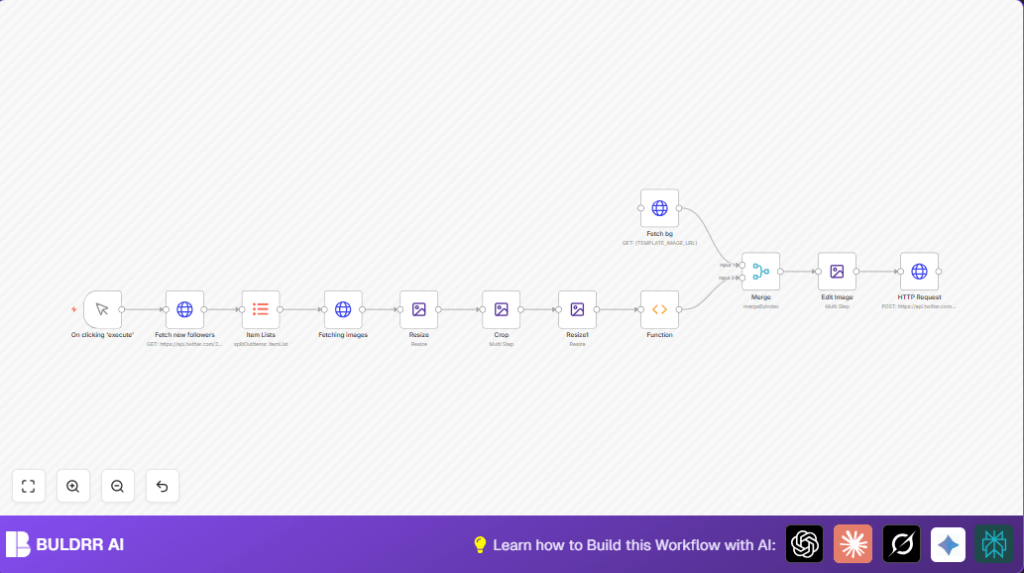

What This Automation Does
This workflow updates your Twitter profile banner to show up to 3 new follower avatars automatically.
It solves the problem of spending hours editing images and uploading banners manually.
The result is a new banner with perfectly sized and placed follower images that updates without any extra work.
The workflow takes your Twitter followers data as input.
Then it processes each follower’s profile pictures by resizing, cropping into circles, and compositing them onto a custom background.
Finally, it uploads the finished banner back to Twitter.
Who Should Use This Workflow
This is for social media managers or business owners who want to save time.
Anyone who updates Twitter banners manually with follower images can benefit.
No coding experience needed but some familiarity with n8n is helpful.
Tools and Services Used
- Twitter API v2: Fetches latest followers with profile images.
- Twitter API v1.1 OAuth1: Uploads profile banner image.
- n8n HTTP Request node: Interacts with Twitter API and downloads images.
- n8n Edit Image node: Resizes and crops follower images.
- n8n Merge and Function nodes: Combine images for final banner.
Beginner Step-by-Step: How to Use This Workflow in n8n
Importing the Workflow
- Download the workflow file using the Download button on this page.
- Open your n8n editor and click “Import from File”.
- Select and import the downloaded workflow JSON file.
Configure Credentials and Settings
- Add your Twitter API credentials following instructions:
– Bearer Token for fetching followers in the HTTP Request node.
– OAuth1 credentials for uploading banner in the appropriate HTTP Request node. - Update your Twitter user ID in the “Fetch new followers” HTTP Request node URL.
- Update the background banner image URL in the “Fetch bg” HTTP Request node.
Test and Activate
- Run the workflow manually using its trigger to test it.
- Check the updated Twitter banner and confirm all works well.
- Activate the workflow in n8n to run on schedule or when triggered.
Inputs → Processing Steps → Output
Inputs
- Twitter user ID to query followers.
- Bearer Token for Twitter API authorization.
- Background banner image URL.
Processing Steps
- Fetch the 3 newest follower profiles including profile image URLs.
- Split followers into separate items.
- Download each follower’s profile image at 400×400 pixels.
- Resize each image to 200×200 pixels.
- Crop each image into a transparent circular avatar.
- Resize these avatars to 75×75 pixels for banner placement.
- Collect avatar images into one binary object.
- Download the banner background image.
- Merge background and avatars into one flow.
- Composite avatars onto the background at fixed coordinates.
- Send the final image to Twitter API to update profile banner.
Output
The Twitter profile banner is updated automatically.
The banner shows up to 3 newest follower avatars arranged on the background.
No manual downloads, edits, or uploads needed.
Customization Ideas
- Change follower count by adjusting
max_resultsin the “Fetch new followers” node. - Resize avatars by editing dimensions in the Resize Edit Image nodes.
- Use different background by updating the image URL in the “Fetch bg” node.
- Change avatar positions by editing X and Y coordinates in the final composite Edit Image node.
Troubleshooting
- 401 Unauthorized fetching followers: Check Twitter Bearer Token is correct and valid.
- Banner not updating: Verify OAuth1 credentials have write permission and are valid.
- Avatars not circular: Review the circle mask steps in the cropping Edit Image node.
Pre-Production Checklist
- Test Twitter API keys separately to confirm access.
- Check all URLs in the HTTP Request nodes for correctness.
- Manually run workflow with few followers to validate avatar images.
- Backup existing Twitter banner image before activating.
Deployment Guide
After testing, activate the workflow in n8n for production use.
Use a Cron node if you want regular banner updates.
Watch n8n logs to catch any errors during runs.
If running self-host n8n, make sure Twitter API environment variables are securely set.
Summary of Benefits and Results
→ Automates Twitter banner updates daily or weekly.
✓ Saves 3-4 hours per week on manual image editing.
✓ Creates neat circular avatars sized for banners.
✓ Uploads banners without human error.
✓ Keeps brand and social profile looking fresh and professional.
