
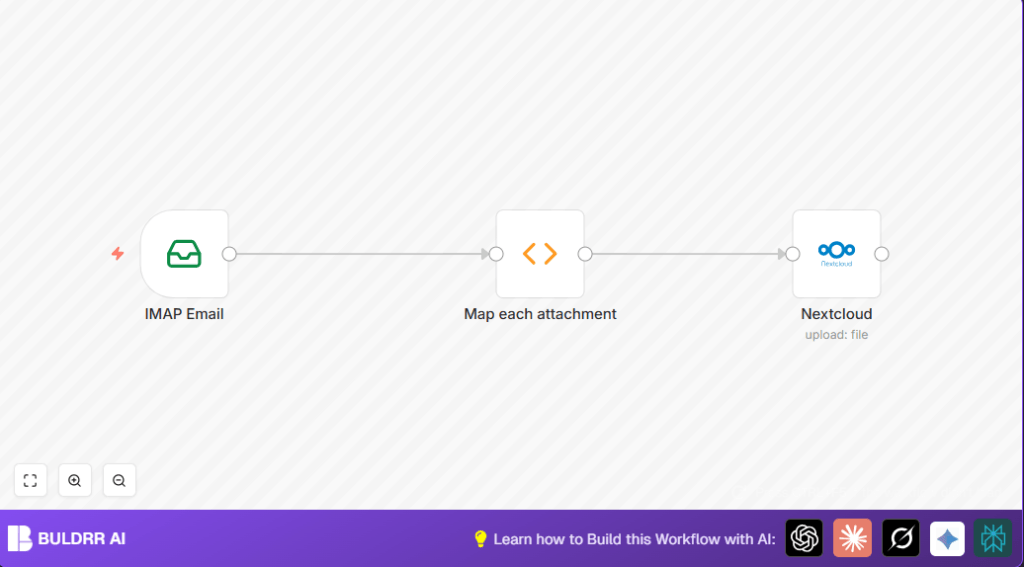

What This Workflow Does
This workflow reads emails from an IMAP “Invoices” folder and takes all attachments out of those emails.
It fixes attachment filenames so they are clean and consistent.
It then puts the attachments into folders in Nextcloud, sorted by email sender and date automatically.
This stops manual downloading, renaming, and sorting, saving many work hours and stopping errors.
Tools and Services Used
- IMAP Email: Reads emails from a specific mailbox folder and gets attachments.
- Function Node: Cleans filenames and connects email info to files.
- Nextcloud: Uploads and organizes files inside cloud folders by date and sender.
Inputs, Processing Steps, and Output
Inputs
- Email account with access to an “Invoices” folder.
- Emails containing invoice attachments.
- Nextcloud with proper permissions to upload files.
Processing Steps
- IMAP Email node fetches all emails from the “Invoices” folder with attachments.
- Function node extracts each attachment, cleans filenames by removing invalid characters and shortening names, and adds sender and date metadata.
- Nextcloud node uploads each cleaned file into folders named by the sender and email date.
Output
- Invoices saved in Nextcloud under well-structured folders like Documents/Invoices/DATE_SENDER_FILENAME.
- Less manual work and fewer file mistakes.
Beginner Step-by-Step: How to Use This Workflow in n8n
1. Import Workflow
- Download the workflow using the Download button on this page.
- Open n8n editor and select “Import from File”.
- Choose the downloaded workflow file to load it into n8n.
2. Configure Credentials
- Add required credentials for your IMAP email account in n8n credentials manager.
- Add Nextcloud API credentials in the same way.
3. Adjust Settings
- Ensure the IMAP node is set to the exact “Invoices” folder your emails use.
- Check the Nextcloud node folder path expression to match your naming preferences or company structure.
4. Test the Workflow
- Manually run the workflow inside n8n to check it downloads and uploads one or two files correctly.
- Review the output files in Nextcloud to confirm folder structure and filename cleanup.
5. Activate for Production
- Toggle the workflow ON in n8n to let it run automatically as scheduled or triggered.
- Monitor logs occasionally to catch errors early.
For self hosting n8n, consider self-host n8n to run this workflow continuously.
Customizations and Options
- Change the Nextcloud path expression to group files by client name or project code.
- Add a filter node after IMAP to only process PDFs or certain file types.
- Add notification triggers, like email or Slack, to alert when new invoices upload.
Troubleshooting and Common Issues
No attachments found in Emails
This usually means no files attached or the IMAP node is not fetching attachments properly.
Check email content and IMAP access rights.
Nextcloud upload fails
Check Nextcloud API keys and the folder path expression.
Invalid path or permissions cause upload errors.
Summary
✓ Saves over 10 work hours each week from manual downloading and organizing.
✓ Removes errors from wrong filenames and misplaced files.
→ Automatically fetches invoice emails and extracts attachments.
→ Uploads cleaned files to accurate folders in Nextcloud sorted by date and sender.
→ Provides clear folder structure and consistent naming for quick invoice access.
const _ = require('lodash')

const sanitize = str => _.chain(str)
  .replace(/[^A-Za-z0-9&.-]/g, '-') // sanitise via whitelist of characters
  .replace(/-(?=-)/g, '') // remove repeated dashes
  .trim('-') // trim any leading/trailing dashes
  .truncate({
    length: 60,
    omission: '-'
  })
  .value()

const result = _.flatMap(items.map(item => {
  return _.values(item.binary).map(file => {
    const filename_parts = file.fileName.split('.')
    const ext = _.slice(filename_parts, filename_parts.length-1)
    const filename_main = _.join(_.dropRight(filename_parts), '.')
    file.fileName = sanitize(filename_main) + '.' + ext
    return {
      json: {
        from: sanitize(item.json.from.value[0].name),
        date: sanitize(new Date(item.json.date).toISOString().split("T")[0])
      },
      binary: { file }
    }
  })
}))

return result
