

What this workflow does
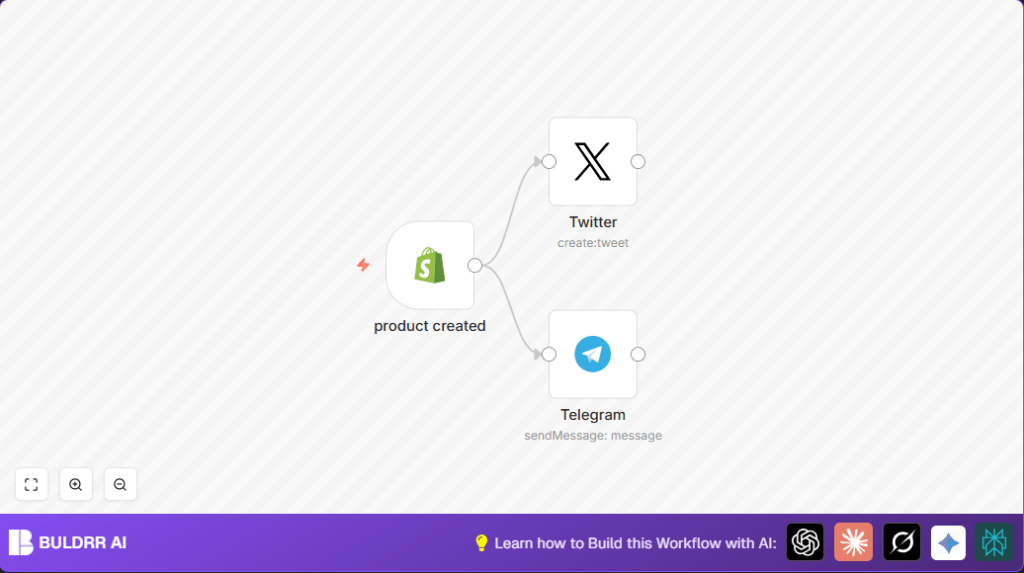
This workflow in n8n watches for new products created in Shopify.
When it finds a new product, it sends announcement messages automatically to both Twitter and Telegram.
This saves time and stops errors from manual posting.
Who should use this workflow
If you sell products in Shopify and want to share new product news fast on social media, this workflow helps.
It best fits small shop owners or social media managers who want to avoid repetitive work.
Tools and services used
- Shopify API: Sends notification when a product is created.
- Twitter API (OAuth1): Posts tweets with product info.
- Telegram Bot API: Sends messages to a Telegram chat or group.
- n8n Workflow Automation: Runs the workflow and connects everything.
Inputs, processing steps, and outputs
Inputs
- New product data from Shopify, including vendor, title, and product type.
Processing Steps
- The Shopify Trigger node listens for new product creation via the “products/create” topic.
- After the trigger, two separate nodes prepare messages:
- Twitter node creates a tweet using product data with a text expression.
- Telegram node builds a chat message with similar product info.
- Both Twitter and Telegram nodes run in parallel to send notifications simultaneously.
Outputs
- A tweet posted on Twitter with product announcement.
- A message sent to the given Telegram chat or group.
Beginner step-by-step: How to use this workflow in n8n
Step 1: Import the workflow
- Download the workflow file using the Download button on this page.
- In n8n editor, click the main menu and choose “Import from File”.
- Select the downloaded workflow file to add it to your n8n account.
Step 2: Configure credentials and parameters
- Open the Shopify Trigger node and add your Shopify API credentials.
- Check the topic is set to “products/create” to listen for new products.
- Open the Twitter node, add Twitter OAuth1 API credentials for your account.
- Check the “Text” field contains the expression:
=Hey there, my design is now on a new product ✨ Visit my {{$json["vendor"]}} shop to get this cool{{$json["title"]}} (and check out more {{$json["product_type"]}}) ????️ - Open the Telegram node, add the Telegram Bot API token and enter the chat ID for your target group.
- Check the “Text” field has this expression:
=Hey there, my design is now on a new product!
Visit my {{$json["vendor"]}} shop to get this cool{{$json["title"]}} (and check out more {{$json["product_type"]}})
Step 3: Test the workflow
- Add a new product in your Shopify store.
- Go back to n8n and run the workflow manually to see if it triggers.
- Check Twitter and Telegram to confirm posts appear as expected.
Step 4: Activate workflow
- Save the workflow in n8n.
- Switch the activation toggle to “Active” to enable continuous running.
Now, new Shopify product creations will announce automatically on Twitter and Telegram.
For help with hosting n8n yourself, visit self-host n8n.
Common issues and how to fix them
- Workflow does not trigger: Check Shopify Trigger node uses “products/create” topic and webhook is active in Shopify settings.
- Twitter posts are empty or wrong: Verify the message text uses correct double curly braces syntax exactly matching Shopify fields.
- Telegram messages not arriving: Confirm chat ID is correct and bot has permission to send messages to that chat.
Ideas for customization
- Add hashtags or product price in social messages by editing the message text expressions.
- Add more social channels by inserting nodes for Facebook, Instagram, or others.
- Filter products by type using an IF node after the trigger to only announce certain categories.
- Include product images in posts by fetching image URLs and attaching them to messages.
Summary of benefits and results
✓ Saves time by automating social media announcements.
✓ Removes manual copying errors and missed posts.
✓ Sends Twitter and Telegram messages at the same time.
✓ Keeps followers updated instantly about new products.
