
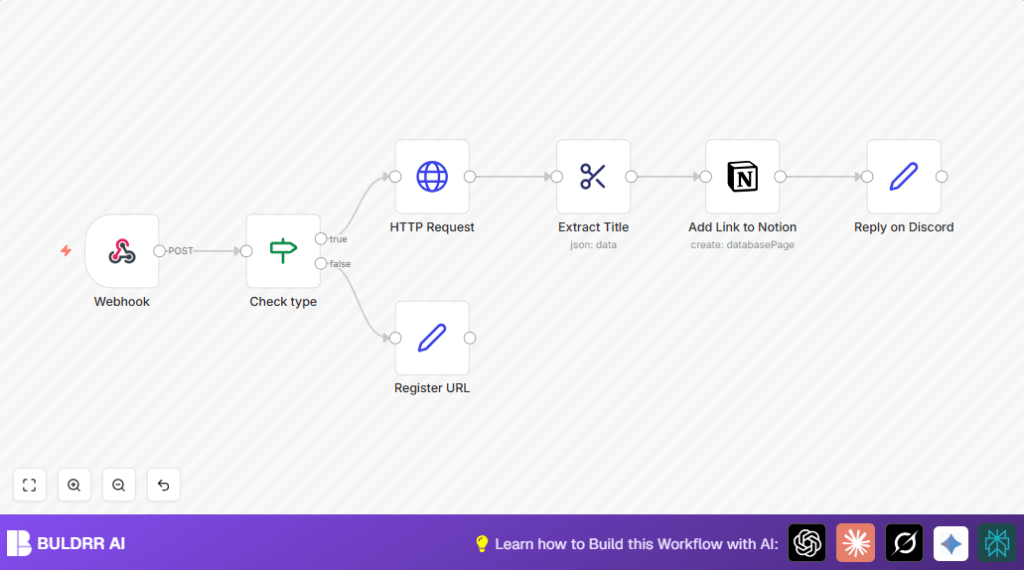

What this workflow does
This workflow gets web links from a webhook and sorts them properly.
It checks if incoming data meets a specific rule.
It gets the webpage content from the link.
It pulls out the page title to name the link.
It saves the link and title inside a Notion database.
It sends a message to Discord confirming the link was added.
Who should use this workflow
This is for any team or person who gets many web links shared often.
People who want to stop manual copying and pasting links.
Those who want to store links nicely in Notion and get alerts.
It works well if you send web links via Discord or any place that can send POST requests.
Tools and services used
- n8n: Runs the workflow and connects nodes.
- Notion API: Receives new pages with link info.
- Discord Webhook or Bot API: Sends confirmation messages.
- HTTP Request node: Retrieves webpage HTML for title extraction.
- HTML Extract node: Pulls the title text from HTML content.
Beginner step-by-step: How to build this in n8n
Importing and setup
- Click the Download button on this page to get the workflow JSON.
- Open your n8n editor and choose Import from File under Workflows.
- Choose the downloaded JSON file to import this workflow.
- After import, find the Webhook node and check the HTTP Method is POST.
Configure credentials and settings
- Add your Notion API Key under credentials to the Notion node.
- Update the Notion database ID in the Notion node to match your target database.
- If you use a Discord node, add your Discord webhook URL or bot token.
- Check the webhook URL path in the Webhook node and make sure your sender will post to it.
Test and activate
- Send a test HTTP POST request with a sample payload including a URL and type=1.
- Watch the workflow run in n8n and check for errors.
- Once verified, activate the workflow by toggling the Active switch.
- Now the workflow will run automatically whenever a request hits your webhook URL.
For self hosting n8n, it is helpful to check self-host n8n resources.
Inputs, processing and output
Inputs
- Receives POST calls to Webhook node containing JSON with at least a URL and a type field.
Processing
- The Check type node tests if
type == 1. - If true, the HTTP Request node fetches the full HTML content from the URL.
- The HTML Extract node extracts the text inside the <title> tag from the HTML.
- The Notion node creates a new page, setting the title as the page name and the URL as a property.
- The workflow sends a confirmation message to Discord through a Set node (or optionally a Discord node).
- If the type is not 1, the workflow sets a response acknowledging receipt.
Output
- New page in Notion database with link title and URL.
- Message sent to Discord channel confirming addition.
- Webhook response to sender confirming processing.
Edge cases and failures
HTTP Request failures
Malformed URLs or websites blocking bots can cause failures.
Try adding headers to mimic browser requests in the HTTP Request node.
Notion errors
Wrong database ID or invalid API key prevent page creation.
Check API keys and database permissions carefully.
Webhook no response
Often caused by inactive workflow or incorrect webhook URL.
Activate workflow and confirm webhook path matches POST request URL.
Customization ideas
- Change Notion database by updating the database ID in the Notion node.
- Add more HTML Extract nodes for description, keywords, or images from the webpage.
- Switch the last Set node with a real Discord node for live message posting.
- Adjust the Check type node condition to accept more or different types.
- Integrate with other tools by posting to the webhook URL from other apps or bots.
Summary
✓ Sends received web links to Notion with their page titles.
✓ Filters links by type to process only relevant ones.
✓ Automatically adds confirmation messages in Discord.
→ Saves time by avoiding manual data entry.
→ Keeps links organized and easy to track.
