

What This Workflow Does
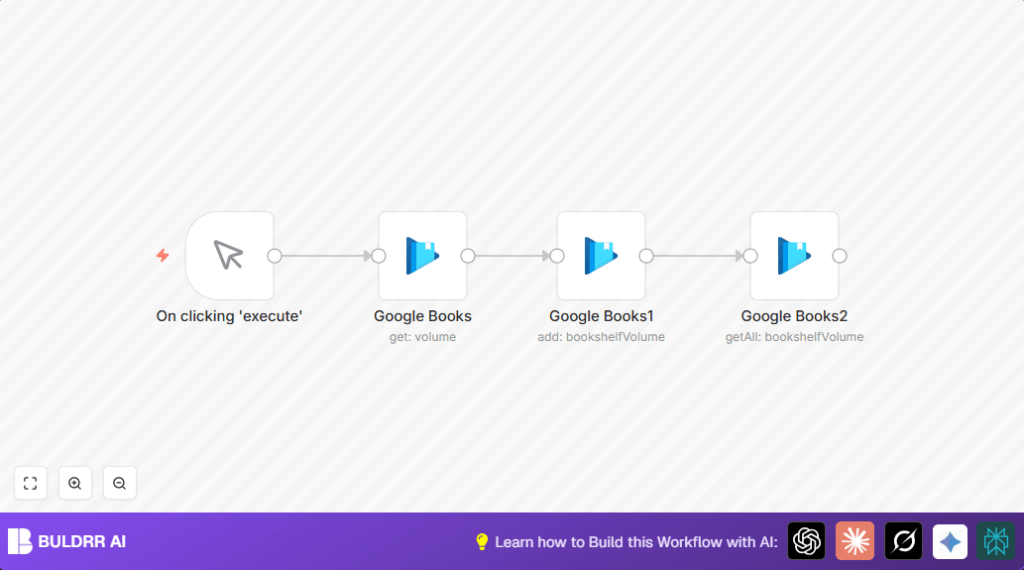
This workflow gets one specific book volume using its unique ID from Google Books.
It then adds that book to a chosen bookshelf in your Google Books account automatically.
Finally, it checks the bookshelf to make sure the book is added successfully.
This saves time and avoids mistakes from doing these steps by hand many times.
Tools and Services Used
- n8n workflow automation platform: To create and run the automated steps.
- Google Books API: Provides access to book volume details and bookshelf management.
- Google Books OAuth2 credentials: To allow secure access to your Google Books library through n8n nodes.
Beginner Step-by-Step: How to Use This Workflow in Production in n8n
Step 1: Import the Workflow
- Download the workflow file using the Download button on this page.
- You must be already inside the n8n editor to continue.
- Go to the top menu in n8n, choose “Import from File”, and select the downloaded file.
Step 2: Configure Credentials and IDs
- Add your Google Books OAuth2 credentials by going to the Credentials tab in n8n.
- Update the bookshelf ID if you want to add books to a different shelf than the default (ID 2).
- Check the volume ID in the first Google Books node; you can change it to add a different volume.
Step 3: Test and Activate
- Run the workflow once using the Manual Trigger node to make sure it works.
- Look at the output to confirm the book was added to your bookshelf.
- If all works, activate the workflow in n8n by toggling the active switch for production use.
If self hosting n8n, consider refreshing credentials often and watch execution logs.
Refer to self-host n8n for help with running on your own server.
Inputs, Processing Steps, and Output
Inputs: A volume ID identifying the specific book to add.
Processing Steps:
- Use the Google Books API to fetch full details of the book volume by ID.
- Add the volume to the selected bookshelf (default shelf ID 2) via the API.
- Fetch the bookshelf contents again to confirm the book is now included.
Output: A list of volumes currently in the bookshelf, including the newly added volume.
Common Problems and How to Fix Them
Authentication Errors
If Google Books OAuth2 credentials don’t work, re-enter or refresh them inside n8n credentials settings.
Book Not Added
Check the bookshelf ID is correct and volume ID expression matches exactly to prevent failures.
Incorrect Bookshelf Contents
Make sure the “My Library” option is set to true when fetching bookshelf contents to avoid incomplete results.
Customization Ideas
- Change the bookshelf target by updating the shelf ID in the add operation node.
- Make the workflow accept dynamic volume IDs via workflow input or webhook instead of a fixed ID.
- Add a loop using the SplitInBatches node to add many volumes one by one automatically.
- Insert email or Slack notifications after adding a book to alert you.
Summary and Results
✓ You get a workflow that automatically finds a book by ID in Google Books.
✓ The book is added to your chosen bookshelf without manual clicking.
✓ The workflow confirms the book is added by retrieving the bookshelf contents.
→ This saves your time and removes errors when managing your digital book collection.
