
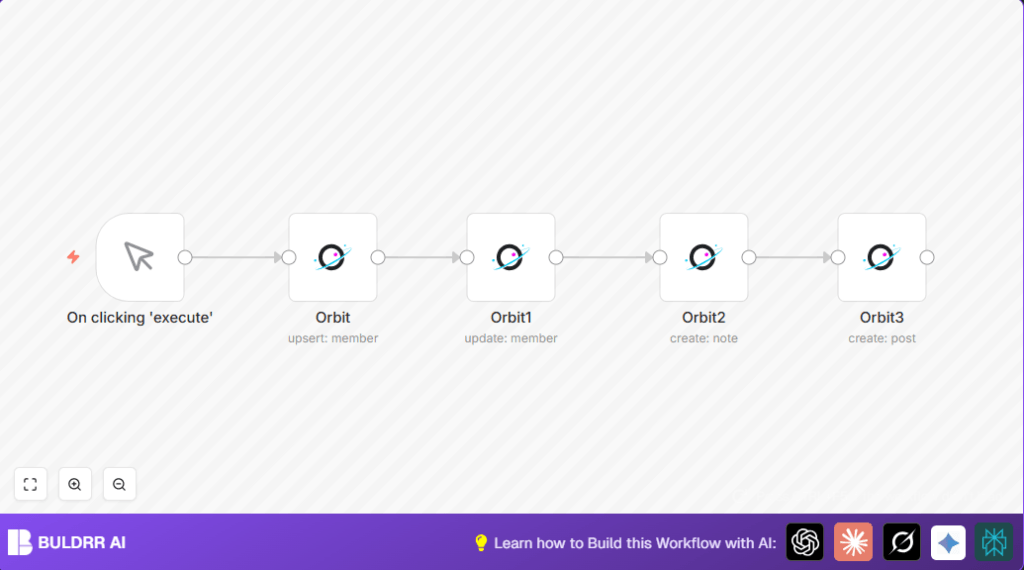

What This Workflow Does
This workflow automatically manages members in Orbit using n8n.
It solves the problem of manual updating member profiles, notes, and posts which can cause mistakes and waste time.
The outcome is faster, accurate member data and less repetitive work.
The workflow creates or updates a member by their GitHub username.
It then updates the member with tags or other info.
Next, it adds a note linked to the member’s profile.
Finally, it creates a post associated with the member.
This keeps the community data clean and consistent.
Who Should Use This Workflow
- Community managers with large member lists
- Teams using Orbit to handle community data
- Anyone needing to reduce manual member updates
Tools and Services Used
- n8n: The workflow automation platform.
- Orbit API: Provides member, notes, and posts data management.
- GitHub usernames: Used as unique identifiers to find or create members.
Inputs, Processing Steps, and Output
Inputs
- GitHub username for the member.
- Orbit workspace ID.
- API key for Orbit access.
Processing Steps
- Search for the member or create if not found by GitHub username.
- Update the member’s tags or other details.
- Create a note linked to that member to log interactions.
- Add a post linked to the member for relevant content sharing.
Output
- A clean, updated member profile in Orbit.
- Logged notes connected to the member.
- Posts associated to member’s profile inside Orbit.
Beginner Step-by-Step: How to Use This Workflow in Production
Import and Setup
- Download the workflow using the Download button on this page.
- Open n8n editor and choose Import from File option.
- Upload the downloaded workflow file.
Configure Credentials and IDs
- Add your Orbit API Key credential in n8n.
- Set your Orbit workspace ID in workflow nodes where needed (like “425” example).
- Make sure GitHub usernames used to search members are correct.
Test and Activate
- Run the workflow once by clicking the forward button to test the flow.
- Check that members are created or updated and notes, posts appear as expected.
- Activate the workflow to run manually or switch the Manual Trigger node to a scheduled or webhook trigger for automation.
For users running self hosting n8n, consider using self-host n8n resources to manage your server setup.
Customization Ideas
- Change member search in first Orbit node from GitHub username to email.
- Add more tags when updating member to label roles or statuses.
- Use expressions to make notes dynamic, like adding timestamps.
- Replace the static post URL with dynamic input fetched from other workflow nodes.
Troubleshooting Common Problems
- Member ID is null in later nodes: Means first Orbit node did not find or create a member. Check that the GitHub username is correct and the output data includes “id”.
- API authentication errors: Orbit API Key is invalid or expired. Refresh the credential settings and verify the key works.
Pre-Production Checklist
- Validate Orbit API Key has needed permissions.
- Test manual trigger to make sure workflow starts.
- Confirm GitHub usernames exist in your Orbit workspace.
- Check that member ID outputs from each node are as expected.
- Backup important data before running in production.
Deployment Notes
This workflow runs manually by default.
To automate fully, replace the Manual Trigger node with either a Webhook node or a Schedule Trigger node.
Monitor workflow runs via n8n execution logs for errors or issues.
Summary of Results
✓ Saves hours of manual member updates weekly.
✓ Improves data accuracy in Orbit member profiles.
✓ Automatically adds interaction notes and posts.
✓ Frees community managers to focus on engagement.
Workflow Example Expression for Dynamic Member ID Usage
This expression captures the member ID from the first Orbit node for use in later updates:
= $node["Orbit"].json["id"]
Place this in memberId fields in nodes that update member details, notes, or posts.
