

Automate Email Localization by IP with n8n Uproc & SES

This workflow automates sending personalized welcome emails based on a user’s IP location, detecting if they are in Spain. Using n8n’s Uproc and AWS SES nodes, it reduces manual email localization and speeds communication.
manualTrigger
uproc
awsSes
+2
Workflow Identifier: 2351
NODES in Use: Manual Trigger, FunctionItem, Uproc, If, AWS SES
Automate email localization with n8n and SES

Press CTRL+F5 if the workflow didn't load.

Learn how to Build this Workflow with AI:

What This Workflow Does

This workflow finds out where a user is by their IP address and sends them a welcome email in Spanish or English automatically.

It solves the problem of sending wrong language emails and saves many hours of manual work every week.

The result is faster, accurate emails sent without mistakes.


Who Should Use This Workflow

This is for anyone who wants to send welcome emails based on user location without manual checks.

It fits well for SaaS owners or teams who want to reduce errors and save time.


Tools and Services Used

  • n8n: For creating and running the workflow.
  • Uproc API: For getting location details from the IP address.
  • AWS Simple Email Service (SES): To send the localized emails.

Inputs, Processing Steps, and Output

Inputs

  • User’s IP address (hardcoded example or dynamic input).
  • User’s email address (hardcoded example or dynamic input).

Processing Steps

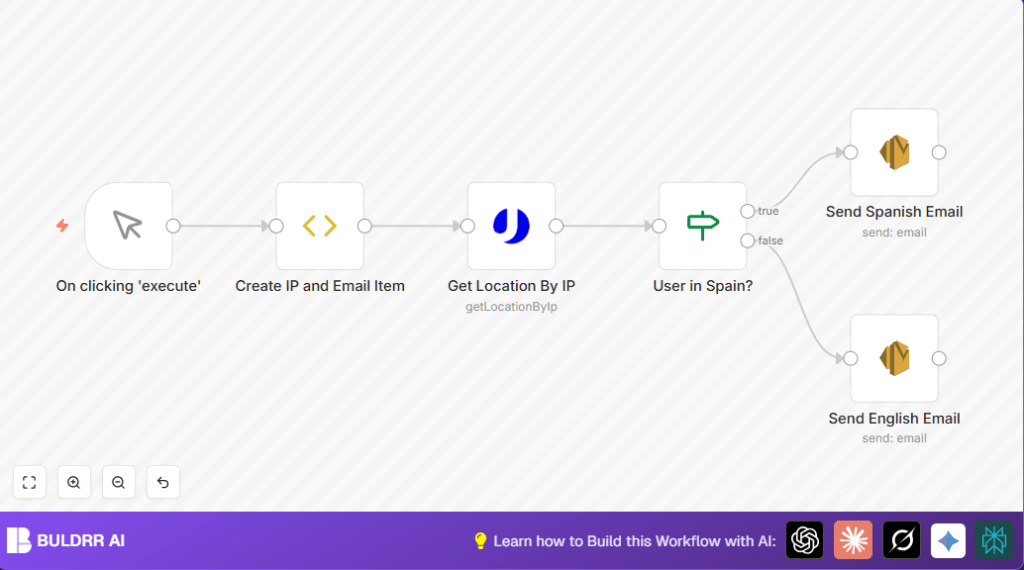
  • The workflow first sets the test IP and email inside a FunctionItem node.
  • It uses the Uproc node to get location info from the IP.
  • An If node checks if the country code matches Spain (“ES”).
  • Depending on the result, it chooses to send a Spanish or English email.
  • Emails are sent using AWS SES nodes configured with language-specific content.

Output

The user receives a welcome email in Spanish if their IP shows Spain or in English otherwise.


Beginner Step-by-Step: How to Deploy This Workflow in n8n

Step 1: Import the Workflow

  1. Use the Download button on this page to save the workflow file.
  2. Open n8n editor and click “Import from File” to load the workflow.

Step 2: Configure Credentials

  1. Add your Uproc API Key in the Uproc node credentials setting.
  2. Add your AWS SES credentials to the AWS SES nodes.
  3. Update the From email address in both AWS SES nodes to a verified SES sender.

Step 3: Optional Adjustments

  1. You can replace the hardcoded test IP and email in the FunctionItem with dynamic inputs if needed.
  2. Check and adjust any email addresses or subjects as needed.

Step 4: Test the Workflow

  1. Manually run the workflow using the Manual Trigger.
  2. Check if emails are sent correctly based on location.

Step 5: Activate for Production

  1. Toggle the workflow switch to “Active” to run automatically when triggered.
  2. Link to real triggers like a Webhook node to automate on actual user signups.
  3. For more control and security, consider self-host n8n deployment options.

Customization Ideas

  • Add more branches in the If node for other countries and languages.
  • Use a Webhook node to accept live user data instead of fixed test input.
  • Improve email appearance with HTML templates inside AWS SES nodes.
  • Log IP and location info for reports by adding a Set node or a spreadsheet node.

Handling Errors and Edge Cases

If the Uproc node fails to return data, check the API Key and validate the IP format. Invalid IPs cause lookup errors.

If emails fail to send via AWS SES, verify the sender email is confirmed and check sending limits.

Make sure all connections between nodes are correct so data flows properly.


Summary of Results

✓ User location detected automatically by IP.

✓ Accurate email language sent: Spanish for Spain, English otherwise.

✓ Manual effort cut from hours weekly to zero after setup.

✓ Improved user experience with fast, correct localized emails.

Automate email localization with n8n and SES

Visit through Desktop to Interact with the Workflow.

Author
Written By
Vikash Kumar
Building AI agents, n8n workflows and end-to-end automation for 30+ Brands across India, the US, Europe, Dubai & Australia. 7+ years of Experience saving founders real hours every week - no code required.
Author
Written By
Vikash Kumar
Building AI agents, n8n workflows and end-to-end automation for 30+ Brands across India, the US, Europe, Dubai & Australia. 7+ years of Experience saving founders real hours every week - no code required.

Frequently Asked Questions

The workflow uses the Uproc node to get the country code from the user’s IP address and checks if it is ‘ES’ for Spain. If yes, it sends a Spanish email; otherwise, it sends an English email.
Yes, after importing the workflow, replace the hardcoded IP and email in the FunctionItem node with live data by connecting to a webhook or other input node.
Verify the sender email is verified in the AWS SES console, check sending quotas, and confirm the correct AWS region is configured in the SES credentials.
Yes, by adding more conditions in the If node and adding corresponding AWS SES nodes with new language emails, localization can support more countries.

Related Workflows

Automate Twist Channel Creation and Messaging with n8n

This workflow automates creating and updating a channel in Twist and sending a personalized message to specific users. It eliminates manual setup errors and saves time managing Twist communications.

Automate Ideogram Image Generation with Google Sheets & Gmail

This workflow automates graphic design image generation via Ideogram AI, storing image data in Google Sheets and Google Drive, with email alerts via Gmail. It saves designers hours by automating image creation, remixing, review, and record-keeping.

Automate IT Support with Slack and OpenAI in n8n

Streamline IT support by automating Slack message handling using n8n and OpenAI. This workflow handles Slack DMs, filters bots, queries a Confluence knowledge base, and delivers AI-generated responses, improving support efficiency and response time.

Automate Crypto Analysis with CoinMarketCap & n8n AI Agent

Discover how this unique n8n workflow leverages CoinMarketCap’s multi-agent AI to deliver precise, real-time cryptocurrency insights directly via Telegram. Manage crypto data analysis efficiently with automated multi-source API integration.

Automate Gumroad to Beehiiv Subscriber Sync with n8n

Learn how to automatically add new Gumroad sales customers as Beehiiv newsletter subscribers using n8n automation. This workflow saves time by syncing sales data to Google Sheets CRM and notifying your Telegram channel instantly.

Generate On-Brand Blog Articles Using n8n and OpenAI

This workflow automates the creation of on-brand blog articles by analyzing existing company content using n8n and OpenAI. It extracts article structures and brand voice to produce consistent draft articles, saving significant content creation time.
1:1 Free Strategy Session
Your competitors are already automating. Are you still paying for it manually?

Do you want to adopt AI Automation?

Every hour your team does repetitive work, you're burning real money.
While you wait, faster businesses are cutting costs and moving quicker.
AI and automations aren't the future anymore — they're the present.

Book a live 1-on-1 session where we show you exactly which of your daily tasks can be automated — and what it’s costing you not to.