
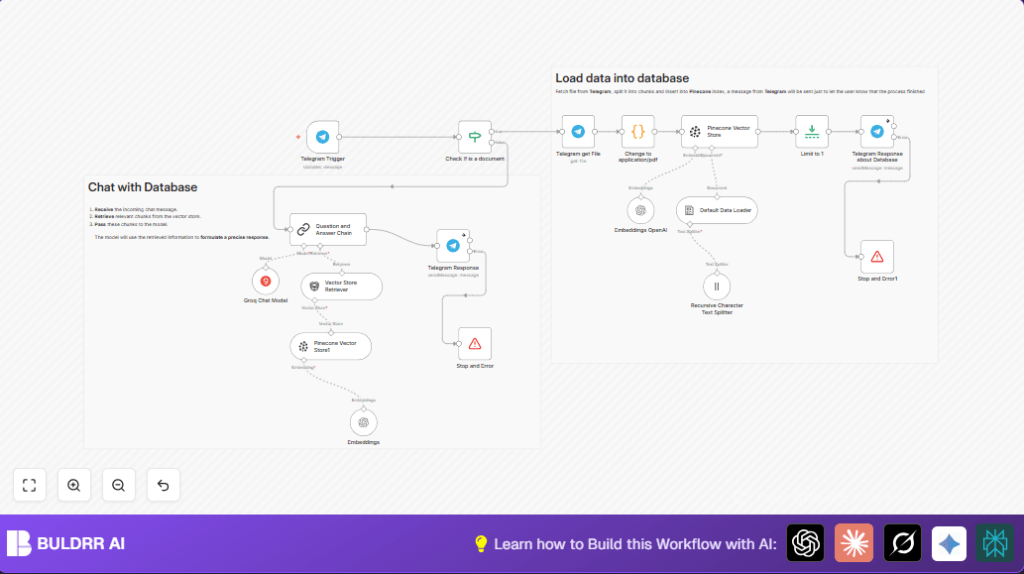

What this workflow does
This workflow reads PDF files sent by users in Telegram chats.
It turns those PDFs into searchable content.
When someone asks a question in the chat, it finds answers from the PDFs and replies right away.
This saves users from reading long files or searching by hand.
Who should use this workflow
This is for users who get many PDF reports or documents in Telegram.
They want to find important info fast by just asking questions in the chat.
No need for deep tech skills to run it, so consultants or team members can use it easily.
Tools and services used
- Telegram Bot API: Receives messages and downloads PDF files.
- OpenAI API: Creates embeddings from text chunks for semantic search.
- Pinecone Vector Database: Stores the embeddings for fast retrieval.
- Groq API: Runs chat models to generate precise answers.
- n8n: Automates the full workflow from receiving files to replying with answers.
Inputs, processing, and output
Inputs
- PDF files sent by users in Telegram chat.
- Text questions typed in the same Telegram chat.
Processing Steps
- Use Telegram Trigger to catch all incoming messages.
- Check if message has a PDF file.
- If yes, download PDF binary using Telegram node with the file ID.
- Run a Code node to fix PDF file metadata to “application/pdf”.
- Split the PDF text into chunks with Recursive Character Text Splitter (size 3000, overlap 200).
- Load chunks into documents using Default Data Loader.
- Generate embeddings from chunks with Embeddings OpenAI node.
- Insert vectors into Pinecone database using Pinecone Vector Store node.
- Send confirmation message in Telegram that PDF upload is done.
- If incoming message is a question (not PDF), use Question and Answer Chain to search Pinecone vectors.
- Use Groq Chat Model to produce a natural language answer based on search results.
- Reply in Telegram chat with the AI-generated answer.
Output
- Confirmation messages sent back in Telegram chat after PDF uploads.
- Fast, relevant answers to user questions inside the Telegram conversation.
Beginner step-by-step: How to use this workflow in n8n
Download and Import Workflow
- Use the Download button on this page to save the workflow file.
- Open the n8n editor and click “Import from File” to upload the saved workflow.
Configure Credentials
- Go to each node needing credentials (Telegram Trigger, OpenAI nodes, Pinecone Vector Store, Groq Chat Model).
- Add valid API Keys for Telegram Bot API, OpenAI, Pinecone, and Groq.
- Update any IDs or names like Pinecone index name “telegram” or bot chat if necessary.
Test the Workflow
- Send a PDF file to the linked Telegram chat and see if the workflow downloads and processes it without error.
- Try asking a question about uploaded PDF content to check if AI replies properly.
Activate for Production
- Once testing works, turn the workflow on by toggling the “Active” button.
- Monitor workflow executions for any issues or errors.
For running the workflow on your own server, explore linking self-host n8n for stable uptime and smooth API calls.
Common problems and solutions
Error: Missing or invalid credentials
Check all API Keys are entered correctly in node credential sections.
Error: Failed to fetch file from Telegram
Make sure file ID is correct and bot has permission to read user messages in chat.
Error: No relevant results found in Pinecone
Confirm PDFs were uploaded successfully and Pinecone index name matches the node configuration exactly.
Customizations ideas
- Change chunkSize and chunkOverlap in the Recursive Character Text Splitter node to control how much text is grouped for embedding.
- Swap out the Groq Chat Model node with OpenAI GPT-4 or other supported models by changing node type and credentials.
- Edit Telegram Response nodes to change message texts or add more info.
- Add error handling nodes for clearer messages if steps fail.
- Use different Pinecone indexes to support multiple Telegram groups independently.
Summary and final results
✓ Automatically process and index PDF files sent in Telegram chat.
✓ Answer user questions fast with AI using stored PDF data.
✓ Save hours of manual reading and searching in documents.
→ Provide clear feedback and answer messages directly in Telegram.
→ Enable smooth automation between Telegram, OpenAI, Pinecone, and Groq using n8n.
