

What This Automation Does
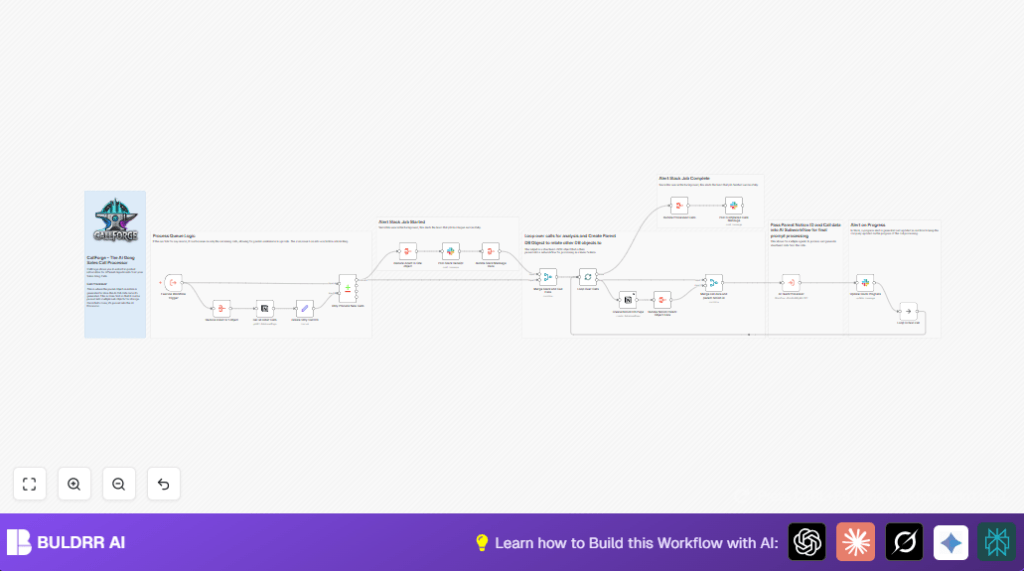
This workflow takes new sales call data from Gong and creates records in Notion automatically.
It also gives live updates to the sales team via Slack messages.
This saves time and stops errors from copying call info manually.
It finds only new calls, makes a Notion page for each, and runs AI analysis in a subworkflow.
The workflow updates Slack with progress and handles retries if there are API limits.
Inputs, Processing, and Outputs
Inputs
- Gong calls JSON: Metadata including call date, participants, opportunity data.
- Notion API: Access to the Sales Call Summaries database.
- Slack API: Credentials to send messages to the team channel.
Processing Steps
- Trigger the workflow when Gong call data arrives.
- Fetch all call records from Notion to check which calls are new.
- Filter out calls already processed by comparing Gong call IDs.
- Aggregate new calls for batch handling.
- Notify Slack that the queue started and how many calls will process.
- Use batching to process calls one at a time.
- Create a Notion page for each new call, filling in details like date, company, reps.
- Aggregate created Notion pages.
- Merge call data with corresponding Notion page IDs.
- Run the AI Team Processor subworkflow for deeper call analysis.
- Update Slack messages with progress after each call.
- Loop to process the next call until all are done.
- Send a Slack message confirming all calls processed.
Outputs
- New pages in the Notion Sales Call Summaries database.
- Slack channel notifications showing processing start, progress, and completion.
Tools and Services Used
- n8n: Workflow automation platform to run nodes and subworkflows.
- Gong: Call recording platform providing call metadata.
- Notion API: To create and fetch call summary pages.
- Slack API: To send and update messages about workflow status.
- AI Team Processor: A subworkflow for AI analysis of calls.
Beginner Step-by-Step: How to Use This Workflow in n8n
Importing Workflow
- Download the full workflow file using the Download button on this page.
- Open your n8n editor where the automation runs.
- Click on “Import from File” and select the downloaded workflow JSON.
Configuring Credentials
- Add your Notion API credentials in the Notion nodes.
- Enter your Slack App’s API Key and set the channel ID where messages should post.
- Make sure Gong call data input is set correctly in the Execute Workflow Trigger node.
- Update any database IDs, emails, opportunity IDs, or folder references as needed to match your environment.
Testing and Activation
- Run the workflow once manually to confirm calls are fetched and Notion pages create successfully.
- Check Slack for correct start, progress, and completion messages.
- Fix any errors, then activate the workflow for scheduled or webhook triggers into production.
- Consider self-host n8n for better control and reliability.
Troubleshooting and Edge Cases
Handling Notion API Rate Limits
If the workflow stops or errors in the Notion nodes, it is likely hitting API limits.
Enable the retry feature on fail in the Notion nodes.
Also, processing calls one at a time with batching keeps limits safer.
Slack Messages Not Posting or Updating
Check the Slack channel ID is correct.
Make sure the Slack app has permission to post and update messages.
Duplicate Calls Showing in Notion
This can happen if Gong call IDs do not match properly with Notion entries.
Check the Compare Datasets node filtering logic.
Ensure the incoming Gong call ID fields are consistent.
Customization Ideas
- Change the Notion database ID in the create page node to target a different database.
- Modify Slack channel IDs in all Slack nodes to notify another team.
- Adjust batch size in the Split In Batches node to process multiple calls at once if API limits allow.
- Enhance the AI Team Processor subworkflow with sentiment or action item extraction.
Summary and Benefits
✓ Saves hours of manual work copying call data.
✓ Reduces errors and missed follow-ups.
✓ Keeps team updated with live progress in Slack.
✓ Creates consistent Notion records for all sales calls.
→ You get an automated, clear, and error-resistant way to log sales calls.
→ The setup works well even with many calls by using batch processing and retries.
