

What This Automation Does
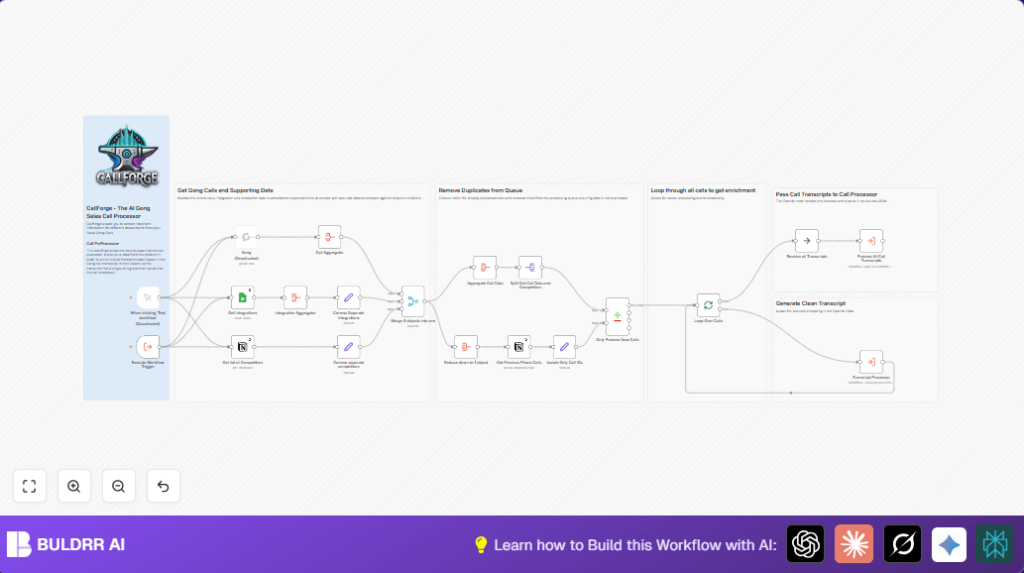
This workflow automatically gets recent Gong sales call data and adds competitor and integration details from Notion and Google Sheets.
It avoids duplicate processing by checking previous call summaries.
It cleans up transcripts using a special workflow.
Finally, AI analyzes the cleaned transcripts to give useful sales insights.
This way, the team saves time and works with accurate, enriched data.
Inputs, Processing Steps, and Output
Inputs
- Recent sales calls from Gong API within the last two days.
- Competitor data from a Notion database.
- Integration data from Google Sheets.
- Previously processed call summaries from Notion to filter duplicates.
Processing Steps
- Calls are fetched and merged into a single list.
- Competitor and integration data lists are converted to comma-separated strings.
- All three data streams are combined into one unified object.
- Existing call IDs are extracted to filter out repeats.
- New calls are split and processed one at a time.
- Each call transcript is cleaned by running the Transcript Processor workflow.
- Clean transcripts are sent to the Call Processor workflow using AI analysis.
Output
Structured JSON with sales insights, such as competitor mentions and integration spots.
Clean transcripts ready for reporting.
Filtered, non-duplicate calls processed each run.
Who Should Use This Workflow
Teams needing to save time on manual Gong call processing.
Sales operations staff wanting richer contextual info on calls.
Anyone wanting automatic transcript cleaning and AI analysis.
Tools and Services Used
- Gong API: Fetches recent sales calls.
- Notion API: Retrieves competitor data and past call summaries.
- Google Sheets API: Reads integration details.
- n8n: Orchestrates the entire workflow automation.
Beginner Step-by-Step: How to Use This Workflow in n8n
Importing the Workflow
- Download the provided workflow file by clicking the Download button on this page.
- Open your n8n editor.
- Go to the menu and choose Import from File.
- Select the downloaded file to load the workflow.
Configuring Credentials and IDs
- Add API Keys or credentials for Gong, Notion, and Google Sheets in n8n’s credentials manager.
- Update any placeholders for database IDs, sheet IDs, or workspace details if needed.
- Check any email addresses, channel IDs, or folder names and modify to fit your setup.
Testing and Activating
- Run the workflow once manually using the Execute Workflow Trigger to confirm it works.
- Fix any errors shown in the execution panel.
- Activate the workflow so it runs on schedule or trigger.
Note: For users hosting their own n8n, refer to self-host n8n for helpful setup options.
Customization Ideas
- Adjust date range parameters in the Gong node to change call fetch periods.
- Add more data sources from Notion or Google Sheets to enrich call context.
- Edit the Transcript Processor workflow for custom text cleanup rules.
- Modify AI prompt details in the Call Processor workflow for different insights.
Troubleshooting Common Issues
- Gong node returns no calls: Check API Key is valid.
Confirm date filters include calls. - Notion node errors: Verify Notion API permissions.
Ensure database IDs are correct. - Duplicate call processing: Confirm matching call IDs in Compare Datasets node.
Update prior calls database in Notion.
Pre-Production Checklist
- Verify Gong API credentials with live call data.
- Check Google Sheets access and confirm sheet data format.
- Test Notion API access to competitor and call summary databases.
- Run workflow manually to confirm all nodes work correctly.
- Run Transcript Processor and Call Processor with sample data before going live.
Deployment Guide
Use the Execute Workflow Trigger to start call fetches automatically.
Watch executions in the n8n panel to catch errors.
For heavy call volumes, consider splitting or batching calls.
Scale self-hosted n8n as needed using self-host n8n resources.
Summary
✓ Automation gets recent Gong calls and enriches with competitor + integration data.
✓ Removes duplicate calls using Notion summaries.
✓ Cleans transcripts using a dedicated workflow.
✓ Uses AI to generate clear, structured sales insights.
✓ Saves significant time and improves data accuracy for sales teams.
