

Automate DSP Certificate Generation with Google Forms & n8n

Reduce manual work by automating DSP certificate creation from Google Form responses using n8n. This workflow extracts key data, validates scores, generates personalized certificates in Google Slides, converts them to PDF, and emails them automatically, saving hours and avoiding errors.
googleSheetsTrigger
googleDrive
googleSlides
+5
Workflow Identifier: 2305
NODES in Use: Google Sheets Trigger, No Operation, Sticky Note, Set, If, Google Drive, Google Slides, Gmail
Automate DSP certificate with Google Forms and n8n

Press CTRL+F5 if the workflow didn't load.

Learn how to Build this Workflow with AI:

What This Workflow Does

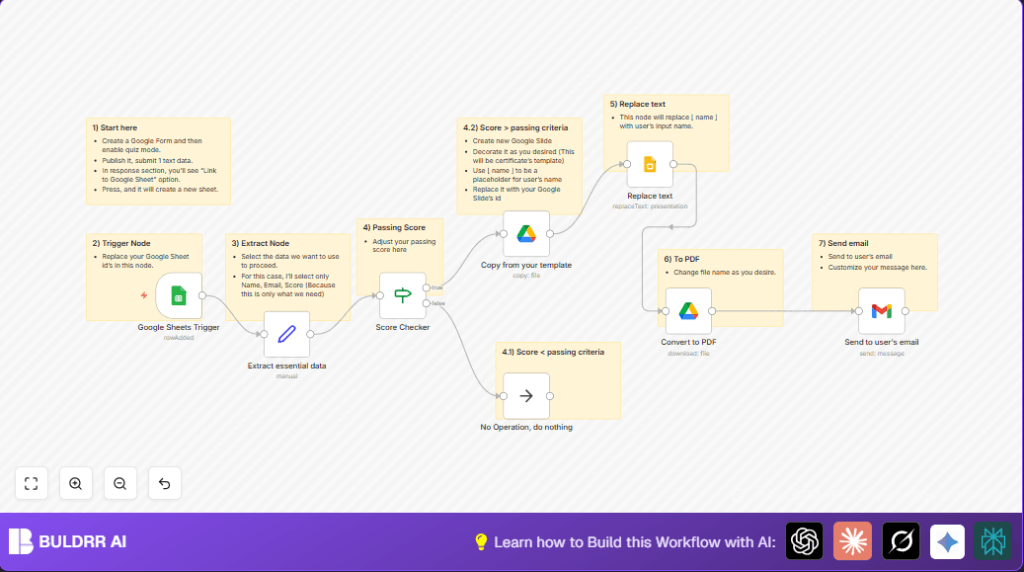
This workflow reads quiz answers from Google Sheets when a new row appears. It checks if the score passed a set limit. If passed, it copies a certificate template from Google Slides, changes the name on it, turns it into a PDF, and emails it to the quiz taker automatically. If the score is too low, the workflow ends quietly.

This removes manual work and mistakes in making and sending certificates.


Who Should Use This Workflow

Users running quizzes via Google Forms who get answers in Google Sheets. If many people take a quiz each week and need personalized certificates, this saves a lot of time.

It is best if the quiz mode in Google Forms is turned on and respondent emails and names are collected.


Tools and Services Used

  • Google Forms: Collect quiz answers.
  • Google Sheets: Store quiz responses and trigger workflow.
  • Google Slides: Hold certificate template with placeholder text.
  • Google Drive: Copy template and convert slide to PDF.
  • Gmail: Send emails with certificate attachments.
  • n8n: Build and run the automation workflow.

Inputs, Processing Steps, and Outputs

Inputs

  • New quiz submission row in Google Sheets including respondent name, email, and score.

Processing Steps

  • Extract name, email, and score from the new row.
  • Check if the score is greater than 3 (passing).
  • If passed, copy the Google Slides certificate template to create a new file.
  • Replace [ NAME ] placeholder in copied slide with actual respondent name.
  • Convert this personalized Google Slide presentation to a PDF file.
  • Send an email to the respondent with the PDF attached.
  • If score is not passing, stop workflow without sending anything.

Outputs

  • Personalized PDF certificate emailed to passing quiz takers.

Beginner Step-by-Step: How to Use This Workflow in n8n

Step 1: Import Workflow

  1. Download the workflow file by clicking the Download button on this page.
  2. Inside the n8n editor, use the “Import from File” option to bring the workflow into n8n.

Step 2: Configure Credentials and IDs

  1. Add Google Sheets, Google Slides, Google Drive, and Gmail OAuth2 credentials if not already set.
  2. Update any placeholder file IDs for the Google Slides template and Google Drive folder in the respective nodes.
  3. Update the email addresses if needed in the Gmail node for sending certificates.

Step 3: Test and Activate Workflow

  1. Run the workflow manually once to test it with sample data.
  2. If the test works, activate the workflow to run automatically when new form responses arrive.

After activation, the workflow listens for new quiz answers and sends certificates without manual work.

For knowledge about hosting n8n yourself, visit self-host n8n.


Customization Ideas

  • Change the passing score number in the “Score Checker” node to fit your test rules.
  • Edit the Google Slides template to update certificate look or add new placeholders.
  • Modify the email subject and message in the Gmail node to match your tone or add details.
  • Add more text replacements in the Google Slides node for date, course name, or other info.
  • Instead of ending silently when the score is too low, add an email notice or alternative action.

Handling Errors and Troubleshooting

  • Error: “Google Drive: file ID not found”
    Cause: File or folder ID is wrong or expired.
    Fix: Open the file or folder in Google Drive and copy the ID from the URL again.
  • Error: “Gmail: Authentication error”
    Cause: OAuth2 credentials are missing or access was revoked.
    Fix: Re-add Gmail credentials in n8n’s credential manager and grant access again.

Summary of Results

✓ Saves hours of manual work every time certificates are needed.
✓ Avoids mistakes in spelling or sending emails.
✓ Sends certificates instantly when quiz answers arrive.
→ Creates PDF certificates personalized with the right names.
→ Works quietly when quiz score is below the passing limit.


Automate DSP certificate with Google Forms and n8n

Visit through Desktop to Interact with the Workflow.

Author
Written By
Vikash Kumar
Building AI agents, n8n workflows and end-to-end automation for 30+ Brands across India, the US, Europe, Dubai & Australia. 7+ years of Experience saving founders real hours every week - no code required.
Author
Written By
Vikash Kumar
Building AI agents, n8n workflows and end-to-end automation for 30+ Brands across India, the US, Europe, Dubai & Australia. 7+ years of Experience saving founders real hours every week - no code required.

Frequently Asked Questions

No, the workflow depends on Google Sheets as the data source. Using Microsoft Forms would require changing the trigger node and data source.
Yes, copying files, editing slides, converting to PDF, and sending emails all use Google API calls and count toward your quota.
Yes, OAuth2 provides secure token-based access. Security also depends on securing the n8n environment where the workflow runs.
Yes, the workflow can handle many submissions if monitored properly. It is important to be aware of Google API limits and adjust accordingly.

Related Workflows

Automate Twist Channel Creation and Messaging with n8n

This workflow automates creating and updating a channel in Twist and sending a personalized message to specific users. It eliminates manual setup errors and saves time managing Twist communications.

Automate Ideogram Image Generation with Google Sheets & Gmail

This workflow automates graphic design image generation via Ideogram AI, storing image data in Google Sheets and Google Drive, with email alerts via Gmail. It saves designers hours by automating image creation, remixing, review, and record-keeping.

Automate IT Support with Slack and OpenAI in n8n

Streamline IT support by automating Slack message handling using n8n and OpenAI. This workflow handles Slack DMs, filters bots, queries a Confluence knowledge base, and delivers AI-generated responses, improving support efficiency and response time.

Automate Crypto Analysis with CoinMarketCap & n8n AI Agent

Discover how this unique n8n workflow leverages CoinMarketCap’s multi-agent AI to deliver precise, real-time cryptocurrency insights directly via Telegram. Manage crypto data analysis efficiently with automated multi-source API integration.

Automate Gumroad to Beehiiv Subscriber Sync with n8n

Learn how to automatically add new Gumroad sales customers as Beehiiv newsletter subscribers using n8n automation. This workflow saves time by syncing sales data to Google Sheets CRM and notifying your Telegram channel instantly.

Generate On-Brand Blog Articles Using n8n and OpenAI

This workflow automates the creation of on-brand blog articles by analyzing existing company content using n8n and OpenAI. It extracts article structures and brand voice to produce consistent draft articles, saving significant content creation time.
1:1 Free Strategy Session
Your competitors are already automating. Are you still paying for it manually?

Do you want to adopt AI Automation?

Every hour your team does repetitive work, you're burning real money.
While you wait, faster businesses are cutting costs and moving quicker.
AI and automations aren't the future anymore — they're the present.

Book a live 1-on-1 session where we show you exactly which of your daily tasks can be automated — and what it’s costing you not to.