

What This Workflow Does
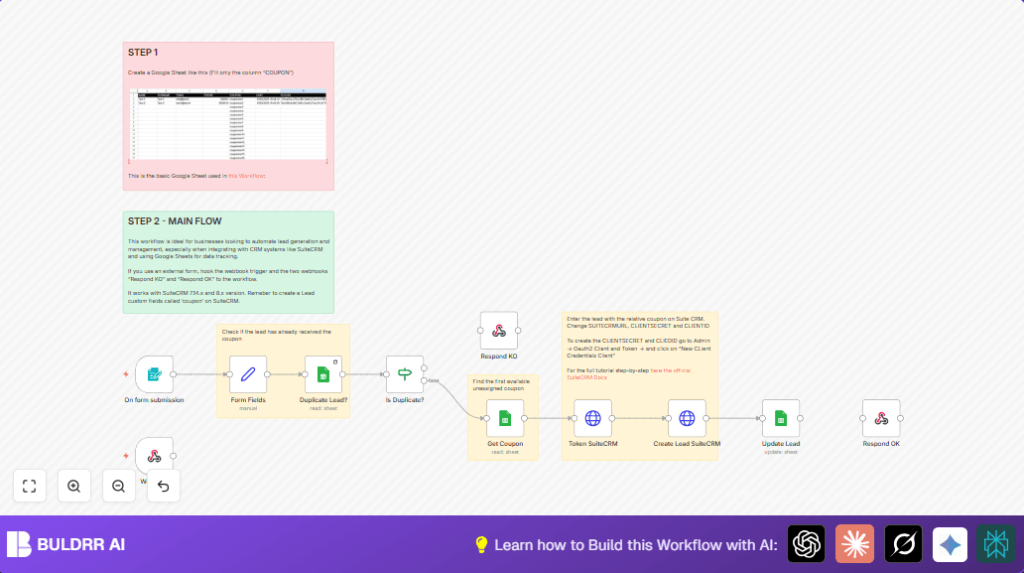
This workflow catches new leads from a form and stops duplicate emails. It assigns a unique coupon from a Google Sheet to each new lead. Then it creates a lead record with coupon info in SuiteCRM. It marks the coupon as used in the sheet and sends back a message if lead creation worked or if the lead was duplicate.
This stops manual typing, cutting hours of work. You get faster lead handling and fewer errors from double coupons.
Tools and Services Used
- n8n: Automation platform to run the workflow.
- SuiteCRM API: Stores leads and coupon info.
- Google Sheets: Holds coupon codes and tracks usage.
- External or Embedded Web Form: Sends lead data (Name, Surname, Email, Phone).
Inputs, Processing Steps, and Outputs
Inputs
- Lead info submitted via web form: Name, Surname, Email, Phone.
- Google Sheets containing coupon codes and lead logs.
Processing Steps
- Catch lead submission from form (Webhook node with form trigger).
- Structure incoming data in a Set node.
- Look for existing lead by Email in Google Sheets to spot duplicates.
- Use If node to check if duplicate.
- If duplicate: send duplication notice back and stop.
- If new lead: pick first available coupon from Google Sheets.
- Get OAuth2 token from SuiteCRM using HTTP Request to authenticate.
- Send new lead and coupon info to SuiteCRM using HTTP POST request.
- Update Google Sheet row marking coupon used and log lead details.
- Send success confirmation back to form system.
Outputs
- New lead created in SuiteCRM with coupon noted.
- Coupon marked as used in Google Sheets.
- Webhook response to original form showing success or duplication.
Who Should Use This Workflow
Anyone who needs to process leads fast and avoid duplicate coupons.
Good for marketing teams handling coupon campaigns with many daily sign-ups.
No coding skills needed, but you use n8n and have a SuiteCRM API setup.
Beginner Step-by-Step: How to Use This Workflow in n8n
Step 1: Import Workflow
- Download the workflow file using the Download button on this page.
- Open n8n editor (cloud or self-host n8n if self-hosted).
- Click the menu and select “Import from File”.
- Load the downloaded workflow JSON file.
Step 2: Configure Credentials and Settings
- Set up Google Sheets credentials in the Google Sheets nodes.
- Enter SuiteCRM API URL, Client ID, and Client Secret in the HTTP Request node for OAuth2 token.
- Update spreadsheet IDs or sheet names if your Google Sheets differ.
- Make sure the form fields in the Webhook node match your real form inputs.
Step 3: Test Workflow
- Send a test submission through your web form.
- Check n8n execution to see if data flows and no errors occur.
- Confirm the lead is created in SuiteCRM and coupon is marked in Google Sheets.
Step 4: Activate for Production
- Enable the workflow toggle in n8n to start processing live submissions.
- Update your form webhook URL if needed to point to the active webhook in n8n.
Customization Ideas
- Assign coupons by location or store by adjusting Google Sheets filters.
- Add more lead fields like campaign source, lead status, or notes in SuiteCRM POST request.
- Use other CRMs by changing SuiteCRM HTTP nodes to match different APIs.
- Validate form emails or phones by adding a Function node before data mapping.
- Send confirmation emails with coupon codes using a Gmail node after lead creation.
Common Issues and Fixes
Duplicate Leads Still Created
Check Google Sheets column name “EMAIL” matches exactly.
Make sure lookup uses same letter case or add lowercase transform.
SuiteCRM API 401 Unauthorized
Verify Client ID and Secret are correct and token request is working.
Ensure OAuth2 client setup in SuiteCRM matches your app.
Coupon Not Assigned or Sheet Not Updated
Confirm Google Sheets credentials in n8n are active and nodes are linked right.
Fix credentials or node connections if missing.
Pre-Production Checklist
- Google Sheets have correct column names and coupon data.
- Test form submits trigger the workflow.
- SuiteCRM OAuth2 credentials verified and API reachable.
- Test lead submission assigns coupon and logs data.
- Backup Google Sheets before running live.
Deployment Guide
Activate workflow toggle in n8n after all tests pass.
Update form webhook URL to n8n webhook node endpoint.
Watch n8n logs for errors or slowdowns and fix credentials or mapping issues.
Summary of Benefits
✓ Saves 2-3 hours daily on data entry and coupon assignment.
✓ Prevents duplicate coupons by checking Google Sheets.
✓ Creates leads automatically in SuiteCRM with coupon info.
✓ Keeps coupon tracking accurate by updating sheet usage.
✓ Sends quick webhook replies to inform form about results.
✓ Reduces errors and speeds up campaign responses.
