

What this workflow does
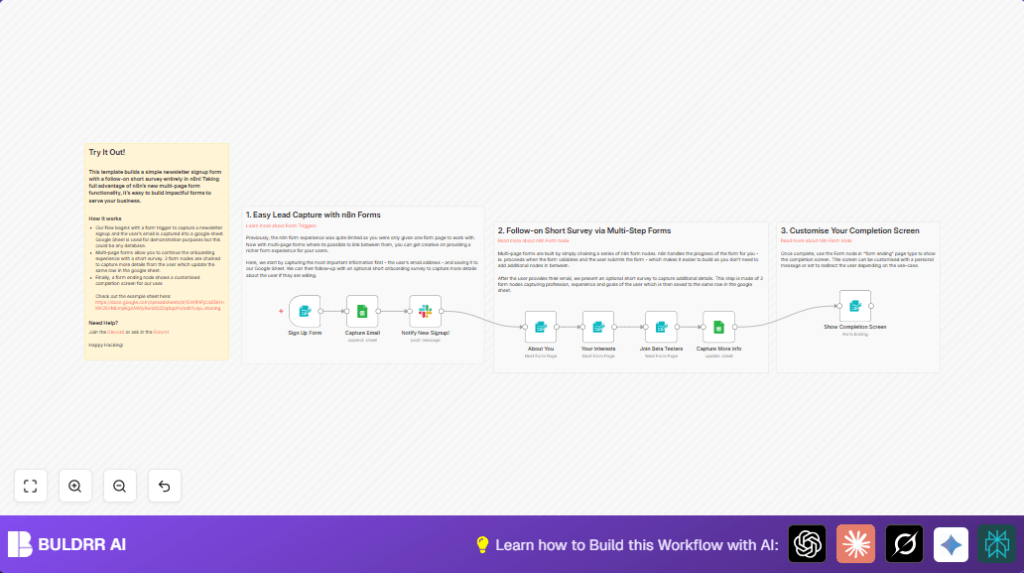
This workflow collects more than just emails during newsletter signup. It captures details like job role, experience, and interests in a few quick steps inside n8n. It stores all data in one Google Sheet row and sends a Slack note when someone signs up. This saves time and helps marketing teams reach people better.
The main problem it solves is stopping marketers from manually chasing subscribers for information after they sign up. Instead, users enter useful info upfront through multi-step forms. The result is richer data without scaring users away with long forms.
Who should use this workflow
Marketing managers or teams who want to collect detailed user info from newsletter signups. People who want to avoid manual follow-ups and get real-time messages about new leads. This works well for startups or any growing company that wants better onboarding and targeted emails.
Tools and services used
- n8n: To create forms and automate data steps inside a workflow.
- Google Sheets: For storing all signup and survey data in one place.
- Slack: To notify the marketing team instantly when new signups happen.
Inputs, Processing Steps, and Outputs
Inputs
- User email from the initial signup form.
- Survey answers including names, country, job details, automation experience, and product interest.
- User preference on joining a beta testers list.
Processing Steps
- Initial email is stored as a new row in Google Sheets.
- Slack sends a notification message naming the new subscriber.
- Multiple follow-up form pages collect extra data step by step.
- Google Sheets row is updated with all extra info using a unique execution ID.
- Final form screen thanks the user and offers next steps.
Outputs
- A fully updated single row in Google Sheets with all subscriber info.
- Slack alert message posted in the chosen channel.
- A completion screen shown to the user after all data is collected.
Beginner step-by-step: How to build this workflow in n8n
1. Import the workflow file
- Download the workflow file using the Download button on this page.
- Open your n8n editor. Click on the menu and select Import from File.
- Choose the downloaded workflow file and import it.
2. Configure credentials and settings
- Add your Google Sheets credentials in the Google Sheets nodes.
- Set the correct Spreadsheet ID and Sheet name where subscriber data will be stored.
- Enter your Slack API key or Bot token in the Slack node credentials.
- Choose the Slack channel name or ID where notifications will go.
- Check the form trigger’s path and make sure it matches your workflow URL you want to use.
3. Test the flow
- Open the form URL from the Form Trigger node in a browser.
- Submit an example email and follow survey steps.
- Watch Google Sheets to see if the new row is added and updated correctly.
- Verify Slack posts the signup alert in your channel.
4. Activate the workflow
- Once testing works, go to the top right of n8n and click Activate.
- The workflow will now run live and collect real subscriber data.
Remember, for extra security or higher volume, consider self-host n8n.
Common failures and how to avoid them
- Google Sheets errors: Usually from wrong OAuth or spreadsheet access. Fix by re-adding Google credentials and checking spreadsheet ID.
- Slack message not sending: Caused by invalid Slack token or wrong channel name. Verify Slack token and test in Slack node.
- Forms not moving forward: Happens if required fields are empty or if webhook IDs do not match across form nodes. Check all form fields and webhook node settings.
- Duplicate rows in Sheets: Often from wrong update key. Ensure the ‘execution_id’ matches the row to update.
Customization ideas
- Add or remove survey questions in form nodes to fit the audience.
- Change Slack notification text to include more details like job level.
- Switch Google Sheets for CRM apps like HubSpot by changing Google Sheets nodes.
- Add conditional logic using IF nodes to show forms based on user answers.
Summary of benefits and results
✓ Saves 5+ hours of manual follow-up per week and avoids missing leads.
✓ Captures rich subscriber data in one place for easier marketing targeting.
✓ Sends instant team notifications for quick responses.
→ Users enjoy a short, multi-step signup without form overload.
→ Marketing teams get unified profiles to improve campaigns and conversion.
