

What This Workflow Does
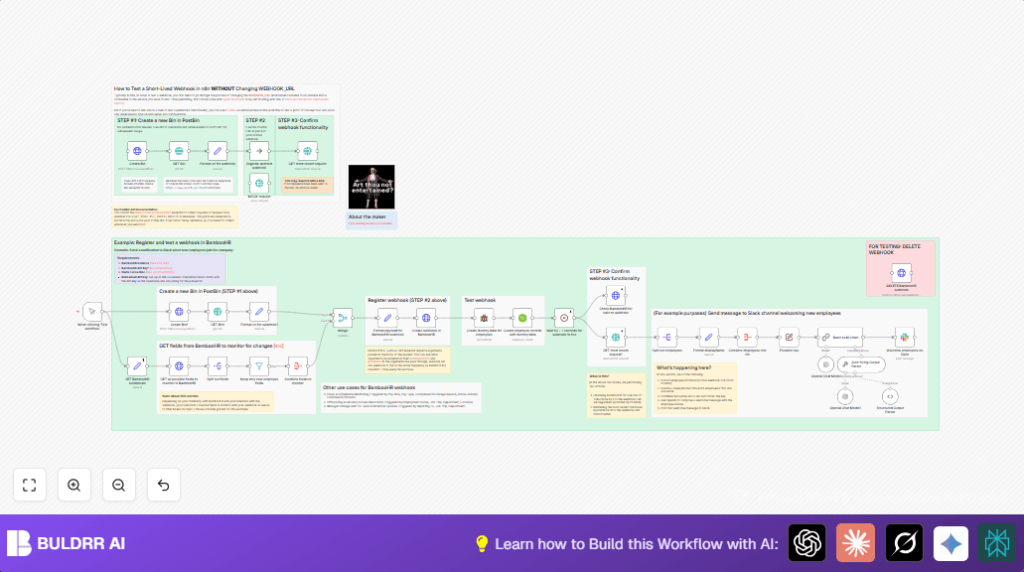
This workflow helps you test BambooHR webhooks fast without changing the WEBHOOK_URL or using tools like ngrok. It makes a temporary URL to catch webhook calls and confirms if BambooHR sends data right. You get automatic employee notifications on Slack with AI-generated messages.
It creates a PostBin bin, registers a BambooHR webhook with that URL, sends fake employee data to trigger events, waits for webhook calls, shows captured data, and posts a welcome message on Slack. This saves time and cuts errors.
Tools and Services Used
- n8n: Runs the workflow automation.
- BambooHR API: Sends and receives employee data.
- PostBin: Creates a temporary public URL to receive webhook requests.
- Slack API: Posts welcome messages to Slack channels.
- OpenAI API: Generates friendly welcome messages with AI.
Inputs → Processing → Output
Inputs
- New BambooHR webhook URL from PostBin.
- Dummy employee data generated for testing.
- BambooHR API key for authentication.
- Slack channel ID and API token for notifications.
- OpenAI API key for message generation.
Processing Steps
- Create a new PostBin bin using Create Bin HTTP node to get
binId. - Format the webhook URL with
binIdin the Format url for webhook node. - Register BambooHR webhook with this URL using Create webhook in BambooHR HTTP node.
- Generate dummy employee data using Create dummy data for employees node.
- Create employees in BambooHR with the dummy data, triggering the webhook.
- Wait 61 seconds with Wait node to avoid API limits.
- Retrieve webhook calls from PostBin using Check BambooHR for calls to webhook and GET most recent request1 nodes.
- Process employee info and create AI prompt for welcome message.
- Use OpenAI Chat Model to generate a personalized welcome message.
- Send the welcome message to Slack with Welcome employees on Slack node.
- Optional cleanup by deleting BambooHR test webhook.
Output
- A working BambooHR webhook that sends employee data to a PostBin URL.
- Confirmation of webhook calls captured for validation.
- Welcome message automatically posted on Slack for new employees.
Who Should Use This Workflow
This workflow is for HR team members, n8n users, and automation engineers who test BambooHR webhooks. It helps anyone who wants fast and easy webhook tests without changing URLs or setting up complex tunnels.
It saves time and avoids errors while giving a clear way to see webhook payloads and send notifications. People starting with BambooHR, Slack, or OpenAI can also benefit.
Beginner Step-by-Step: How to Use This Workflow in n8n Production
Import the Workflow
- Download the workflow file using the Download button on this page.
- In your n8n editor, go to “Import from File” and upload the workflow JSON.
Configure Credentials and Settings
- Add BambooHR API Key credentials in n8n, using Basic Auth with the API key as username.
- Set up your Slack API credentials and verify the target Slack channel ID in the Welcome employees on Slack node.
- If using OpenAI, add your API key and check the prompt in the Basic LLM Chain node for personalization.
- Verify the PostBin service is accessible; no credentials needed.
Test and Activate
- Run the workflow manually once to create the PostBin bin and register the BambooHR webhook.
- Check PostBin for incoming webhook calls and confirm Slack messages are posted.
- Activate the workflow in n8n to run automatically for future tests or production use.
- Optionally, clean up test webhooks using the DELETE BambooHR webhook node.
If self hosting n8n, consider a secure public URL or self-host n8n to fully automate webhooks without PostBin.
Troubleshooting Common Problems
Problem: No binId or PostBin URL 404
Cause: PostBin bin not created or no webhook calls were sent yet.
Solution: Make sure the Create Bin node runs successfully before retrieving data.
Problem: BambooHR Webhook Registration Fails
Cause: Wrong BambooHR API credentials or Basic Auth setup.
Solution: Recheck API key in n8n credentials and use Basic Auth with the API key as username.
Problem: Slack Messages Don’t Appear
Cause: Invalid Slack token or wrong channel ID.
Solution: Confirm Slack node configuration, tokens, and target channel correctness.
Customization Ideas
- Change fields monitored in BambooHR webhook to include extra employee info like department or status.
- Adjust Slack channel or message style to fit company tone or different team groups.
- Use different temporary webhook services instead of PostBin by editing the webhook URL formatting.
- Tweak OpenAI prompt in the Basic LLM Chain node to write messages for events like promotions or exits.
- Increase wait node time to comply with BambooHR rate limits during heavy testing.
Summary
✓ Saves time by automating BambooHR webhook tests using PostBin temporary URLs.
✓ Avoids changing webhook URLs or using tunnel tools.
✓ Shows captured webhook data clearly.
✓ Sends AI-generated welcome messages on Slack automatically.
→ Makes webhook validation fast and less error-prone.
→ Enables easy integration for HR and automation users.
