

What This Automation Does
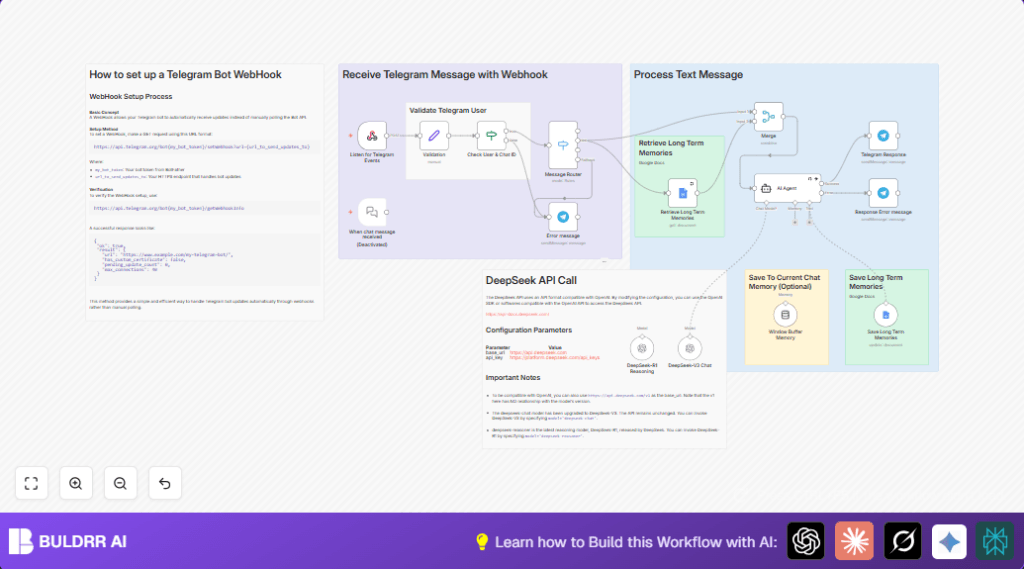
This workflow listens for Telegram messages, checks if the sender is allowed, and sorts message types like text, audio, or images.
It then fetches past chat memories from Google Docs and combines them with the new message.
An AI chat model from DeepSeek makes replies based on the full context.
New useful info found is saved back to Google Docs.
Users get smart answers that remember history and fit their needs.
This stops repeated questions and saves hours spent looking back at old chats.
Errors are handled with polite Telegram messages.
Who Should Use This Workflow
This workflow fits anyone managing Telegram groups or channels who wants quick, smart replies with remembered context.
It helps people tired of manual chat memory checks and wanting better personalization.
Tools and Services Used
- Telegram Bot API: Receives user messages.
- Google Docs API: Stores and retrieves chat memories.
- DeepSeek AI Agent: Processes messages and generates replies using long-term memory.
- n8n Automation Platform: Orchestrates the workflow nodes.
How The Workflow Works: Input → Process → Output
Input
- Telegram messages sent to the bot.
- User details to check authorization.
Processing Steps
- Webhook nodes catch the Telegram messages.
- Validation nodes check if user ID and name match authorized users.
- Message Router separates text, audio, or images for handling.
- Google Docs node reads stored memories.
- Merge node adds memory content to current message.
- AI Agent node runs DeepSeek model to create replies using full context.
- Google Docs node appends new memory text with timestamps.
- Telegram node sends the AI reply back.
- Error handling nodes send polite messages if issues happen.
Output
- Telegram messages with smart, personalized replies.
- Updated Google Docs with new conversation memories.
Beginner Step-by-Step: How to Use This Workflow in n8n
Step 1: Import the Workflow
- Download the workflow JSON file from this page.
- Open the n8n editor and choose “Import from File”.
- Select the downloaded workflow file and load it.
Step 2: Add Credentials
- Provide the Telegram Bot API token in the Telegram nodes.
- Connect Google Docs account in the Google Docs nodes with OAuth2.
- Set API key for DeepSeek AI Agent node.
Step 3: Update IDs and Settings
- Check and edit authorized user IDs and names in the Validation node.
- Change Google Docs document ID to your memory document.
Step 4: Test the Workflow
- Send a message to your Telegram bot and confirm it replies properly.
- Make sure memories load, responses are relevant, and errors handled politely.
Step 5: Activate for Production
- Turn on the workflow toggle in n8n editor.
- Ensure the webhook URL remains reachable for Telegram.
- If you self host n8n, keep the server running for reliable operation. See self-host n8n.
Edge Cases and Error Handling
- If unauthorized users message the bot, a polite refusal reply is sent.
- Messages types other than text, audio, and images are routed to error messages.
- If Google Docs fails to load memory, AI replies without past context.
- General errors trigger friendly Telegram notifications without technical details.
Customization Ideas
- Allow more users by adding their IDs to the Validation node.
- Add support for videos or documents in the Message Router node.
- Switch AI models in the AI Agent node to DeepSeek “deepseek-reasoner” for different AI behavior.
- Store memories in Google Sheets or a database instead of Google Docs.
Summary and Results
✓ The workflow gives clear, remembered responses on Telegram.
✓ It cuts down hours spent on manual chat checks.
✓ Users get replies that fit their conversation history.
→ More engagement and less repeated questions happen.
→ The AI keeps learning for future chats.
