

What This Workflow Does
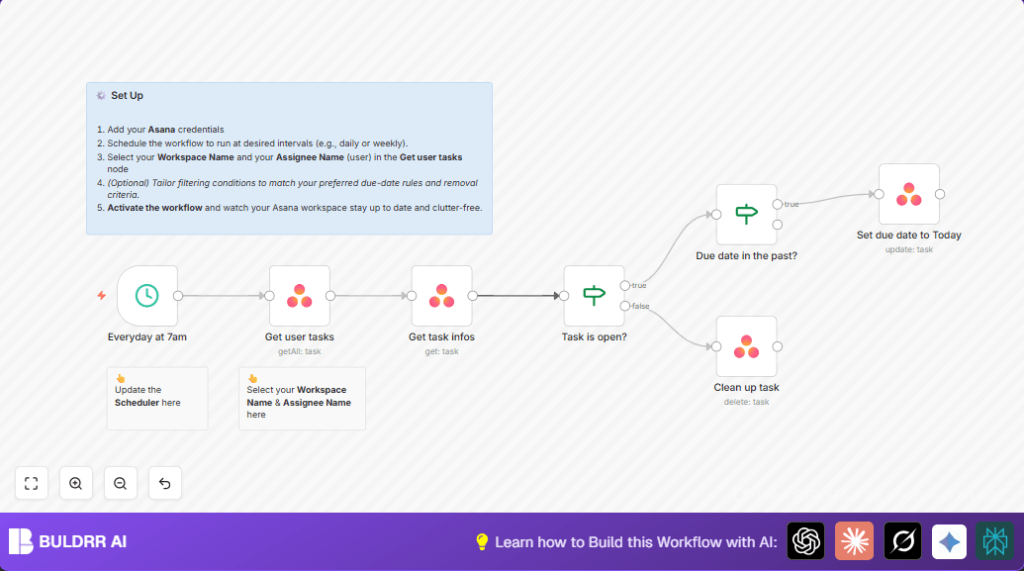
This workflow automatically finds all completed tasks assigned to a user in Asana that were completed today. It also checks if there are any open tasks with due dates in the past. Then, it reschedules those overdue tasks to today and deletes the completed tasks. This saves time by reducing manual work and keeps Asana projects clean every morning at 7 am.
Who Should Use This Workflow
This is for anyone using Asana who manages lots of tasks daily. If tasks pile up unfinished with old due dates or completed tasks clutter the workspace, this helps clean and update the task list automatically. Project managers or team leads can rely on this to save time and avoid missing deadlines.
Tools and Services Used
- n8n Workflow Automation: Runs and manages the task actions automatically.
- Asana API: Accesses and changes task data like due dates and completion status.
- Scheduling in n8n: Triggers the workflow every day at 7:00 AM.
Inputs, Processing, and Outputs
Inputs
- User Asana workspace ID and assignee ID.
- API credentials for Asana inside n8n.
Processing Steps
- The workflow runs daily at 7 am.
- Fetches all tasks assigned to the user that were completed today or later.
- Gets detailed info of each task to check status and due date.
- Filters only open (not completed) tasks.
- Checks if the task’s due date is before today to find overdue tasks.
- Updates overdue tasks by setting their due date to today.
- Deletes completed tasks to clean the workspace.
Outputs
- Overdue tasks rescheduled to today’s date.
- Completed tasks deleted from the workspace.
- A clean and updated daily task list in Asana.
Beginner Step-by-Step: How to Use This Workflow in n8n
Importing the Workflow
- Download the workflow file using the Download button on this page.
- Open the n8n editor.
- Go to the menu and select “Import from File”.
- Choose the downloaded workflow file and import it.
Configuration After Import
- Open the nodes and enter your Asana API Key credentials.
- Update the Asana workspace ID and assignee ID in the Get user tasks node.
- Check and update any other IDs if needed, like task IDs, channels, or emails.
Testing and Activation
- Run the workflow manually once to test and verify tasks are fetched and updated correctly.
- Fix any errors or incorrect IDs if needed.
- Activate the workflow by toggling it on in the top right corner of n8n.
- The workflow will now run automatically every morning at 7 am.
For self-hosting needs, consider resources for self-host n8n to keep control over your data.
Customization Ideas
- Change the trigger time from 7 am to any preferred hour in the Everyday at 7am scheduling node.
- Add filters in the task retrieval for more users or different workspaces by changing the assignee or workspace IDs.
- Add extra conditions to not delete tasks if they have certain tags or properties.
- Include notification nodes like Slack or Email after changes for team updates.
Troubleshooting Common Issues
- Issue: No tasks found in Get user tasks node.
Cause: Wrong workspace or assignee ID or expired API Key.
Fix: Check and update workspace and assignee IDs and refresh API Key credentials. - Issue: Workflow fails to delete tasks.
Cause: Missing delete permission in Asana API settings.
Fix: Make sure the Asana user has task delete permission enabled.
Pre-Production Checklist
- Confirm that Asana API credentials are correctly linked in n8n.
- Verify the workspace and assignee IDs in task retrieval nodes.
- Test workflow with a few tasks before full use.
- Check that the schedule matches the desired run time.
- Backup important tasks before starting, especially where deletion is involved.
Summary
→ Automatically finds and cleans up completed tasks daily.
→ Reschedules overdue open tasks to today’s date.
✓ Saves around 15-30 minutes of daily manual task management.
✓ Keeps Asana workspace organized and reduces missed deadlines.
✓ Runs at a set time every morning without user attention.
