
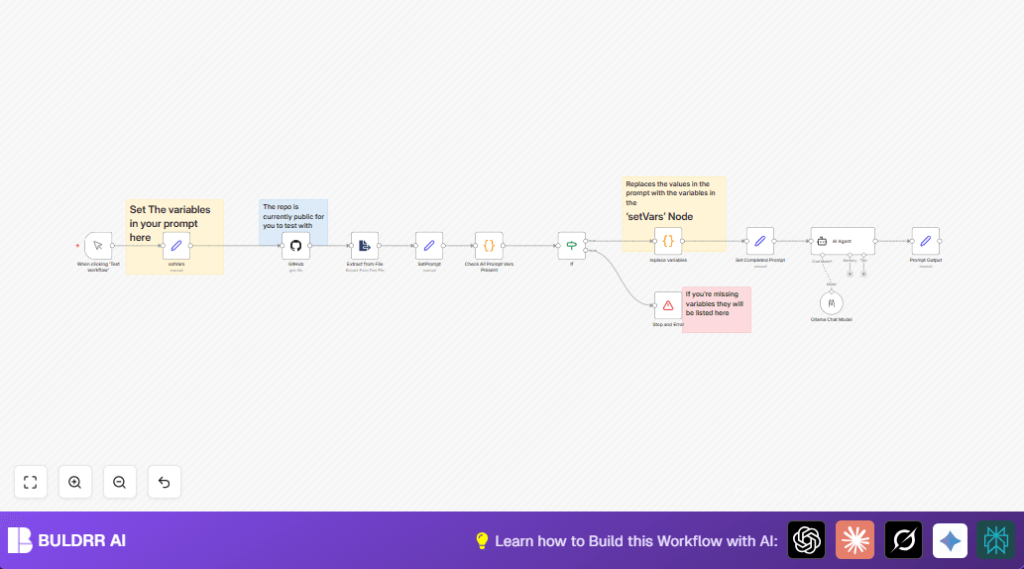

What this workflow does
This workflow helps load AI prompt templates from a GitHub repo and fills in variables automatically.
It solves long, error-prone manual editing and speeds up AI prompt creation.
The output is a ready-to-use prompt sent to AI for content generation.
Who should use this workflow
If you need to generate AI prompts often with placeholders to fill,
and want to stop copying and pasting manually,
this workflow fits well.
It suits content creators, digital marketers, or teams handling AI prompts regularly.
Tools and services used
- n8n platform: To build and run the automation workflow.
- GitHub API: To fetch prompt text files from repository.
- Ollama AI and Langchain: For AI prompt processing.
Inputs, processing steps, and output explained
Inputs
- GitHub account and repo info: Includes owner, repository name, file path, and prompt file name.
- Variables for prompts: Company name, product, features, sector, etc.
Processing Steps
- Fetch prompt file: Downloads prompt markdown file using GitHub node dynamically.
- Extract text: Converts file content into plain prompt text.
- Detect placeholders: Finds all {{variable}} parts inside prompt text.
- Check variables: Compares placeholders to supplied variables to find missing ones.
- Replace placeholders: Substitutes missing placeholders with actual values given.
- Stop on errors: Halts if any required variable is missing with detail message.
- Send to AI: Passed final prompt to AI agents for output generation.
Output
The result is a finalized AI prompt with all needed variables filled.
This prompt is ready for SEO keyword research, content ideas, or other AI-driven tasks.
Beginner step-by-step: How to use this workflow in production
Import the workflow
- Download the workflow file by clicking the Download button on this page.
- Open your n8n editor where you build automations.
- Use the Import from File option to bring the workflow in.
Configure credentials and settings
- Add or update your GitHub API credentials with proper access rights.
- Insert Ollama AI account credentials for AI processing.
- Update any IDs, emails, channels, folders, or tables inside nodes if needed.
- Check and modify the setVars node variables like company name, product, and features to match your use case.
Test and activate
- Run the workflow manually once to check if it works fine.
- Look for errors and fix missing variables or wrong paths.
- When tests pass, activate the workflow for regular use.
- Consider replacing manual trigger with Webhook node or schedule node to automate.
- For users self hosting n8n, visit self-host n8n for hosting info.
Edge cases and failure points
- If the GitHub node returns 404 or no content,
check the repo owner, repo name, path, and filename in setVars. - If missing prompt variables appear,
make sure all placeholders in the prompt file have matching keys in setVars. - If variable replacement is not happening,
verify keys in the replacement code exactly match placeholder names.
Customization ideas
- Add more variables inside the setVars node.
- Make repo, path or prompt file dynamic by using webhook input or external parameters.
- Switch Ollama AI with other n8n supported AI services like OpenAI.
- Change placeholder syntax from
{{ var }}to other formats in the code nodes. - Send AI outputs to other apps like Google Sheets or email after processing.
Code snippets to help activate the workflow
Check All Prompt Vars Present code node:
// Get prompt text
const prompt = $json.data;

// Extract variables inside {{ }} dynamically
const matches = [...prompt.matchAll(/{{(.*?)}}/g)];
const uniqueVars = [...new Set(matches.map(match => match[1].trim().split('.').pop()))];

// Get variables from the Set Node
const setNodeVariables = $node["setVars"].json || {};

// Check if all required variables are present in the Set Node
const missingKeys = uniqueVars.filter(varName => !setNodeVariables.hasOwnProperty(varName));

// Return false if any required variable is missing, otherwise return true
return [{
  success: missingKeys.length === 0,
  missingKeys: missingKeys
}];
Replace variables code node:
const prompt = $('SetPrompt').first().json.data;

const variables = {
  company: $('setVars').first().json.company,
  features: "Awesome Software",
  keyword: "2025-02-07"
};

const replaceVariables = (text, vars) => {
  return text.replace(/{{(.*?)}}/g, (match, key) => {
    const trimmedKey = key.trim();
    const finalKey = trimmedKey.split('.').pop();
    return vars.hasOwnProperty(finalKey) ? vars[finalKey] : match;
  });
};

return [{
  prompt: replaceVariables(prompt, variables)
}];
Summary of benefits and outcome
✓ Saves hours by automating prompt loading and variable filling.
✓ Stops manual copy-paste errors.
✓ Produces consistent, error-free AI prompts.
✓ Works with popular AI tools like Ollama and Langchain.
→ Get final AI prompts ready for SEO or content generation faster.
