

What This Workflow Does
This workflow automates calling and scheduling leads for sales teams.
It solves the problem of manual tracking, late follow-ups, and lost leads.
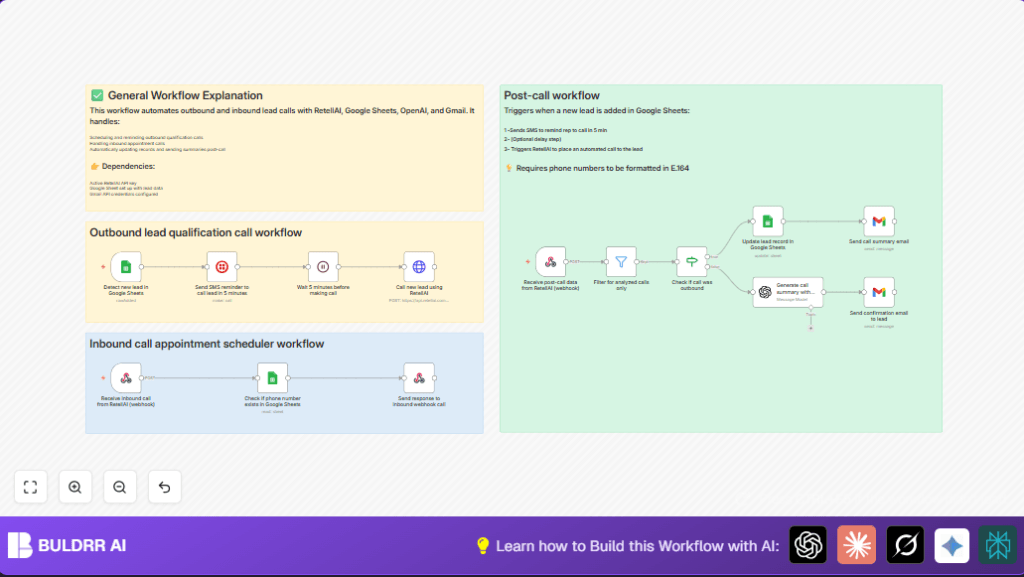
The system detects new leads, sends reminders, places calls, updates records, and sends summaries automatically.
This saves time and helps close deals faster.
Tools and Services Used
- RetellAI API: Makes and receives phone calls.
- Google Sheets: Stores lead data and updates results.
- Twilio: Sends SMS reminders to sales reps.
- Gmail: Sends call summary emails.
- OpenAI: Analyzes call transcripts to make summaries.
- n8n: Automates and connects all these tools.
Inputs, Processing, and Outputs
Inputs
- New lead data added to Google Sheets (name, phone, UUID).
- Inbound call data captured by webhook.
- Call transcripts and analysis from RetellAI.
Processing Steps
- Trigger watches for new rows in Google Sheets.
- SMS reminder sent to rep via Twilio.
- Wait 5 minutes to allow rep preparation.
- Outbound call placed using RetellAI API call.
- Inbound calls received by webhook and verified against Google Sheets.
- Call results and transcripts received from RetellAI using post-call webhook.
- Filter events to process only analyzed calls.
- Update lead status in Google Sheets with qualification results.
- OpenAI creates call summary from transcript.
- Email summary sent internally via Gmail.
- Optional confirmation email sent to the lead.
Outputs
- Sales reps get SMS reminders on new leads.
- Leads get qualification calls and scheduled appointments.
- Updated Google Sheets with real-time call outcome.
- Sales team receives AI-generated call summaries by email.
- Leads get confirmation emails when applicable.
Beginner Step-by-Step: How to Use This Workflow in n8n
Import and Setup
- Download the workflow file using the Download button on this page.
- Open the n8n editor and use “Import from File” to add the workflow.
- Add required credentials or API Keys for RetellAI, Google Sheets, Twilio, Gmail, and OpenAI.
- Update Google Sheets IDs, email addresses, phone numbers, or table details as needed.
- Copy and paste the exact code or prompts for HTTP requests and OpenAI nodes when prompted.
Testing and Activation
- Run the workflow once to test by adding a sample lead to Google Sheets.
- Check that the SMS reminder is sent and the RetellAI call is triggered.
- Verify inbound webhook URLs and updates in Google Sheets.
- Confirm OpenAI generates a call summary and emails send correctly.
- When all works, toggle the workflow to active for production use.
Consider hosting n8n yourself for better control and uptime. Visit self-host n8n for help.
Customization Ideas
- Change SMS text in the Twilio node to your own message.
- Adjust the Wait node time to give more or less delay before calling.
- Add extra lead data fields like source or priority in Google Sheets and update post-call.
- Edit the prompt text in the OpenAI node to get different call analysis views.
- Change email recipients in the Gmail nodes to notify different people.
Troubleshooting Common Problems
- Google Sheets trigger not firing: Check sheet ID and event type set to “rowAdded.”
- Twilio SMS not sent: Verify “From” number is SMS-enabled and lead phone format is correct (E.164).
- RetellAI call fails: Confirm API key is valid and HTTP request body is formatted correctly.
- OpenAI summary missing: Check API quota and prompt formatting for errors.
Pre-Production Checklist
- Test adding lead row in Google Sheets triggers SMS.
- Confirm Twilio phone and message settings.
- Send test API call in HTTP request node for RetellAI.
- Check inbound and post-call webhooks receive data correctly.
- Validate Google Sheets lookup and update find the right rows.
- Test OpenAI node with sample transcript inputs.
- Send test emails via Gmail nodes to ensure correct content.
- Backup Google Sheets before going live.
Deployment Guide
After testing, activate the workflow in n8n by toggling the top-right switch.
Watch execution logs to check no errors happen.
Keep API Keys safe and renew when needed.
Consider self-host n8n to run this workflow securely with better uptime.
Summary of Results
→ Saves hours of manual lead calling and tracking.
→ Prevents lead follow-ups from being missed.
→ Updates lead qualification data automatically in sheets.
→ Sends SMS reminders to reps to call fast.
→ Creates AI-generated call summaries for better insights.
→ Sends clear emails to teams and leads summarizing calls.
→ Enables faster, smarter sales qualification and scheduling.
