

What This Automation Does
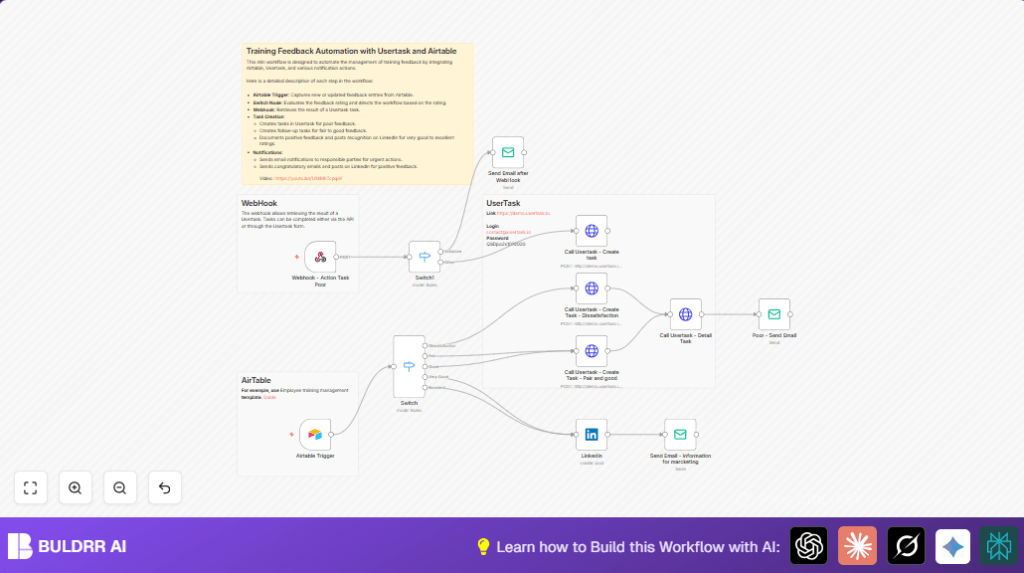
This workflow watches new and updated training feedback in Airtable fast.
It sorts feedback by rating, then acts right away.
If feedback is poor, it makes a task in Usertask to fix issues fast.
For good feedback, it posts on LinkedIn to share success.
It also sends emails to the right people, so nobody misses important info.
This saves hours weekly and helps improve training fast.
Tools Used
- Airtable: Stores and triggers on feedback data.
- Usertask API: Creates and tracks task instances.
- LinkedIn API: Posts positive messages on company page.
- SMTP Email Service: Sends notification emails.
- n8n Automation Platform: Runs the workflow and connects everything.
Inputs, Processing Steps, and Outputs
Inputs
- New or updated feedback entries from Airtable.
- Feedback ratings (1 to 5 stars).
- Webhook data about task status from Usertask.
Processing Steps
- Detect feedback changes with Airtable Trigger.
- Use Switch node to check the rating category.
- Create Usertask tasks for poor feedback via HTTP Request node.
- Listen for task completion updates with Webhook node.
- Send notification emails after webhook responses with Email Send node.
- Post positive feedback on LinkedIn using LinkedIn node.
- Create tasks for fair and good feedback similarly.
- Retrieve task details with HTTP Request node after creation.
Outputs
- Automated tasks in Usertask for urgent feedback follow-up.
- LinkedIn posts sharing training achievements.
- Email alerts keeping teams updated.
Beginner step-by-step: How to use this workflow in n8n for production
Step 1: Import Workflow
- Download the workflow file using the Download button on this page.
- Open n8n editor where you want this automation.
- Choose “Import from File” and upload the downloaded workflow.
Step 2: Configure Credentials and IDs
- Add or select Airtable OAuth2 credentials in n8n.
- Add Usertask API Key and Client ID in the HTTP Request node headers.
- Set LinkedIn OAuth2 credentials in the LinkedIn node.
- Enter SMTP email credentials for Email Send node.
- Update Airtable Base ID and Table ID if needed.
- Update email addresses, webhook URLs, and any paths or endpoints as needed.
Step 3: Test and Activate
- Run the workflow manually or submit test feedback in Airtable.
- Verify tasks appear in Usertask and emails send correctly.
- Check LinkedIn posts if positive feedback is simulated.
- Activate the workflow toggle to enable automatic running.
- Adjust the Airtable Trigger polling interval for better responsiveness.
For any self hosting n8n needs, visit self-host n8n to learn more.
Customizations ✏️
- Change the rating numbers in the Switch node to decide what feedback triggers tasks or posts.
- Modify task descriptions and instructions in HTTP Request nodes for clarity.
- Add more email recipients or replace emails with Slack by adding new nodes.
- Change LinkedIn post text and tags to better match your company style.
- Adjust trigger polling speed to balance API load and update speed.
Troubleshooting ????
- Webhook not triggering? Check webhook URL is correct and public.
- 401 on HTTP Requests? API keys may be wrong or missing.
- Emails not sending? Verify SMTP login and open ports.
Pre-Production Checklist ✅
- Confirm Airtable base and table IDs work with your account.
- Test Usertask API keys manually first.
- Send test POST request to webhook and confirm receipt.
- Send test email using configured SMTP.
- Check LinkedIn OAuth by posting draft message.
- Run workflow from sample feedback of all rating types.
Deployment Guide
After tests pass, activate the workflow in n8n.
Set the Airtable Trigger poll time as needed.
Monitor workflow runs for errors.
Watch emails, LinkedIn, and Usertask for proper updates.
Summary
✓ Saves hours by auto-processing feedback entries.
✓ Sends task alerts to fix bad feedback fast.
✓ Shares wins on LinkedIn to boost morale.
✓ Notifies teams with email to keep all informed.
✓ Uses Airtable, Usertask, LinkedIn, email inside n8n.
→ This automation clears feedback tasks.
→ It helps improve training quality quicker.
→ Makes feedback management simple and less error-prone.
