

What This Automation Does
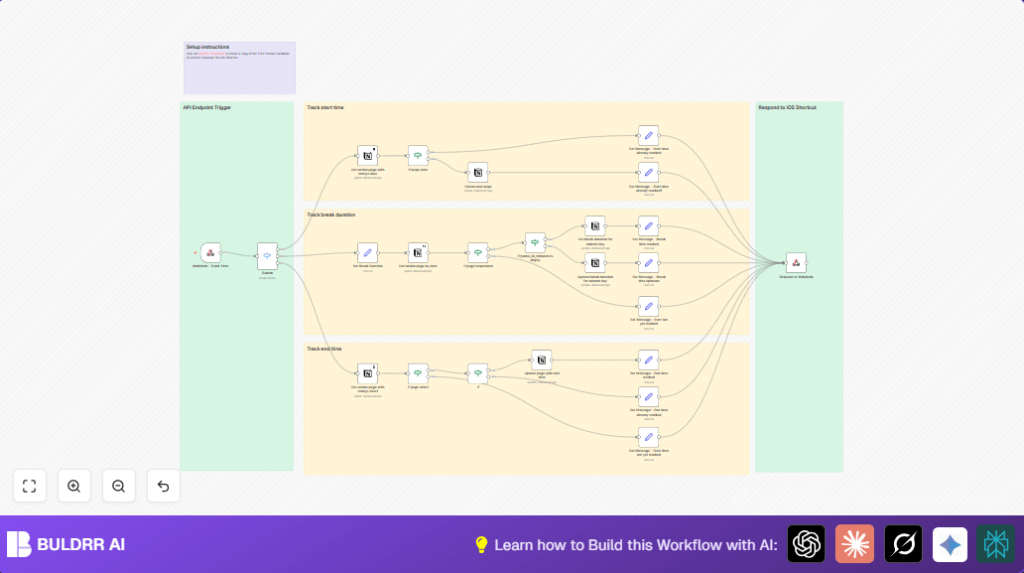
This workflow tracks your work start time, breaks, and end time automatically in a Notion database.
It solves the problem of manual time logging errors and saves time spent on daily entries.
The workflow updates one daily record with exact timestamps for start, break durations, and end times.
The result is accurate and automatic time tracking inside Notion, triggered via webhook calls from apps like iOS Shortcuts.
It listens for commands to start work, pause for breaks, or finish the work session.
It then creates or updates records in Notion accordingly, preventing duplicates and errors.
Tools & Services Used
- n8n: Workflow automation platform that runs the process.
- Notion API: Access and modify the Time Tracker database.
- Webhook client (optional): Such as an iOS Shortcut to send POST commands (start, break, end) with optional break duration.
Inputs, Processing, and Outputs
Inputs
- Webhook POST requests with a parameter called
method: values can be ‘start’, ‘break’, or ‘end’. - When on break, an optional
durationparameter in minutes indicating break length.
Processing Steps
- A Webhook node receives POST requests and passes data to a Switch node that routes by
methodvalue. - Each route uses a Notion – Get All Pages node filtered by today’s date to find or create today’s record.
- For a ‘start’ command, it checks if the day’s start time exists. If not, it creates a new page with the current timestamp. If yes, it sends a message stating start already tracked.
- For ‘break’ commands, it updates or adds the total break duration field based on the input duration parameter.
- For ‘end’ commands, it verifies if start is tracked and end time is not yet set, then updates End timestamp. Otherwise, it returns an error or confirmation message.
- Each branch ends with a Respond to Webhook node that sends back a clear text confirmation message.
Outputs
- Accurate Notion daily time tracking entries with Date, Start Time, Break Duration, and End Time updated correctly in one record.
- Confirmation messages sent back via webhook response like “Start time tracked.” or “End time already tracked.”
Beginner Step-by-Step: How to Use This Workflow in n8n Production
Step 1: Import the Workflow File
- Download the workflow file using the Download button on this page.
- Inside your open n8n editor, click on “Import from File.”
- Select and upload the workflow file you downloaded.
Step 2: Add Your Credentials
- Go to the Credentials section in n8n.
- Create or update the Notion API credential; enter your Notion API Key.
- Link the Notion credential to all Notion nodes in the workflow.
Step 3: Configure Specific Fields
- Check the filter in all Notion – Get All Pages nodes; update the database ID if needed.
- If you use emails, channels, or tables in other nodes, update those accordingly.
Step 4: Test the Workflow
- Trigger the webhook manually using Postman, curl, or an iOS Shortcut with a sample POST request.
- Verify you get confirmation responses.
- Check that the Notion database receives correct time entries.
Step 5: Activate for Production
- Set the workflow status to Active inside n8n.
- Ensure the workflow stays running to listen for webhook events.
- Optionally, consider self-host n8n to ensure uptime and reliability.
Edge Cases and Error Handling
- The workflow checks if a start time already exists before creating a new page to avoid duplicates.
- It prevents setting an end time before having a recorded start time.
- If a break duration is missing or invalid, it handles the update gracefully without crashing.
- Duplicate end times or start times cause informative confirmation messages without overwriting.
Customization Ideas
- Add project or task properties in the Notion database and update setting nodes to track more details.
- Integrate Slack or email notifications after start, break, or end events using corresponding n8n nodes.
- Expand webhook inputs to include fields such as task description or location for richer logs.
- Modify filters and database design to support multiple users by adding a user ID attribute.
Summary
✓ Automates daily work time tracking inside Notion with webhook commands.
✓ Prevents manual logging errors and duplicate entries.
✓ Saves time by updating one daily record accurately.
✓ Sends clear confirmation messages to trigger apps.
✓ Checks and handles edge case errors like missing start time.
✓ Easy to import, configure, test, and run in n8n.
