

What this workflow does
This workflow helps users edit images using AI to fill or fix selected parts automatically.
It solves the problem of slow and hard manual editing.
The final result is a ready-to-use edited image sent straight back to the user.
The main tool is an interactive online editor combined with the FLUX API to do smart image filling.
Users upload images, mark areas to change, then the AI fills those masked parts.
Who should use this workflow
This workflow is for people who do image editing but want to save time and avoid mistakes.
It works well for designers, artists, content creators who need faster image retouching.
No deep technical skills are needed to run it.
Anyone with basic computer use and a modern browser can use the editor interface.
Tools and services used
- n8n platform: Automates workflow and connects API calls.
- FLUX API: Does the AI image fill or inpainting.
- Konva.js: JavaScript library powering the image mask and brush editor.
- img-comparison-slider: Displays before/after images to users.
- HTTP Webhook: Receives user requests from the editor web page.
Input, processing steps, and output
Inputs
- User uploads or selects an image from default samples.
- User draws mask areas to edit and enters a text prompt describing desired change.
- User configures parameters like AI steps and guidance strength.
Processing steps
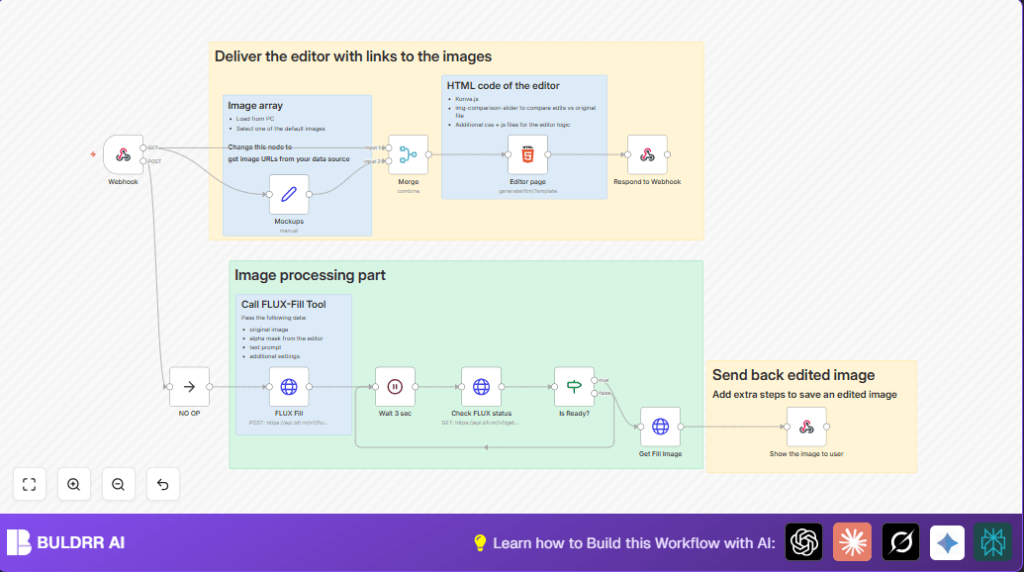
- Webhook node receives the user submission.
- Merge node combines default images and user inputs to initialize the editor.
- Editor page shows interactive editing interface.
- FLUX Fill (HTTP Request node) sends user images, mask, and prompt to FLUX API.
- Wait 3 sec node pauses to allow processing.
- Check FLUX status (HTTP Request node) polls API to check if image fill task is finished.
- Is Ready? node decides to keep polling or continue.
- Get Fill Image (HTTP Request node) fetches the final edited image.
Output
- The workflow responds with the filled image in binary format.
- The user can view, download, or reuse the edited image directly in the browser.
Beginner step-by-step: How to use this workflow in n8n
Import the workflow
- Download the workflow file using the Download button on this page.
- Open the n8n editor where you want to run the workflow.
- Use “Import from File” to load the workflow into the editor.
Configure credentials and settings
- Add your FLUX API Key in the FLUX Fill HTTP Request node HTTP Header Authentication.
- Update any image URLs or IDs in the Mockups (Set) node, if needed.
- Change any email addresses, folder paths, or channel IDs if applicable.
- Check or adjust AI parameters like steps or guidance to fit your needs.
Test and activate
- Run the workflow once manually or by using the webhook URL.
- Ensure the editor page loads with images.
- Submit an example image edit and confirm the output is correct.
- When satisfied, activate the workflow to keep it running and serving requests.
- If using self-hosted n8n, refer to self-host n8n for help.
Customizing the workflow
- Change images by editing URLs in the Mockups node.
- Adjust AI parameters inside the FLUX Fill node for different output styles.
- Add more brushes or tools by editing the HTML in the Editor page node.
- Improve prompts by adding a step for AI prompt enhancement before calling FLUX API.
- Save results automatically by adding HTTP Request nodes to cloud storage after receiving the final image.
Edge cases and errors to watch for
- Make sure the FLUX API Key is correct to avoid authorization errors.
- The base64 image and mask data must be trimmed properly without data prefixes.
- Check JSON formatting of image arrays to prevent editor load failures.
- Validate polling logic in Is Ready? node to avoid infinite loops.
- Set the correct response
Content-Typeheader to avoid browser image display errors.
Summary of benefits and results
✓ Saves many hours of manual editing time.
✓ Reduces mistakes from repetitive manual tasks.
✓ Gives users an easy, interactive editor in their browser.
✓ Integrates AI image fill automatically without extra software.
→ Produces ready-to-use edited images fast.
