
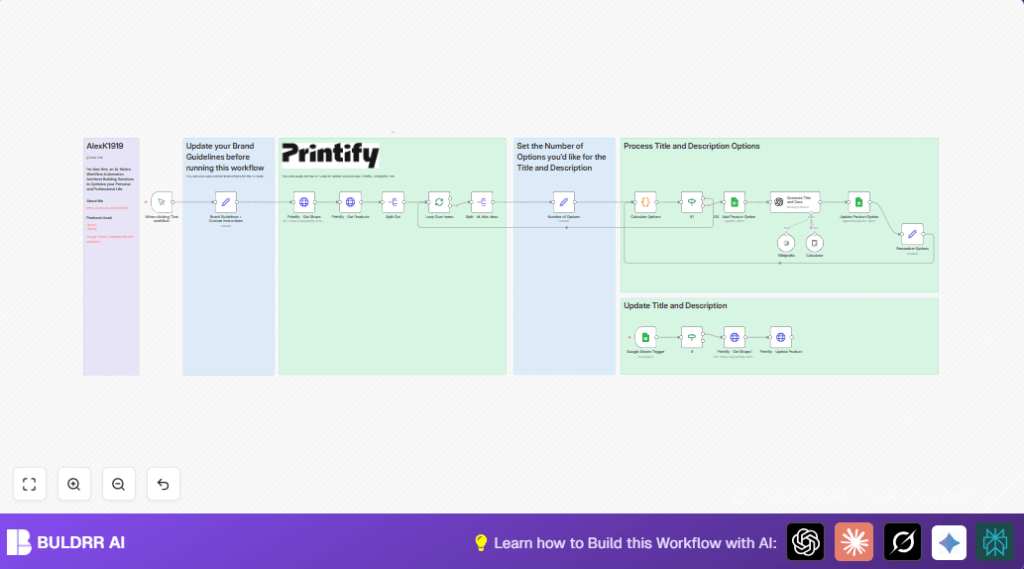

What This Automation Does
This workflow automatically gets shops and products from Printify.
It rewrites product titles and descriptions using AI for seasonal campaigns.
Then it updates the products back on Printify with new content.
It helps save time and reduce errors when updating many products.
The result is fresh, engaging, and consistent product listings ready for multichannel sales.
Who Should Use This Workflow
This helps ecommerce store owners who use Printify to sell custom products.
It’s good for people who update product info often, like for Christmas sales.
The workflow helps avoid manual rewriting and speeds up marketing updates.
Tools and Services Used
- Printify API: Gets shops and products, updates product info.
- OpenAI GPT-4o-mini: Writes new product titles and descriptions.
- Google Sheets: Stores and triggers updates, tracks progress.
- n8n: Automates the workflow steps and connections.
How the Workflow Works
Inputs
- Printify shops and products data via API.
- Brand details and seasonal instructions set by the user.
- User actions in Google Sheets to trigger uploads.
Processing Steps
- Fetch all shops using Printify API.
- Loop through each shop’s products.
- Use OpenAI GPT to rewrite titles and descriptions.
- Log updates in Google Sheets.
- Use Google Sheets trigger for final product update.
- Update Printify product with new data.
Output
Updated product titles and descriptions live on Printify.
Logged info and processing status in Google Sheets.
Beginner Step-by-Step: How to Use This Workflow in n8n
Step 1: Download and Import
- Download the workflow file using the Download button on this page.
- Open the n8n editor where you work on automation.
- Click Import from File and select the downloaded workflow file.
Step 2: Add Credentials and Update Settings
- Go to n8n credentials and add your Printify API Key under HTTP Header Auth.
- Add your OpenAI API Key in the OpenAI node credentials.
- If needed, update Google Sheets IDs, sheet names, and columns to match your actual sheet.
- Check the Set node named “Brand Guidelines + Custom Instructions” and update brand name, tone, and instructions.
Step 3: Test the Workflow
- Use the Manual Trigger at the start to run a full test.
- Watch the nodes execute and check outputs for errors.
- Adjust credentials or settings if any step fails.
Step 4: Activate for Production
- Enable the Google Sheets Trigger node to watch for upload signals.
- Save and activate the workflow so it runs automatically.
- Now, when “upload” column updates to “yes” in the sheet, updates will be pushed live.
If using self hosting n8n, check self-host n8n for more information.
Common Edge Cases and Failure Points
- If Printify API calls say “Unauthorized,” check API Key in credentials.
- Empty OpenAI results usually mean missing or incorrect prompt variables.
- If Google Sheets trigger does not fire, confirm correct sheet and column settings.
- Skipping generation if number_of_options is zero prevents errors downstream.
Customizations Ideas
- Change the “number_of_options” in the Set node to generate more variations.
- Update the “custom_instructions” string for various campaign themes.
- Replace Printify API endpoints with other similar services by editing HTTP Request nodes.
- Select other OpenAI models for different cost or quality balances.
- Add timestamps or notes in Google Sheets for better tracking.
Summary and Results
✓ Automatically gather and update Printify shop products with AI-generated new titles and descriptions.
✓ Reduce hours of manual editing into minutes.
✓ Keep product info fresh, brand-consistent, and tailored for multiple sales channels.
✓ Track all changes and statuses in Google Sheets for easy monitoring.
✓ Easily customize generation amount, brand voice, and campaign focus.
