

What This Automation Does
This workflow helps get keyword data fast without mistakes from typos.
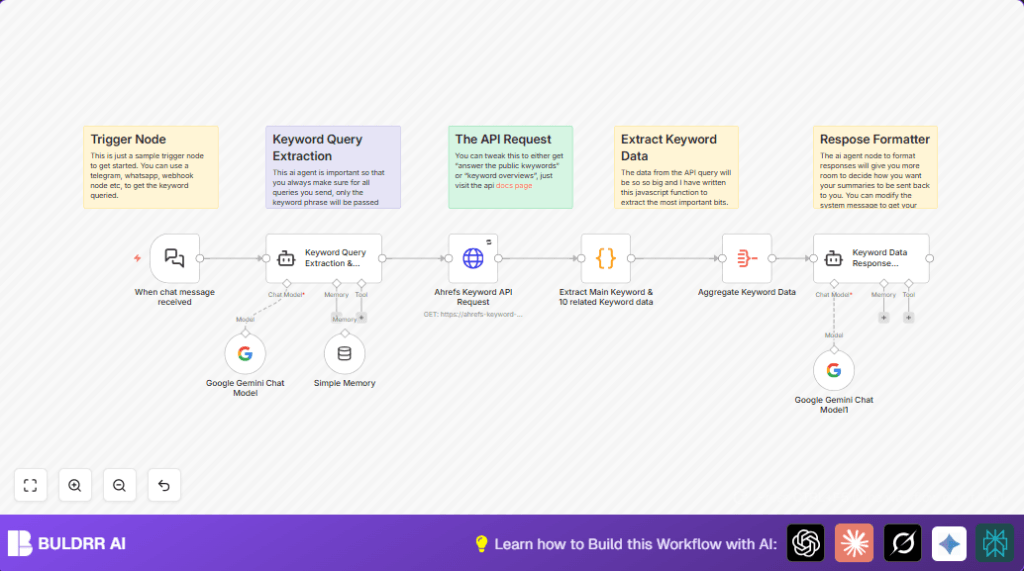
It takes words from chat messages, cleans them, fixes spelling, then asks Ahrefs API for keyword info.
It shows search numbers, competition info, and price costs in a neat summary.
This saves many hours and stops data confusion.
Who Should Use This Workflow
Anyone who wants quick and clear keyword research results.
Especially good for digital marketers who handle many SEO tasks and hate long data lists.
Tools and Services Used
- Telegram Bot API: Receives user messages.
- Google Gemini (PaLM) API: Fixes spelling and finds main keyword.
- Ahrefs Keyword API via RapidAPI: Gives detailed keyword stats.
- n8n automation tool: Runs and links all these steps together.
Beginner Step-by-Step: How to Use This Workflow in n8n
Step 1: Download and Import
- Download the workflow file using the Download button on this page.
- Open n8n editor where you want to use this.
- Click “Import from File” and select the downloaded workflow.
Step 2: Add Your Credentials and API Keys
- Fill in Google Gemini (PaLM) API Key in the Google Gemini Chat Model node credentials.
- Put RapidAPI key and host info in the HTTP Request node headers.
- Update any chat webhook URLs or channel IDs for your chat system if needed.
Step 3: Test the Workflow
- Send a test keyword as a chat message to check if the Webhook node receives it.
- Watch each node’s output inside n8n UI to make sure keywords clean well and data flows.
Step 4: Activate for Production
- Switch the workflow ON from the main n8n canvas screen.
- Make sure your chat service points to the webhook URL.
- Monitor the workflow for any errors at startup.
If doing self hosting of n8n, visit self-host n8n to help set up.
Inputs, Processing, and Outputs Explained
Inputs
- Chat messages with keywords or search phrases enter via the chat trigger node.
- These messages can be from Telegram, WhatsApp, or any webhook-compatible chat app.
Processing Steps
- The Google Gemini AI model node extracts exactly one clean keyword from the message.
- The HTTP Request node calls the Ahrefs API with that keyword to get data.
- The Code node parses the API response, pulling main and related keyword metrics like volume and cost.
- The Aggregate node combines all keyword entries into one dataset.
- The LangChain Agent node formats the data into a clearly readable summary.
Output
- A neat text summary with main keyword stats and related keywords details.
- Summary includes search volume, competition level, and CPC values.
- This formatted text can be sent back to chat or used elsewhere.
Common Errors and What to Look For
- Incorrect API keys in the HTTP Request node cause no data returns.
- Vague AI prompts in the Google Gemini node may output extra text or no keyword.
- Wrong JSON data paths in the Code node can give blank or wrong results.
- Webhook not connected properly means messages never start the workflow.
Check these points when troubleshooting.
Customization Ideas
- Change chat input by replacing Chat Trigger with another webhook or Telegram node.
- Switch between multiple Ahrefs API endpoints in the HTTP Request node URL for more data types.
- Add more keyword metrics in the Code node by editing JavaScript extraction.
- Update the LangChain Agent prompt to change the summary style or data depth.
- Add conversational memory nodes for multi-turn chat keyword help.
Summary of Benefits and Results
✓ Saves many hours per SEO session.
✓ Fixes typing errors automatically.
✓ Gets accurate, detailed keyword data instantly.
✓ Gives friendly summaries easy to read and use.
✓ Requires less manual data sifting.
