

What This Workflow Does
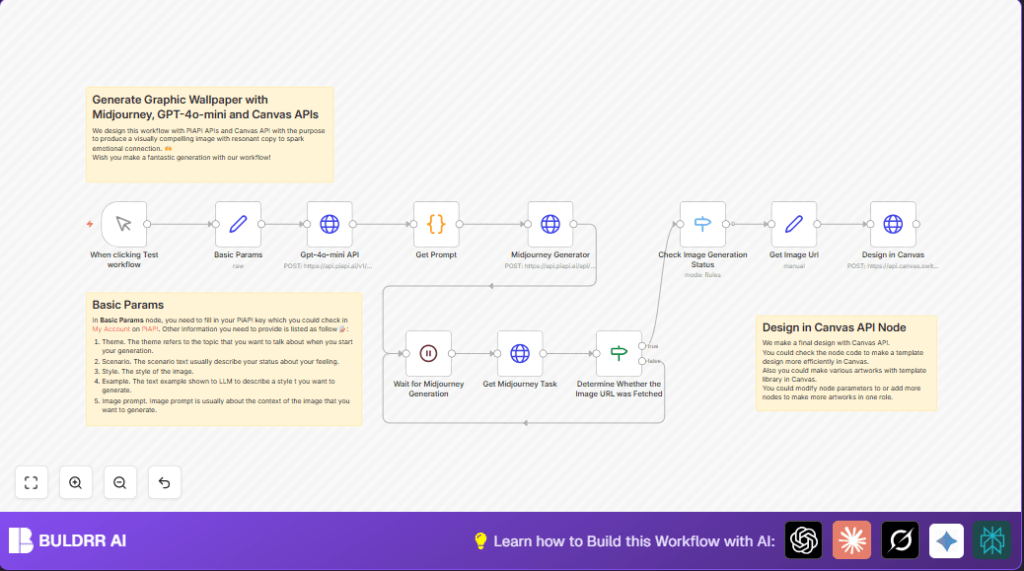
This workflow automates creating graphic wallpapers by using three APIs: Midjourney, GPT-4o-mini, and Canvas.
It solves the problem of spending many hours manually writing prompts, managing image creation, and assembling designs.
The result is ready-to-use, visually attractive wallpapers with meaningful text, made faster and easier.
How the Workflow Works: Inputs, Process, and Output
Inputs
- Theme: The main idea or emotion for the wallpaper, e.g. “Hope”.
- Scenario: A short description that adds context, e.g. “Confused about the future of AI agents”.
- Style: Visual styles like “Cinematic Grandeur, Sci-Tech Aesthetic, 3D style”.
- Examples: Sample text to guide GPT’s tone.
- Image Prompt: A detailed template describing the image to generate.
- API Key: Your PiAPI key for calling Midjourney and GPT-4o-mini APIs.
Processing Steps
- Parameters set in a Set node called Basic Params.
- HTTP Request node to GPT-4o-mini generates refined text prompt based on inputs.
- Code node combines GPT text with base image prompt to form final image prompt.
- HTTP Request node sends final prompt to Midjourney for image creation.
- Wait node pauses workflow while Midjourney works.
- Workflow polls Midjourney status via a repeating HTTP Request node until image is ready.
- If and Switch nodes check if image generation succeeded or failed.
- Set node extracts image URLs after completion.
- Final HTTP Request node sends image and prompt text to Canvas API to create designed wallpaper.
Output
The output is a polished digital wallpaper image combining AI-generated art and styled text ready for social media or use.
Who Should Use This Workflow
This workflow is for digital artists, content creators, and social media managers.
Anyone who wants to save time on creating wallpapers while keeping a consistent style and message.
No deep coding or prompt-writing skills needed.
Tools and Services Used
- PiAPI: Provides access for GPT-4o-mini and Midjourney APIs.
- Midjourney API: Generates images from text prompts.
- GPT-4o-mini API: Creates smart, nuanced text prompts.
- Canvas API: Combines text and image into a graphic wallpaper.
- n8n: Runs the workflow to orchestrate all steps.
Beginner Step-by-Step: How to Use This Workflow in Your n8n Production
Step 1: Import the Workflow
- Download the workflow file using the Download button on this page.
- Go inside your n8n editor.
- Click on Import from File and select the downloaded workflow.
Step 2: Configure API Keys and IDs
- Open the Set node named Basic Params.
- Enter your PiAPI API key exactly into the
x-api-keyfield. - Update any other IDs like email, folder paths, or channel names if present.
Step 3: Test the Workflow
- Save the workflow.
- Click on the manual trigger node.
- Run the workflow and watch the output to ensure images are created without errors.
Step 4: Activate for Production
- Once confirmed, activate the workflow in n8n.
- Optionally, replace the manual trigger with a scheduled trigger for automatic runs.
- If self hosting n8n, see self-host n8n for setup ideas.
Common Edge Cases and Failures
- Missing or wrong API Key: Causes API calls to fail immediately.
- Improper loop on Midjourney status check: Workflow hangs waiting or loops forever.
- Incorrect JSON structure for Canvas API: Causes failures in design creation.
- Bad code syntax in Code or prompt nodes: Breaks prompt generation or task submission.
Customization Ideas
- Resize Wallpapers: Change the size values in Design in Canvas node JSON.
- Change Art Style: Edit the
stylefield in Set node Basic Params. - Add More Text Elements: Extend Canvas JSON to add more text or shapes.
- Schedule Wallpaper Creation: Use a Cron trigger to automate creation daily or weekly.
- Create Multiple Prompts: Modify Code node for variations to generate many wallpapers at once.
Key Code Snippet for Combining Prompts
This JavaScript inside the Code node Get Prompt inserts GPT-generated text into the image prompt.
const image_prompt = $('Basic Params').first().json.image_prompt;
const show_prompt = $input.first().json.choices[0].message.content;
const prompt = image_prompt.replace(/'xxx'/, `'${show_prompt}'`);
return { show_prompt, prompt };
Summary of Benefits and Results
✓ Saves up to 8 hours writing and managing wallpaper creation.
✓ Avoids manual prompt writing and multi-tool juggling.
✓ Produces consistent, emotional wallpapers automatically.
→ Workflow inputs set theme and style, processes prompts and images, outputs ready wallpapers.
→ Easy to import and configure in n8n, no advanced coding needed.
