

What this workflow does
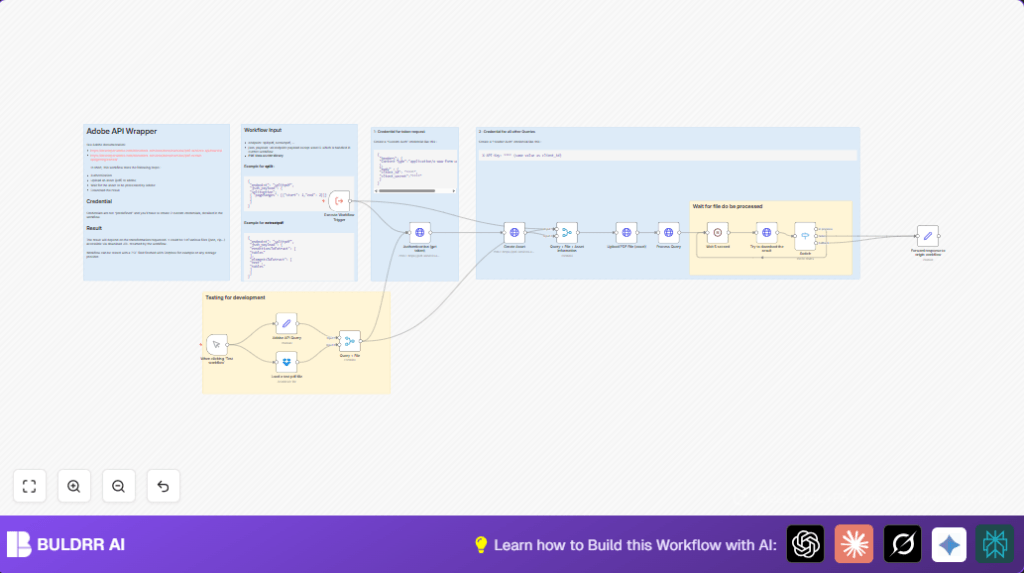
This workflow automates PDF processing using Adobe PDF Services API and Dropbox within n8n.
It solves the problem of slow, error-prone manual data extraction from PDFs.
The result is fast extraction of tables and text ready for analysis.
Tools and services used
- Adobe PDF Services API: For PDF authentication, upload, and data extraction.
- Dropbox: Source of PDF files via OAuth 2.0.
- n8n nodes: Manual Trigger, Set, Merge, HTTP Request, Wait, Switch.
Inputs, processing steps, and output
Inputs
- PDF file from Dropbox storage.
- Extraction parameters specifying tables and text.
Processing steps
- Authenticate with Adobe API to get OAuth token.
- Create an asset on Adobe platform for the PDF.
- Upload the PDF binary data to Adobe asset.
- Trigger PDF content extraction via Adobe API.
- Poll Adobe API status with wait intervals to avoid overload.
- Download the processed extraction result automatically.
Output
- Extracted tables and text data from PDF as JSON or ZIP files.
- Data ready for use in spreadsheets or further workflows.
Beginner step-by-step: How to use this workflow in production inside n8n
Step 1: Import the workflow
- Download the workflow file using the Download button on this page.
- Open n8n editor where you want to run this automation.
- Use the Import from File option to upload the downloaded workflow file.
Step 2: Add required credentials
- Enter Adobe PDF Services API credentials using Custom Auth and Header Auth as explained.
- Insert Dropbox OAuth2 credentials to allow access to files.
Step 3: Update workflow variables
- Change Dropbox PDF file path if needed.
- Update any IDs, tokens, or parameters inside Set or HTTP Request nodes as needed.
Step 4: Test and activate
- Run the workflow once manually using the Manual Trigger.
- Verify the extracted data downloads correctly and matches expectations.
- After testing, activate the trigger node for continuous or scheduled runs.
For users running self-host n8n, ensure credentials and node permissions are configured correctly for smooth execution.
Customization ideas
- Change extracted elements by editing the JSON in the Set node to include “images” or other Adobe-supported types.
- Adjust the wait time in the Wait node to balance API polling frequency and speed.
- Use other cloud storage sources by replacing the Dropbox node with Google Drive or FTP nodes.
- Make extraction endpoint dynamic by setting it from an input form or webhook to select “splitpdf”, “combinepdf”, or other operations.
Common issues and troubleshooting tips
Authentication fails with 401 Unauthorized
Cause: Incorrect API Key or expired token.
Fix: Check your Adobe API credentials in the Custom Auth node and refresh tokens if needed.
Upload fails with 400 Bad Request
Cause: Missing or wrong upload URI from asset creation step.
Fix: Verify the Create Asset node returns a valid uploadUri and use it properly in the upload step.
Processing hangs endlessly at “in progress”
Cause: Large files or slow Adobe service response.
Fix: Increase wait time in the Wait node or check Adobe service status.
Pre-production checklist
- Check Adobe API token can be fetched manually.
- Validate Dropbox file is accessible with correct path.
- Test workflow with small PDF to confirm flow works.
- Confirm all HTTP Request nodes have correct URLs, headers, and payloads.
- Verify Switch node branches correctly on status values.
Summary and impact
✓ Saves 3-4 hours per PDF batch by automating extraction.
✓ Reduces human errors from manual copying.
✓ Provides ready-to-use extracted text and tables for analysis.
→ Streamlines document processing workflow inside n8n with Adobe API.
→ Enables easy scaling by removing manual bottlenecks.
