
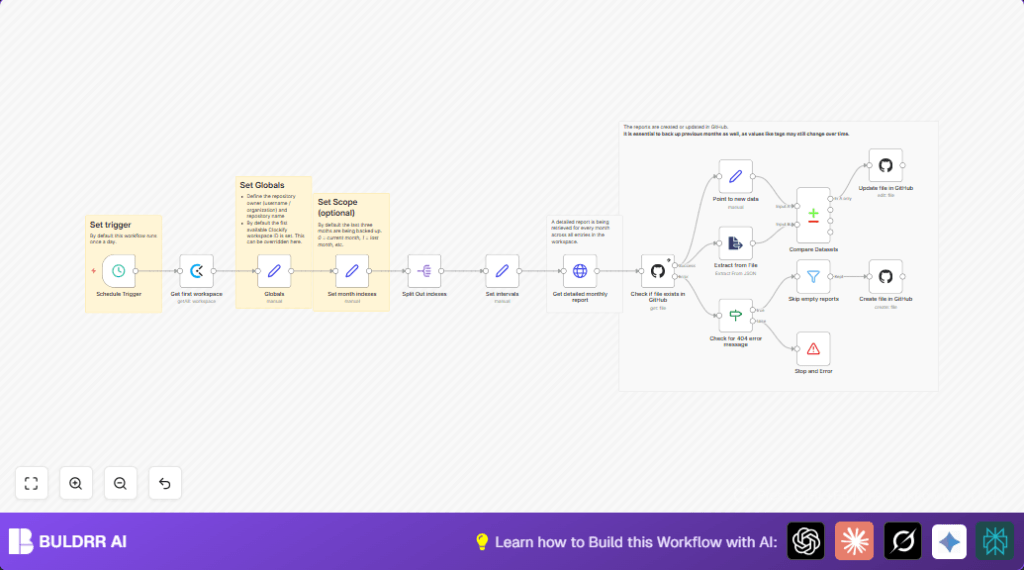

What this workflow does
This workflow automatically backs up monthly detailed reports from Clockify to a GitHub repository daily. It solves the problem of manual exporting, renaming, and uploading reports, preventing data loss and errors. The result is a reliable, up-to-date backup of time tracking data stored in GitHub.
The workflow runs every day to fetch Clockify workspace data, generate reports for the last three months, check if report files exist on GitHub, compare new report data with existing backups, and create or update files as needed.
Who should use this workflow
Project managers or teams who manually export Clockify reports for backups and want to save time daily. It is useful for companies needing accurate, historical records of tracked hours for audits or billing.
This workflow fits users with basic knowledge of n8n and access to Clockify and GitHub with required API credentials.
Tools and services used
- Clockify API: Provides workspace IDs and detailed monthly time reports in JSON format.
- GitHub API: Manages backup files by checking, creating, or updating JSON reports in the repository.
- n8n workflow automation platform: Orchestrates scheduled triggers and API calls to automate the backup process.
How the workflow works (Input → Process → Output)
Inputs
- Clockify API key to access workspace and reports.
- GitHub API key with repo write permissions.
- Settings for GitHub repository owner and name.
- Date information to generate reports for the current and previous two months.
Processing Steps
- Schedule daily trigger at 5 AM starts the workflow.
- Retrieve first Clockify workspace ID for API calls.
- Store global variables like workspace ID and GitHub repo info.
- Define three month indexes [0,1,2] meaning current month and previous two.
- Split month indexes to process separately in sequence.
- Calculate start and end dates for each month and build report file name (e.g., detailed_report_2024-06.json).
- Request detailed report JSON from Clockify API for each month.
- Check if report file exists in GitHub repository.
- If file exists, extract existing JSON data for comparison.
- Compare new report data with existing data to detect any changes.
- Skip empty reports with no time entries.
- Create new file or update existing file on GitHub if there are changes.
- Stop workflow with error message if API requests fail or data is missing.
Outputs
- JSON report files in GitHub repository for three months, named with consistent date-encoded filenames.
- Accurate historical backups stored in version-controlled GitHub.
- Error messages logged in workflow if issues occur.
Beginner step-by-step: How to run this workflow in n8n
1. Import Workflow
- Download the provided workflow file from this page.
- In the n8n editor, click on the menu and select Import from File.
- Choose the downloaded workflow file to load it.
2. Configure API Credentials
- Add your Clockify API Key credential in n8n’s credential manager.
- Add your GitHub API Key credential with write access to the target repository.
- In the Globals node, update the repository owner and repository name fields to match your GitHub repo.
- Verify the workspace ID is set automatically, or update manually if needed.
3. Test the Workflow
- Manually run the workflow once in n8n to check if the reports create in GitHub properly.
- Look at the execution logs for any errors or failures and fix configuration issues.
4. Activate the Workflow
- After successful test, activate the Schedule Trigger node to make it run daily at 5 AM automatically.
- Monitor the workflow executions periodically to confirm backups are working as expected.
Optional: For more control or privacy, consider self-host n8n to run this workflow on your own server or VPS.
Edge cases and failures
If the GitHub report file path is wrong or the file doesn’t exist, the workflow may error when checking existence. Check and fix repo owner/name in the Globals node.
Clockify API calls may fail if API keys are invalid or expired, causing no reports to be fetched. Refresh Clockify API credentials if needed.
If GitHub API token lacks write permission, file creation or updates will fail. Make sure the token scopes include write access for the repository.
Customization ideas
- Increase backup range by changing month indexes array to more months, like [0,1,2,3,4].
- Change the Schedule Trigger node settings to run at different times or frequencies.
- Switch GitHub repository owner or name in the Globals node for backups in another repo.
- Adjust Get detailed monthly report node’s pageSize parameter to fetch larger report pages.
- Add notification nodes (email or Slack) after GitHub updates for alerting backup status.
Summary of results
✓ Saves 3+ hours monthly by automating report export.
✓ Prevents manual errors and data loss in backups.
✓ Stores time tracking reports reliably in GitHub with version control.
✓ Automatically runs daily to keep reports up-to-date.
✓ Provides error stopping and messages for troubleshooting.
