

What this workflow does
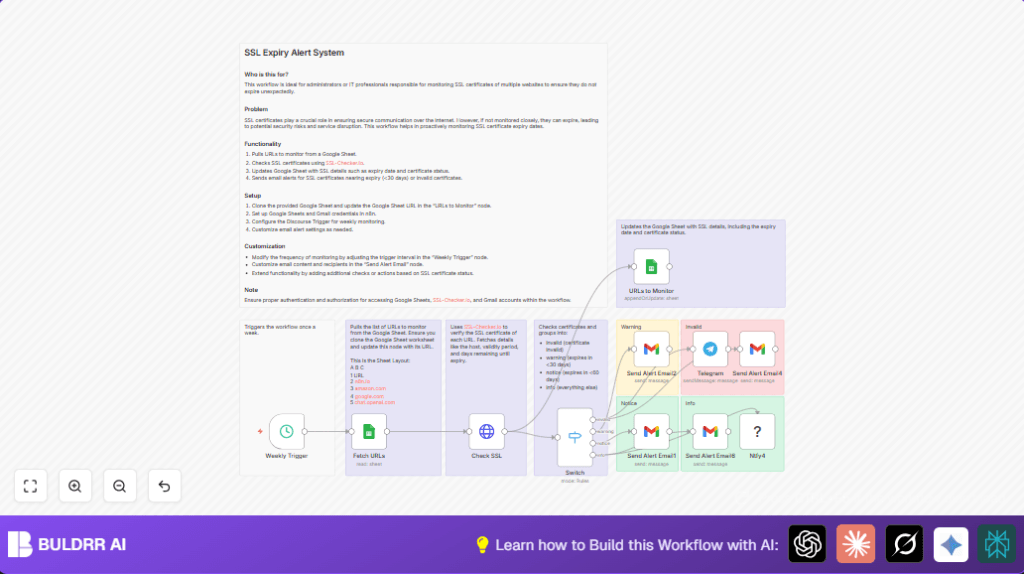
This workflow automatically checks SSL certificate expiry for many website URLs weekly.
It gets the URLs from Google Sheets and checks them with the SSL-Checker.io API.
It then updates the sheet with SSL status and sends email and Telegram alerts based on severity.
This saves time and prevents missed certificate expiration problems.
The workflow helps keep websites safe by alerting in time for certificate renewal.
It divides SSL results into invalid, warning, notice, and info categories.
Tools and services used
- Google Sheets: Stores the list of URLs and updated SSL info.
- SSL-Checker.io API: Retrieves SSL certificate status and expiry data.
- n8n Automation Platform: Runs scheduled workflow with connected nodes.
- Gmail: Sends alert emails to stakeholders.
- Telegram Bot API: Sends instant messaging alerts (optional).
Inputs, processing steps, and outputs
Inputs
- Weekly trigger from Schedule Trigger node.
- List of website URLs from Google Sheets document.
Processing steps
- Fetch the URLs using a Google Sheets node configured with correct spreadsheet and sheet.
- For each URL, send a GET request via HTTP Request node to SSL-Checker.io API.
- Clean URL formats by removing http(s):// and trailing slashes before API call.
- Receive SSL certificate data including validity, expiry date, and days left.
- Update the original Google Sheet with new SSL data using another Google Sheets node, matching rows by ID.
- Use Switch node to classify certificates into four categories: invalid, warning (≤30 days), notice (≤60 days), and info (others).
- Route alerts accordingly: send emails via Gmail nodes with custom subjects and messages per category.
- Optionally, send instant Telegram alerts for invalid certificates through Telegram node.
Outputs
- Updated Google Sheet showing current SSL certificate status for each URL.
- Email alerts for invalid, warning, notice, and info levels.
- Telegram alerts for critical (invalid) certificates, if configured.
Beginner step-by-step: How to use this workflow in n8n production
Step 1: Import the workflow
- Open the n8n editor.
- Click the Download button on this page to get the workflow file.
- In n8n, select Import from File and choose the downloaded workflow.
Step 2: Add credentials and update configuration
- Add Google Sheets credentials with access to your sheets.
- Add Gmail OAuth2 credentials authorized to send emails.
- Add SSL-Checker.io API key if needed.
- Optionally, add Telegram Bot API credentials for instant alerts.
- Edit Google Sheets node to set your spreadsheet ID and sheet names if different.
- Change Gmail nodes email recipients if needed.
Step 3: Test the workflow
- Run the workflow manually to check if all nodes work correctly.
- Fix any errors such as authorization or URL issues.
Step 4: Activate the workflow
- After successful test, toggle the workflow active switch.
- The Schedule Trigger starts the weekly checks automatically.
- Monitor executions in the n8n dashboard for any failures.
If needed, use self-host n8n for running n8n on a server securely.
Common workflow issues and edge cases
- HTTP 400 or empty SSL-Checker.io API response: Usually caused by URLs still having http/https or trailing slashes. Using JavaScript replace in the HTTP node is critical.
- Google Sheets update failures: Check sheet and document IDs and permissions. OAuth2 credentials must allow editing.
- Gmail emails not sent: Verify Gmail API enabled and OAuth tokens valid. Reauthorize if needed.
- API limits exceeded: Monitor SSL-Checker.io and Gmail API usage quotas. Consider reducing frequency or splitting batches.
Customization ideas
- Change Switch node thresholds for days_left to adjust warning timing.
- Add SMS alerts with Twilio node for wider notifications.
- Modify the Schedule Trigger to run daily or monthly.
- Update Gmail recipients in all Gmail nodes.
- Expand SSL API request to gather more certificate info and store in Google Sheets.
Summary
✓ Automatically checks SSL certificates weekly for multiple URLs.
✓ Updates Google Sheets with detailed SSL status.
✓ Sends categorized Gmail and Telegram alerts based on certificate health.
✓ Saves time and prevents website downtime from expired certificates.
✓ Easy to set up by importing and configuring in n8n editor.
