
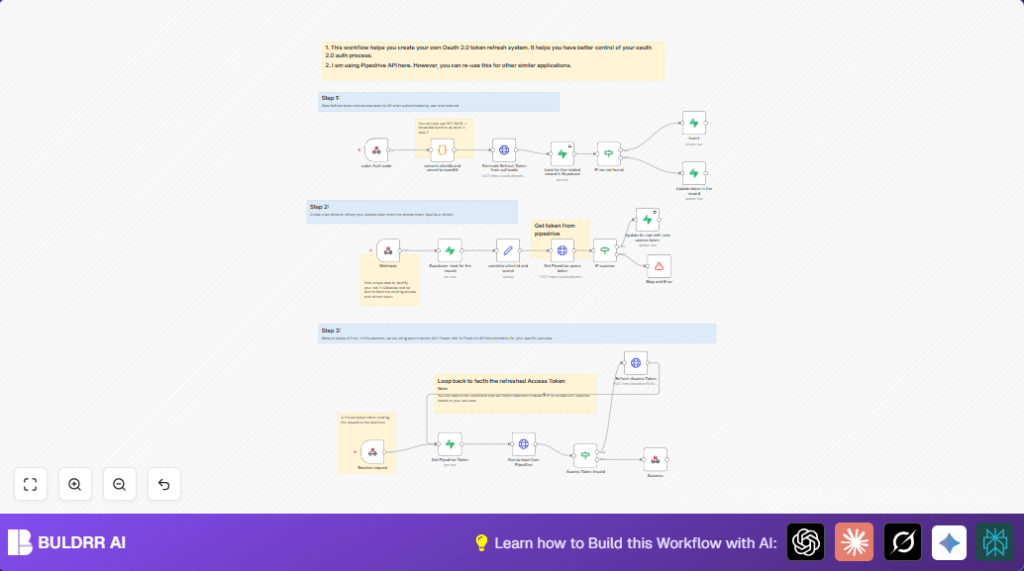

What This Workflow Does
This workflow helps get and refresh Pipedrive API tokens automatically.
It stops API calls from failing because of expired tokens.
The main result is steady access to Pipedrive contacts without manual work.
The system does this by storing and updating tokens safely, then using them for API calls.
Who Should Use This Workflow
People who use Pipedrive with OAuth 2.0 and want to avoid manual token renewals.
Good for anyone needing reliable API access without stopping for token problems.
Tools and Services Used
- n8n: The automation platform running the workflow.
- Supabase: Where access and refresh tokens are stored securely.
- Pipedrive API: The CRM system providing contact data.
- Webhook with Basic Auth: To securely receive requests.
Beginner Step-by-Step: How to Use This Workflow in n8n
Import Workflow
- Download the workflow file by clicking the Download button on this page.
- Go to the n8n editor and choose “Import from File”.
- Select the downloaded file to load the workflow inside n8n.
Setup Credentials
- Add your Supabase credentials in the Supabase nodes.
- Provide your Pipedrive OAuth
client_idandclient_secretwhere needed.
Configure IDs and URLs
- Update any IDs such as
AppIdorPlatformaccording to your app. - Make sure the webhook URLs match your deployed URLs for token exchange.
Test Workflow
- Trigger the workflow manually or via webhook to test token fetching and API calls.
- Check the output to confirm contact data returns correctly.
Activate Workflow
- Switch the workflow toggle to active to enable production use.
- Make sure webhooks are accessible securely from outside sources.
For best control, consider running self-host n8n.
Inputs, Processing, and Outputs
Inputs
- Webhook requests with user/app identification.
- Stored access and refresh tokens from Supabase.
- Pipedrive API authorization code when user authorizes.
Processing Steps
- Receive authorization code and exchange it for tokens.
- Save tokens to Supabase securely.
- Listen for API requests needing Pipedrive data.
- Retrieve tokens from Supabase.
- Make authorized API calls with access token.
- If the access token is expired or invalid, refresh it automatically.
- Update stored tokens with new ones after refresh.
- Repeat API call if needed after token refresh.
Outputs
- Return requested Pipedrive contact data in JSON format.
- Error messages if token refresh fails or API call errors.
Edge Cases and Failures
If the refresh token expires or is revoked, the workflow returns error messages.
In such case, manual re-authentication is needed to get new tokens.
Supabase query failures may happen if credentials or table names are wrong.
Verify database configuration carefully to avoid empty results.
Customization Ideas
- Adapt the API call node to work with other OAuth 2.0 APIs by changing URLs and headers.
- Add more detailed token error checks with a Switch node instead of just If.
- Store token update history inside Supabase for audit purposes.
- Add alerting with Slack or email nodes when token refreshes fail.
Summary
✓ Saves many hours by automating token refresh.
✓ Prevents API call failures due to expired tokens.
✓ Keeps Pipedrive data syncing steady and reliable.
→ Enables using Pipedrive API without stopping for token problems.
